BoostonCP is engineered not just for individual server administrators, but as a high-margin growth engine for web hosting companies, datacenter operators, and digital agencies. The BoostonCP Partner Program unlocks aggressive wholesale license discounts of up to 70%, white-label licensing rights, priority engineering escalations, and automated provisioning APIs for WHMCS and custom billing engines.
Once approved into the Partner Program, your client portal elevates with dedicated reseller tooling: the Partner Hub (partner_hub.php) and the API Portal (api_portal.php), allowing you to manage customer licenses, execute 1-click Suspend and Unsuspend actions, and automate provisioning via REST APIs.
This guide details the partner discount tiers, the application procedure, the Partner Hub dashboard, remote license controls, and the developer API interface.
1. Wholesale Partner Discount Tiers
The partner program operates on an escalating tier model based on the number of active server nodes maintained under your reseller account.
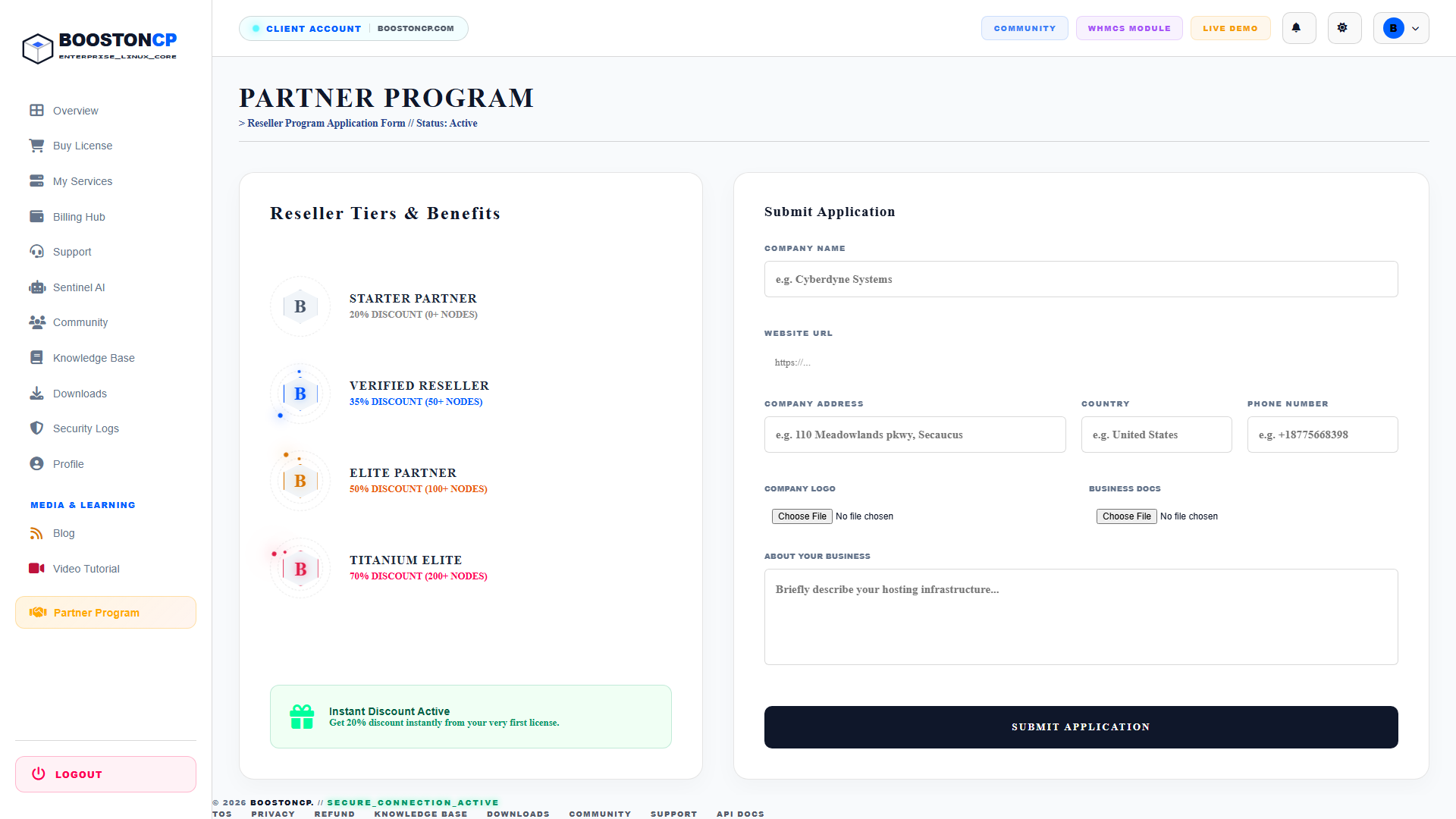
The four partner tiers provide increasing wholesale profit margins:
| Partner Tier | Node Commitment | Wholesale Discount | Target Profile & Benefits |
|---|---|---|---|
| STARTER PARTNER | 0+ Nodes |
20% DISCOUNT | Instant Activation: Unlocks 20% off all licenses starting from your very first server purchase. Ideal for boutique agencies and freelancers. |
| VERIFIED RESELLER | 50+ Nodes |
35% DISCOUNT | Designed for small hosting companies. Includes co-branded marketing collateral and priority helpdesk routing. |
| ELITE PARTNER | 100+ Nodes |
50% DISCOUNT | Half-price infrastructure costs. Direct Slack/Discord channel access to BoostonCP core kernel developers. |
| TITANIUM ELITE | 200+ Nodes |
70% DISCOUNT | Datacenter-grade volume pricing. Custom feature roadmapping, dedicated account manager, and whitelabel binary builds. |
2. Step-by-Step: Submitting a Partner Application
To apply for the wholesale reseller program:
- Navigate to
https://boostoncp.com/client/partner_apply.phpor click Partner Program in the sidebar. - In the Submit Application panel on the right side of the screen, complete the following fields:
- COMPANY NAME: Your registered corporate or business entity (e.g.,
Cyberdyne Systems). - WEBSITE URL: Your primary commercial web address (e.g.,
https://cyberdyne-hosting.com). - COMPANY ADDRESS: Your registered headquarters address (e.g.,
110 Meadowlands pkwy, Secaucus). - COUNTRY: The country where your business is incorporated (e.g.,
United States). - PHONE NUMBER: Official business contact number (e.g.,
+18775668398). - COMPANY LOGO: Upload a transparent PNG/SVG logo for your co-branded partner profile.
- BUSINESS DOCS: Upload your certificate of incorporation or tax registration certificate (PDF/PNG).
- ABOUT YOUR BUSINESS: Provide a concise summary of your current hosting infrastructure, estimated monthly node additions, and client target market.
- COMPANY NAME: Your registered corporate or business entity (e.g.,
- Click the dark button labeled SUBMIT APPLICATION.
- Our partner operations team will review your application within 24 business hours. If pre-approved, your account is immediately granted the Starter Partner (20% Off) tier.
3. The Approved Partner Dashboard (Partner Hub)
Once approved, navigating to Partner Hub (partner_hub.php) unlocks the dedicated Reseller Command Center:
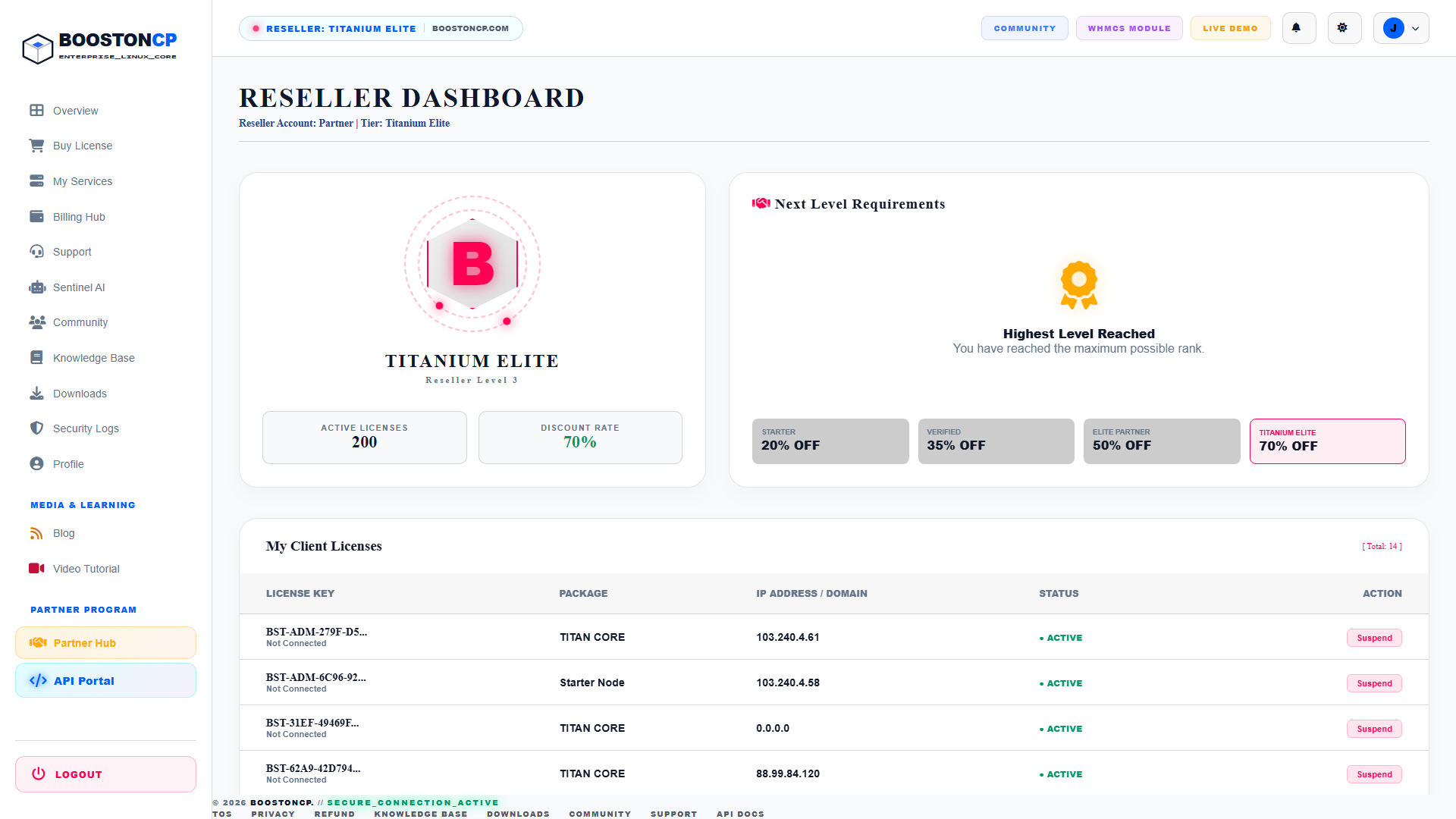
The Partner Hub dashboard provides real-time telemetry and management controls:
Top Navigation & Status Indicator
- Reseller Badge: Displays your active partner rank in the global header (e.g.,
RESELLER: TITANIUM ELITE | BOOSTONCP.COM). - Header Title: Identifies your reseller account handle and current tier classification.
Holographic Rank Crest & Progress Rail
- Animated Rank Crest: Displays a 3D animated holographic badge with spinning neural rings corresponding to your tier color (e.g., Pink for Titanium Elite, Gold for Elite Partner, Blue for Verified Reseller).
- ACTIVE LICENSES: Shows the total volume of client licenses deployed across your fleet (e.g.,
200). - DISCOUNT RATE: Displays your active wholesale margin (e.g.,
70% OFF). - Next Level Requirements: A dynamic progress rail displaying current synced nodes against the required quota for the next tier rank. If you have achieved the maximum rank, it confirms
Highest Level Reached.
4. Managing Customer Licenses: Suspend & Unsuspend Actions
Inside the Partner Hub, the My Client Licenses table displays all licenses provisioned under your wholesale account:
- LICENSE KEY: Displays the client license identifier (e.g.,
BST-ADM-279F-D5...). - PACKAGE: Indicates the provisioned server tier (
TITAN CORE,Starter Node, etc.). - IP ADDRESS / DOMAIN: Shows the bound IPv4 address or connected hostname.
- STATUS:
● ACTIVE(Green): Server is running and authorized.● SUSPENDED(Red): Server panel access is temporarily frozen.
- ACTION BADGES (Remote License Control):
- Suspend: Clicking the red Suspend badge (
?action=suspend&lic_id=...) prompts a security confirmation (SUSPEND?). Upon confirmation, the license status is immediately updated tosuspended. The remote BoostonCP panel on your client's server will instantly lock non-administrative features and display a payment suspension notice. - Unsuspend: If a client settles an overdue invoice, clicking the green Unsuspend badge (
?action=unsuspend&lic_id=...) restores the license toactive, immediately reactivating the remote control panel without requiring a server reboot.
- Suspend: Clicking the red Suspend badge (
5. Developer REST API & External Billing Automation
For web hosts utilizing WHMCS, Blesta, or custom customer portals, BoostonCP provides complete RESTful API integration via the API Portal (api_portal.php).
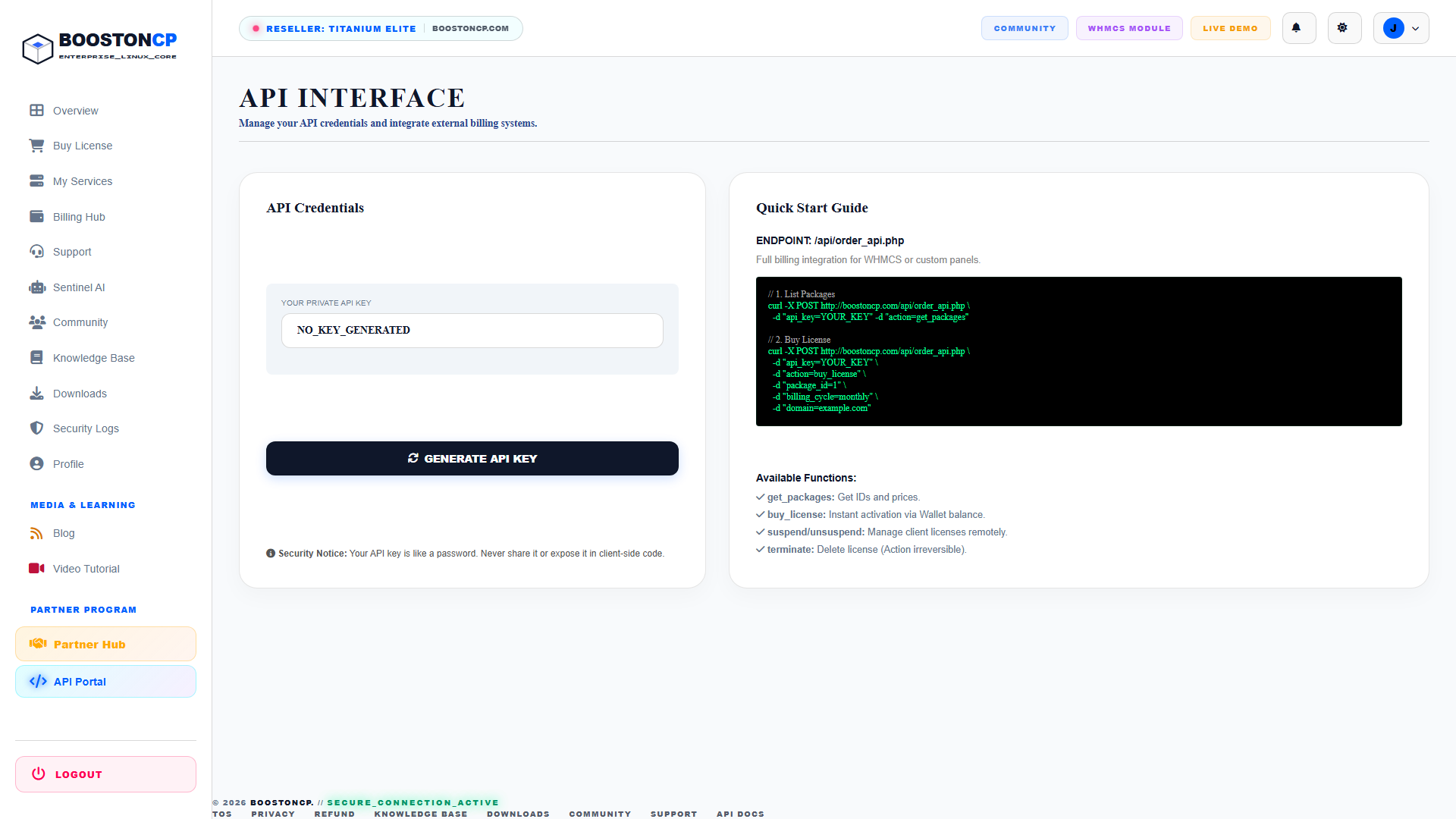
API Key Generation:
- In the sidebar under PARTNER PROGRAM, click API Portal (
api_portal.php). - In the API Credentials card, click the dark button labeled GENERATE API KEY.
- A unique, cryptographically random private API key is generated and linked to your reseller account.
[!CAUTION] Treat your API Key like a root password. Never expose it in frontend JavaScript or public Git repositories. All requests should originate server-side from your billing engine.
Quick Start API Integration:
The BoostonCP API endpoint resides at:
POST https://boostoncp.com/api/order_api.php1. Querying Available Packages:
curl -X POST https://boostoncp.com/api/order_api.php -d "api_key=YOUR_API_KEY" -d "action=get_packages"2. Provisioning a New Client License:
curl -X POST https://boostoncp.com/api/order_api.php -d "api_key=YOUR_API_KEY" -d "action=buy_license" -d "package_id=1" -d "billing_cycle=monthly" -d "domain=clientdomain.com"- The cost is deducted directly from your Wallet Balance at your discounted wholesale rate (e.g., 70% off), and the license key is returned instantly in JSON format.
3. Remote Suspend / Unsuspend via API:
curl -X POST https://boostoncp.com/api/order_api.php -d "api_key=YOUR_API_KEY" -d "action=suspend" -d "license_id=213"6. Official WHMCS Provisioning Module
If your hosting business runs on WHMCS, you can automate all provisioning without writing custom code:
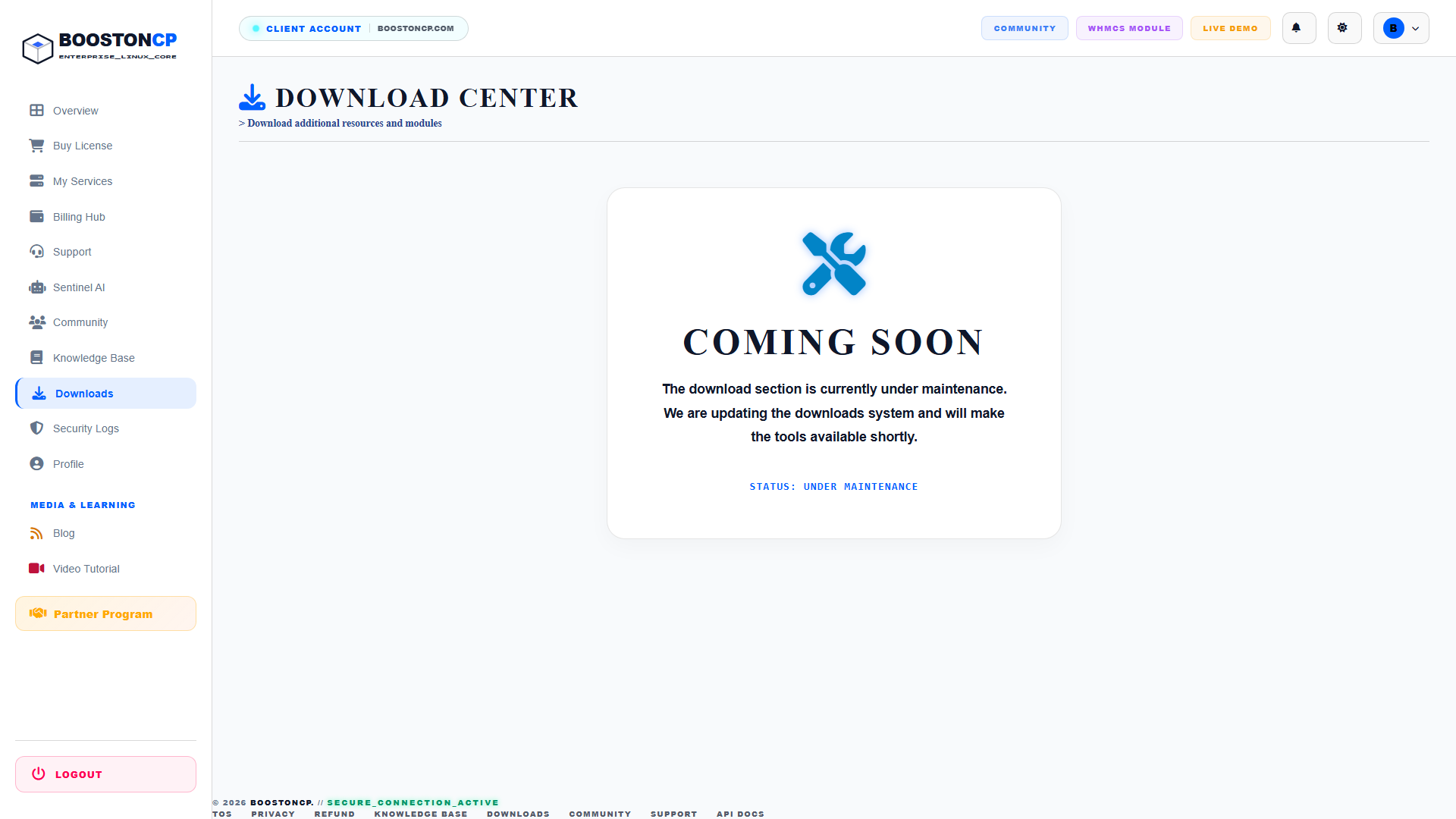
- Navigate to Downloads (
downloads.php) and downloadboostoncp_whmcs_v1.zip. - Extract into
/modules/servers/boostoncp/on your WHMCS server. - Add a new server in WHMCS with module
BoostonCP, and enter your API Key. - Now, whenever an end-user orders VPS hosting on your site, WHMCS will automatically call BoostonCP, provision the license, and handle automated suspend/unsuspend actions based on invoice payments.
7. Troubleshooting Partner Operations
Issue 1: "Action Denied" when attempting to Suspend a License
- Cause: The license ID does not belong to your client ID, or your partner account status was flagged for verification.
- Resolution: Verify that the license appears in your My Client Licenses table. If you manage sub-resellers, ensure the target license was provisioned under your parent API key.
Issue 2: API returns "Insufficient Wallet Balance"
- Cause: Your prepaid wallet funds dropped below the discounted wholesale price of the license tier.
- Resolution: Navigate to
billing.php, click + ADD FUND, and deposit credit via Paddle or bKash.




