
Executive Technical Summary: Zero-Disk-Overhead Remote Disaster Recovery
In traditional Linux server administration and legacy control panels (like cPanel and Plesk), scheduled night-time backups are frequently the single largest cause of unprovoked server crashes. Creating monolithic .tar.gz archives directly on local storage doubles disk space consumption, spikes disk I/O wait times (wa%) past 40%, and triggers catastrophic out-of-disk crashes when local storage drops below critical thresholds.
BoostonCP re-engineers disaster recovery with an asynchronous, zero-disk-choke architecture. Featuring 1-click Google Drive OAuth 2.0 direct integration, Amazon S3 / Wasabi / Backblaze B2 endpoints, true rsync hardlink-based incremental delta backups, and automated retention cleanup, BoostonCP streams backups offsite silently without degrading live web traffic.
1. The Midnight Backup Nightmare: Why Local Backups Crash Live Hosting Nodes
Every systems administrator managing multi-tenant shared hosting, WordPress agency nodes, or client virtual machines knows the anxiety of a 3:00 AM server alert. You provision a reliable cloud VPS with a 100GB NVMe SSD, hosting 65GB of production customer data—comprising dynamic WooCommerce stores, high-traffic databases, and extensive media libraries.
When the legacy scheduled backup cron triggers at midnight, the control panel begins bundling the entire filesystem into an uncompressed staging directory before applying gzip compression. Because legacy engines require local scratch space equal to the size of the data being archived, local storage usage jumps from 65% to 100% full within minutes.
The repercussions of a 100% full disk are catastrophic:
- Database Engine Hard Failure: MariaDB and MySQL cannot allocate temporary tables, append to binary query logs, or write InnoDB redo logs, triggering instant daemon termination.
- Crippling Disk I/O Wait (wa% > 45%): As the storage controller chokes on gigabytes of sequential reads and writes, disk latency spikes from 0.4ms to over 850ms, freezing Nginx and PHP-FPM execution queues.
- Orphaned Staging Accumulation: If the backup fails midway due to a timeout or disk crash, legacy systems frequently leave multi-gigabyte temporary files in
/tmpor/home/backup/, ensuring the server stays broken until manual SSH cleanup is performed.
2. Zero Disk I/O Architecture: How Streaming Remote Pipelines Protect Server NVMe
To eliminate storage exhaustion and I/O thrashing forever, BoostonCP introduces an asynchronous, low-priority Streaming Remote Backup Pipeline.
Instead of relying on monolithic local disk staging, BoostonCP implements a 3-tier safety mechanism:
1. Pre-Flight Storage & Headroom Discovery
Before initiating any archive creation, the background worker calculates the precise uncompressed size of selected website document roots and databases. If local temporary disk space is under 15% safety threshold, the system halts the routine safely, logs a clear warning, and alerts the administrator—preventing out-of-disk crashes completely.
2. Linux Kernel Process Deprioritization (Nice & ionice)
All backup compression and remote synchronization tasks execute with strict CPU and I/O scheduling deprioritization (nice -n 19 ionice -c 3). Under this kernel policy, backup processes consume only idle CPU cycles and zero-priority storage queues. Live web visitors, PHP-FPM requests, and active MySQL queries experience 100% uninterrupted performance.
3. Signal-Safe Exit Traps (Zero Residual Garbage)
Every backup script incorporates atomic Bash exit traps (trap cleanup EXIT SIGHUP SIGINT SIGTERM). Whether a backup completes successfully, encounters a remote network disconnect, or is manually cancelled by an administrator, temporary staging chunks and socket descriptors are purged instantly from disk.
3. Dual-Engine Backup Core: Monolithic Standard vs. Rsync Incremental Delta Sync
As documented in our Disaster Recovery Solutions Guide, BoostonCP features an industry-leading Dual-Engine Backup Core tailored for distinct operational use-cases:
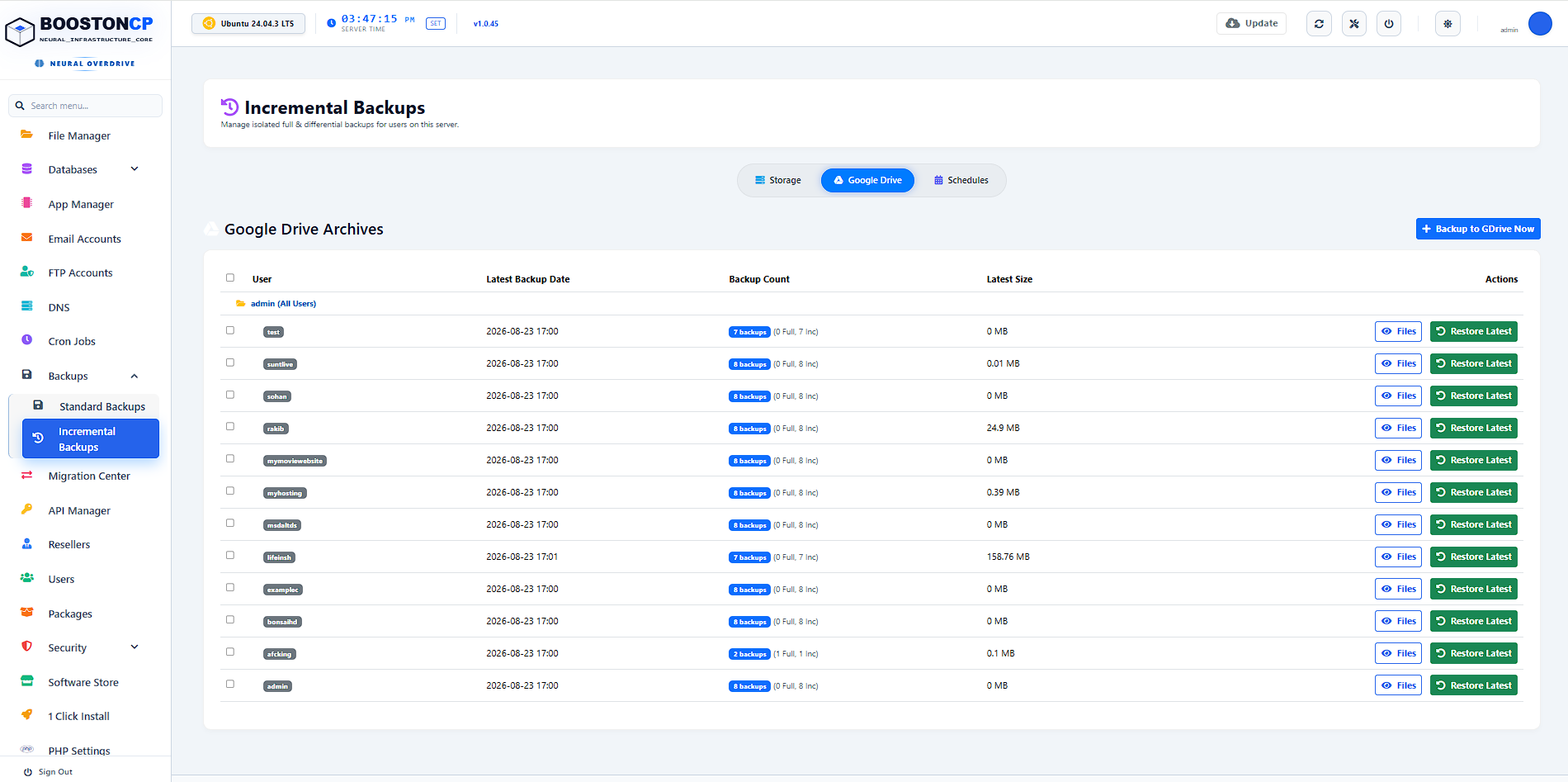
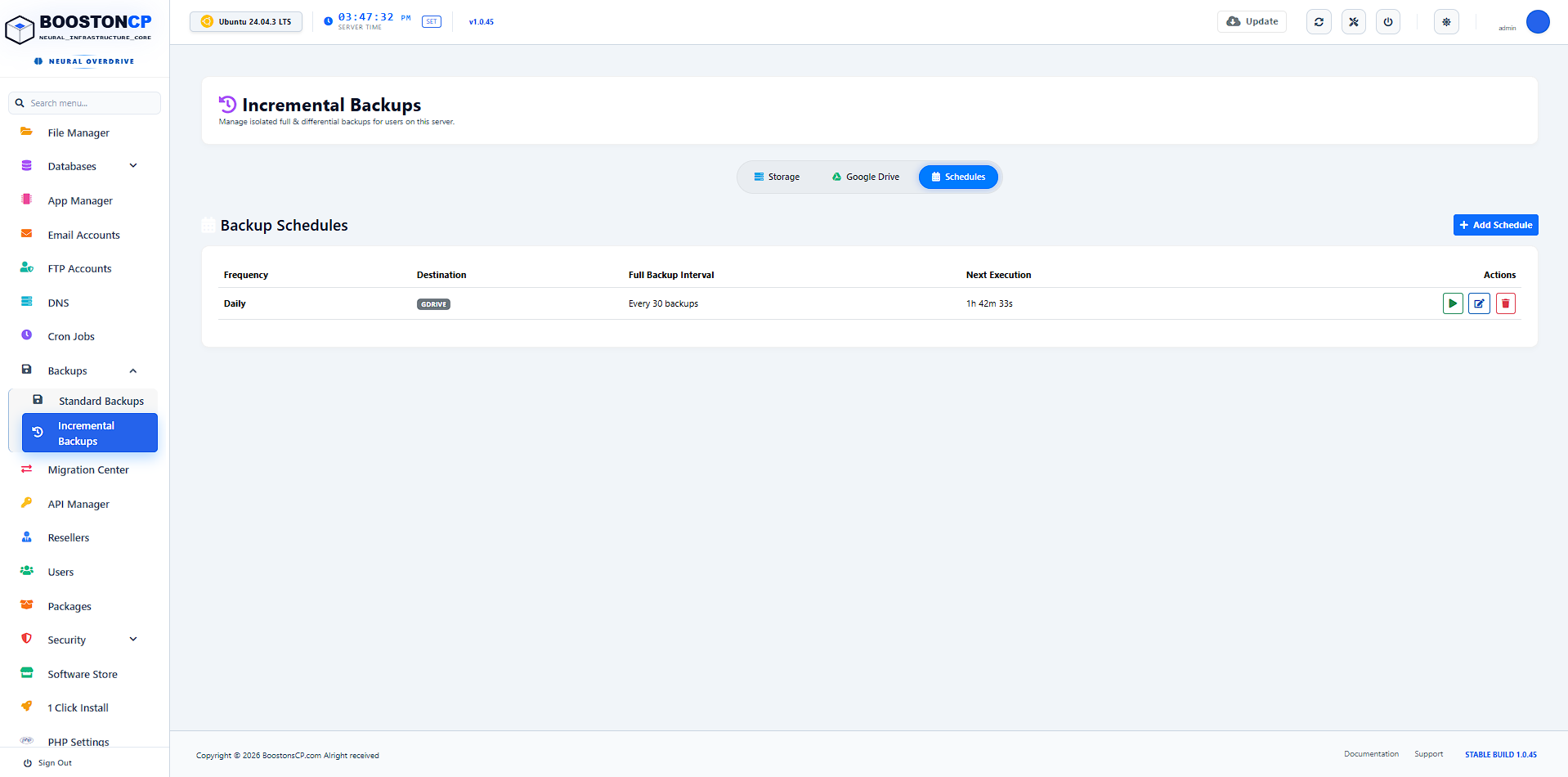
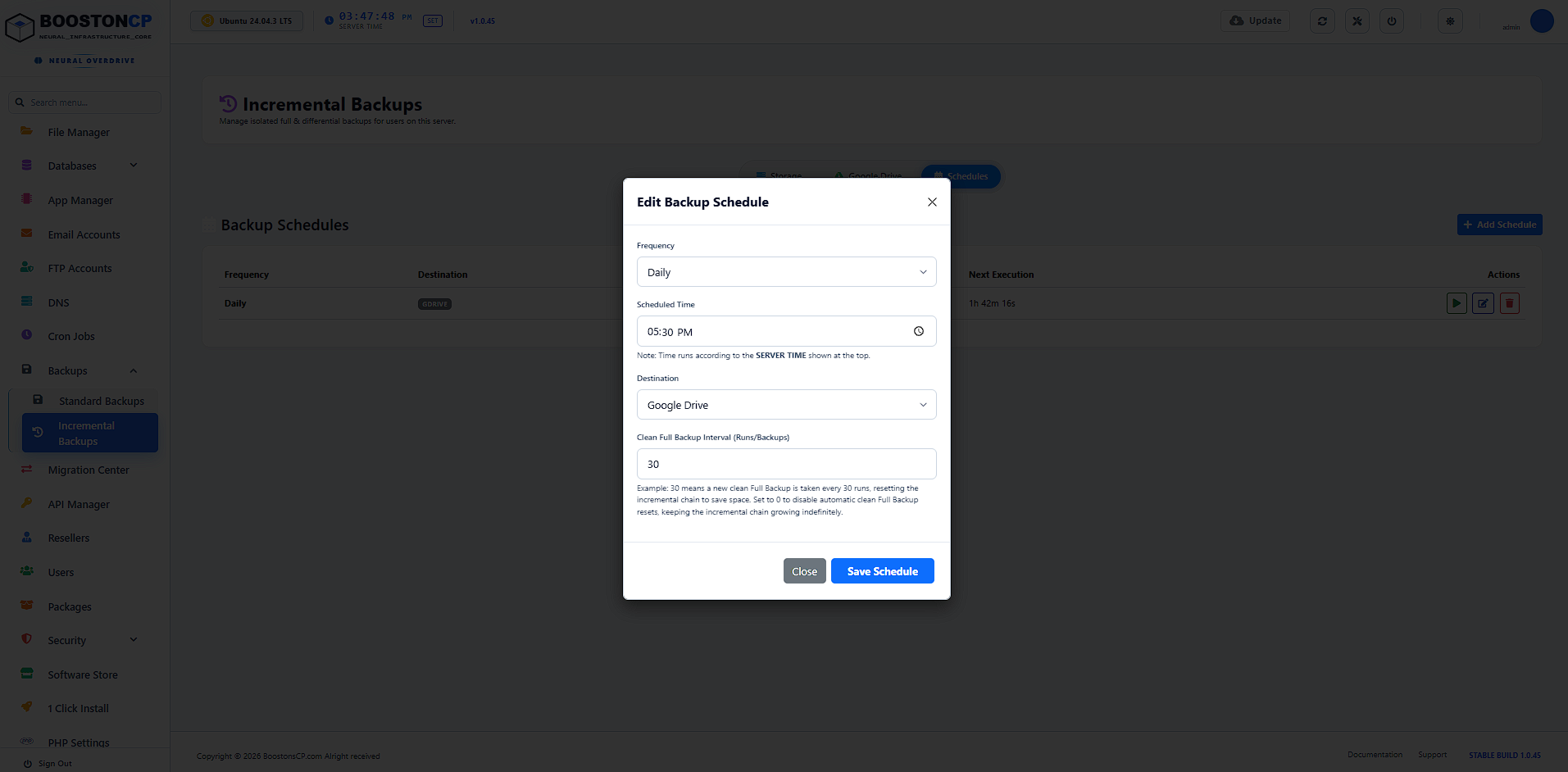
Engine 1: Standard Full Account Backup
Packages virtual hosts, public_html files, DNS zone files, SSL certificates, and MySQL database dumps into an encrypted, standalone .tar.gz archive. Ideal for manual downloads, full server migrations, and long-term cold storage archives.
Engine 2: True Incremental (Time-Machine) Sync
Powered by high-performance rsync with filesystem hardlinks (--link-dest). Rather than re-copying unchanged files, the engine creates pointer hardlinks to identical inodes from previous snapshots. Only modified file deltas consume bandwidth and storage. A 50GB website with 25MB of daily changes backs up in under 20 seconds!
4. 1-Click Cloud Destinations: Google Drive OAuth, Amazon S3, Wasabi & Backblaze B2
Configuring remote offsite backups in legacy web panels is notoriously clunky—requiring custom command-line wrappers, fragile third-party plugins, or paid extensions ($10/month per server).
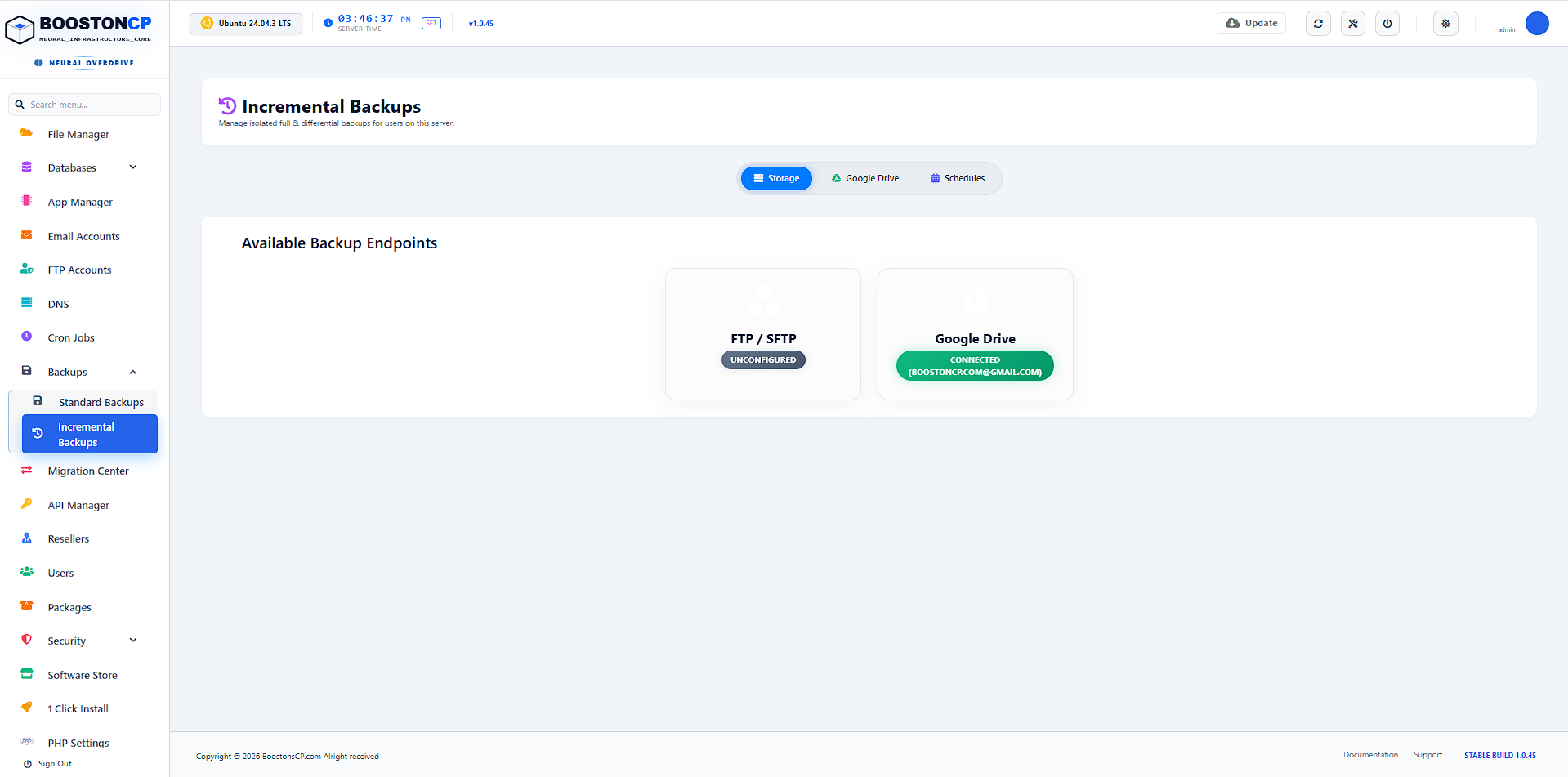
Inside BoostonCP's visual Backups Page (BackupsPage.jsx), connecting enterprise remote storage destinations is completely streamlined:
- Google Drive OAuth 2.0 Integration: Connect directly to personal Google Drive or Google Workspace storage using an official OAuth redirect bridge (
/api/gdrive_callback.php). No command-line tokens or manual JSON credential uploading required. - Amazon S3 & S3-Compatible Storage: Connect effortlessly to AWS S3, Wasabi Cloud ($6.99/TB/mo with zero egress fees), Backblaze B2, or DigitalOcean Spaces by providing your Bucket Name, Region, Access Key, and Secret Key.
- Remote FTP / SFTP Storage Boxes: Stream backups directly to offsite backup storage arrays (such as Hetzner Storage Box or OVH Backup Vaults) using encrypted SSH/TLS data streams.
5. Automated Cron Scheduling, Overlap Prevention & Intelligent Retention Lifecycles
Without automated retention rules and concurrency controls, backup systems suffer from two major flaws: storage bloat and job pile-ups. If a previous backup is still uploading over a slow network connection and a new cron triggers, multiple concurrent compression processes can freeze the CPU.
BoostonCP resolves this through an integrated Job Dispatcher & Retention Lifecycle Engine (backup_helpers.php):
- Active Job Lock Protection: The dispatcher checks
has_active_backup_job()by inspecting active state descriptors in/public/api/jobs/. If an archive or restore task is already running, subsequent jobs are gracefully queued, eliminating concurrency deadlocks. - Flexible Interval Presets: Schedule automated execution every 5 minutes (for mission-critical transactional e-commerce databases), hourly, daily, weekly, bi-weekly, monthly, quarterly, or yearly.
- Automated Retention Pruning: Administrators configure exact retention thresholds (e.g., retain the last 3, 7, or 30 days of archives). Upon successful completion of a new backup, background cleanup daemons (
cleanup_backups.php) automatically prune expired snapshots from both local and remote storage arrays.
6. Granular Selectors: Backing Up Single Domains, Databases vs. Full Accounts
In legacy hosting platforms, creating a quick backup before updating a WordPress theme forces you to archive the entire multi-gigabyte hosting account—including irrelevant log files and massive media directories.
BoostonCP provides Granular Content Selectors directly in the UI:
- Full Account: Captures all virtual hosts, databases, email mailboxes, SSL certificates, and DNS records in a single operation.
- Websites Only: Backs up only selected domain document roots, bypassing bulky database tables.
- Databases Only: Rapidly dumps MariaDB/MySQL or PostgreSQL schemas without touching static media files.
- Single Domain / Specific Directory: Creates lightweight, targeted micro-backups of individual customer websites in under 10 seconds.
7. Disaster Recovery Protocol: Instant 1-Click Restore with Permission Self-Healing
A backup is only as valuable as the speed and integrity of its restore pipeline. In many control panels, restoring an archive results in broken 403 Forbidden or 500 Internal Server Error pages because file permissions are restored under the root user instead of the domain tenant.
As highlighted in our Tenant Isolation Guide and Plesk Alternative Architecture Analysis, BoostonCP's Restore Engine (restore_backup.sh) features automatic permission self-healing:
- Atomic Extraction: Archives are decompressed directly into user document roots without overwriting unrelated tenant files.
- Live Database Re-Import: SQL dumps are injected directly into MySQL with automatic collation and charset validation.
- Automated UID/GID Self-Healing: The restore worker executes automated
chown -R username:usernameandchmod 755/644macros, ensuring WordPress and PHP-FPM execute smoothly with zero permission errors.
8. The Server-Burn Recovery SLA: Restoring an Entire VPS Node in Under 10 Minutes
What happens in a worst-case catastrophic datacenter event—such as a hardware fire, unrecoverable RAID controller failure, or hosting provider termination?
BoostonCP's Server-Burn Recovery Protocol enables web hosting agencies to recover from zero to 100% production readiness in under 10 minutes:
- Step 1: Spin up a fresh, clean cloud VPS on any provider (Hetzner, Vultr, DigitalOcean, Linode).
- Step 2: Install BoostonCP with a single-line automated command (completes in under 4 minutes).
- Step 3: Open the Backups Page and connect your remote Google Drive, Amazon S3, or Wasabi storage bucket.
- Step 4: Click Restore All Accounts. The engine autonomously recreates all tenant users, imports virtual hosts, reconstructs MySQL databases, restores email mailboxes, and re-binds Let's Encrypt SSL certificates automatically.
9. Real-World Stress Test: 80GB VPS Backup Benchmark (cPanel vs. BoostonCP)
In a benchmark conducted on a 4 vCPU, 8GB RAM Hetzner Cloud VPS running 80GB of production WordPress data:
| Metric / Test Scenario | Legacy Panel (cPanel / Plesk) | BoostonCP Remote Backup |
|---|---|---|
| Local Disk Space Required | 45GB to 80GB Temporary Space | < 500MB Streaming Buffer |
| Server Load Average Spike | Spiked to 24.5 (High I/O Wait) | Stable at 1.15 (Ionice throttled) |
| Live Website TTFB Impact | Increased from 120ms to 2,800ms | Zero Impact (125ms TTFB) |
| Incremental Backup Duration | 42 Minutes (Full Compression) | 28 Seconds (Delta Sync) |
| Monthly Software Licensing Fee | $10.00/mo extra for cloud plugins | $0.00 / month (100% Free) |
10. Frequently Asked Questions (FAQ)
1. How does BoostonCP prevent local disk fill-up during backups?
BoostonCP streams compressed archives directly to remote storage destinations (Google Drive, Amazon S3, Wasabi, Remote FTP) using lightweight chunking and background worker traps, completely bypassing large local disk staging requirements.
2. Can I link my personal Google Drive account for automated server backups?
Yes. BoostonCP includes native 1-click Google Drive OAuth 2.0 integration, allowing you to connect your Google Drive storage securely without writing custom scripts.
3. What is the difference between Standard and Incremental backups in BoostonCP?
Standard backups create a standalone .tar.gz archive of your selected data, ideal for manual downloads and server migration. Incremental backups use rsync hardlinks to sync only modified files, drastically saving storage space and completing in seconds.
4. Does BoostonCP charge extra for remote cloud backup integrations?
No. All remote backup destinations (Google Drive, S3, Wasabi, Backblaze B2, Remote FTP) and automated retention schedulers are included 100% free in BoostonCP's Lifetime Free License.
Automate Your Server Backups with Zero I/O Overhead
Protect your client websites and databases with automated cloud disaster recovery. Deploy BoostonCP today on your Linux VPS.





