
Executive Technical Overview: The Fatal Dilemma of Live WordPress Modifications
In enterprise web engineering, modifying production systems in place is universally recognized as an operational anti-pattern. Continuous Integration and Continuous Deployment (CI/CD) pipelines, immutable infrastructure, and isolated staging environments have been standard practice in high-scale software development for over a decade.
Yet, in the WordPress and commercial web hosting ecosystem, a staggering percentage of digital agencies, WooCommerce operators, and freelance developers continue to update plugins, modify custom child themes, and execute database migrations directly on live production websites.
The consequences of this operational negligence are catastrophic:
- The White Screen of Death (WSOD): A minor version bump of an e-commerce extension or security plugin triggers an unhandled fatal PHP syntax error (
Uncaught Error: Call to undefined function) or class collision, instantly taking the public storefront offline. - Database Schema Locking & Contention: Heavy database migrations initiated by complex plugins (such as WooCommerce, LearnDash, or Elementor) lock critical MariaDB/MySQL InnoDB tables (
wp_posts,wp_postmeta), exhausting PHP-FPM worker pools and causing cascading 504 Gateway Timeouts across the server. - Corrupted Serialized PHP Data Strings: Novice developers attempting to clone websites or migrate staging changes manually run naive SQL queries (
UPDATE wp_options SET option_value = REPLACE(...)). Because WordPress serializes complex theme settings, navigation menus, and widget states into length-indexed strings (e.g.,s:19:"https://example.com";), replacing the domain string withstaging.example.com(27 characters) without recalculating the length header breaks PHP'sunserialize()parser, permanently wiping site layouts. - The "Lost Order" Disaster in E-Commerce: When a digital agency spends three days developing a redesigned checkout flow on a staging clone and pushes the entire staging database back to production, every customer transaction, order update, and user registration that occurred on the live site during those three days is permanently overwritten and eradicated.
+--------------------------------------------------------------------------------------------------+
|                   THE FATAL ARCHITECTURAL DILEMMA OF LIVE WORDPRESS UPDATES                      |
+--------------------------------------------------------------------------------------------------+
|                                                                                                  |
|   [ Live Production Traffic: 10,000 Concurrent Visitors ]                                       |
|                         │                                                                        |
|                         ▼                                                                        |
|   ┌────────────────────────────────────────────────────────┐                                     |
|   │               PRODUCTION NGINX / OPENLITESPEED         │                                     |
|   └─────────────────────────┬──────────────────────────────┘                                     |
|                             │                                                                    |
|                             ▼                                                                    |
|   ┌────────────────────────────────────────────────────────┐   ◄── Developer updates WooCommerce  |
|   │         PHP-FPM Worker Pool (8 to 16 Workers)          │       plugin directly on live host   |
|   └─────────────────────────┬──────────────────────────────┘                                     |
|                             │                                                                    |
|         ┌───────────────────┴───────────────────┐                                                |
|         ▼                                       ▼                                                |
|   [ Table Metadata Lock ]                 [ Fatal PHP Error ]                                    |
|   `wp_postmeta` locked during             Plugin dependency collision                            |
|   un-indexed DB migration script          throws `Error: Undefined Class`                        |
|         │                                       │                                                |
|         ▼                                       ▼                                                |
|   All incoming HTTP requests stall        Immediate 500 / WSOD crash                             |
|   PHP workers hit `max_children`          100% bounce rate & lost revenue                        |
|                                                                                                  |
+--------------------------------------------------------------------------------------------------+
Historically, webmasters turned to WordPress plugins to generate staging copies. However, plugin-based staging is inherently flawed: it runs within the very PHP execution sandbox it is attempting to replicate, competes for runtime RAM, crashes on low max_execution_time thresholds, and fails to isolate webserver configurations or PHP runtimes.
True zero-risk staging requires infrastructure-level isolation.
In this comprehensive systems engineering runbook, we will dissect the architectural physics of enterprise WordPress staging and cloning. We will analyze why plugin-based staging fails under real load, explore how kernel-level filesystem mechanics and binary-safe serialized search-replace engines operate, and demonstrate how to orchestrate isolated staging subdomains and 1-click zero-downtime production rollouts using BoostonCP's Native Hosting Platform.
1. Why Plugin-Based Staging Plugins Fail: The Runtime Sandbox Trap
Before examining infrastructure-driven staging, it is essential to understand why popular WordPress staging and cloning plugins (such as WP Staging, Duplicator, UpdraftPlus, or All-in-One WP Migration) consistently break down when deployed on mission-critical websites.
The Inherent Vulnerabilities of Application-Level Staging
+--------------------------------------------------------------------------------------------------+
|                         APPLICATION-LEVEL (PLUGIN) STAGING BOTTLENECK                            |
+--------------------------------------------------------------------------------------------------+
|                                                                                                  |
|  [ Linux Operating System: Kernel, cgroups, Storage NVMe, TCP Stack ]                           |
|    └── [ Webserver Daemon: Nginx / Apache / OpenLiteSpeed ]                                      |
|          └── [ PHP-FPM Execution Sandbox: `memory_limit = 256M`, `max_execution_time = 60s` ]    |
|                └── [ WordPress Core Runtime: 150 Database Queries / Request ]                    |
|                      └── [ STAGING PLUGIN ENGINE ] ◄── FORCED TO OPERATE HERE!                   |
|                            ├── Compresses 15GB wp-content into ZIP inside live PHP process       |
|                            ├── Dumps 2GB MySQL schema via unbuffered PDO queries                 |
|                            └── Overflows PHP memory buffer ──► 500 FATAL OUT OF MEMORY           |
|                                                                                                  |
+--------------------------------------------------------------------------------------------------+
When an application-level WordPress plugin attempts to stage or clone an active website, it is constrained by the strict resource boundaries of the PHP runtime environment:
1. PHP Memory Exhaustion (Allowed Memory Size Exhausted)
A production WordPress site with high-resolution media libraries, extensive WooCommerce product catalogs, and page-builder revisions often spans 10GB to 50GB in storage and hundreds of megabytes in raw database tables.
When a staging plugin attempts to traverse the filesystem or generate an in-memory SQL dump, it relies on PHP’s memory heap. If the operation exceeds the allocated memory_limit (commonly set between 128M and 512M), the PHP-FPM worker terminates abruptly:
Fatal error: Allowed memory size of 268435456 bytes exhausted (tried to allocate 33554440 bytes)
in /var/www/vhosts/example.com/wp-content/plugins/wp-staging/apps/Backend/Optimizer.php on line 214
This leaves an incomplete, corrupted staging environment on disk, consuming storage while remaining non-functional.
2. Gateway Timeouts and Execution Time Limits
Webservers (Nginx, OpenLiteSpeed, or Apache) enforce strict timeout thresholds on upstream FastCGI connections (fastcgi_read_timeout 60s or proxy_read_timeout 60s).
If a staging plugin spends more than 60 seconds compressing large directories or scanning database tables, the reverse proxy severs the client connection and throws a 504 Gateway Time-out. Because the PHP script was abruptly severed without completing atomic cleanup, locks on the database may remain open, degrading production performance.
3. Zero PHP Runtime or Webserver Isolation
Plugin-based staging simply places the cloned files into a subfolder of the existing document root (e.g., https://example.com/staging/).
Because the staging instance shares the exact same virtual host configuration, webserver directives, and PHP version as the parent site:
- You cannot test how your theme or plugins perform under PHP 8.3 while keeping production on PHP 8.1.
- You cannot test a high-performance OpenLiteSpeed
.htaccesscaching rewrite rule without affecting production traffic. - If a security vulnerability exists in an untested staging plugin, an attacker who compromises the
/staging/directory possesses full read and write access to the productionwp-config.phpfile, granting immediate access to your live database credentials.
2. The Architectural Physics of Infrastructure-Level Staging
To eliminate the runtime failures of application-level plugins, enterprise systems utilize Infrastructure-Level Staging. Instead of running backup routines inside WordPress PHP workers, the underlying server operating system and hosting control panel handle the provisioning, data isolation, and synchronization.
+--------------------------------------------------------------------------------------------------+
|                    INFRASTRUCTURE-LEVEL STAGING ARCHITECTURE (BOOSTONCP)                         |
+--------------------------------------------------------------------------------------------------+
|                                                                                                  |
|   HOST SERVER ENVIRONMENT (Isolated Linux Namespaces & cgroups v2)                               |
|                                                                                                  |
|   ┌─────────────────────────────────────────┐   ┌─────────────────────────────────────────┐      |
|   │        PRODUCTION ENVIRONMENT           │   │          STAGING ENVIRONMENT            │      |
|   ├─────────────────────────────────────────┤   ├─────────────────────────────────────────┤      |
|   │ Domain: example.com                     │   │ Domain: staging.example.com             │      |
|   │ DocRoot: /www/wwwroot/user/example.com  │   │ DocRoot: /www/wwwroot/user/staging.ex...│      |
|   │ Webserver: Nginx + FastCGI Cache        │   │ Webserver: OpenLiteSpeed / Nginx        │      |
|   │ PHP Runtime: PHP 8.1-FPM                │   │ PHP Runtime: PHP 8.3-FPM (Test Sandbox) │      |
|   │ Database: `db_prod_live`                │   │ Database: `db_staging_test`             │      |
|   │ DB User: `usr_prod` (Isolated Grants)   │   │ DB User: `usr_staging` (Isolated Grants)│      |
|   │ SSL: Let's Encrypt Production SAN       │   │ SSL: Let's Encrypt Staging SAN          │      |
|   └─────────────────────────────────────────┘   └─────────────────────────────────────────┘      |
|                        ▲                                     ▲                                   |
|                        │                                     │                                   |
|                        └───────────────[ SYNC ENGINE ]───────┘                                   |
|                                                │                                                 |
|                                 • Binary Search-Replace Engine                                   |
|                                 • NVMe Copy-on-Write Hardlinks                                   |
|                                 • Atomic Symlink Switchover                                      |
|                                 • Pre-Sync Point-in-Time Snapshot                                |
|                                                                                                  |
+--------------------------------------------------------------------------------------------------+
Infrastructure-level staging decouples the environment across five distinct architectural layers:
Layer 1: Filesystem Segregation
The staging site is granted its own discrete document root directory (e.g., /www/wwwroot/myhosting/staging.example.com). It operates under separate POSIX file permissions. A rogue script or file upload vulnerability in the staging environment is physically prevented from traversing parent directories or reading production application secrets.
Layer 2: Dedicated VirtualHost Configuration
Rather than nesting within a subdirectory, the staging environment is provisioned with a dedicated webserver configuration block. In BoostonCP, this means the staging site receives its own independent Nginx server block or OpenLiteSpeed virtual host context:
- Custom HTTP header policies (such as
X-Robots-Tag: noindex, nofollowto prevent search engine indexing). - Custom client request body limits (
client_max_body_size 128M). - Custom FastCGI timeouts and buffer allocations, allowing deep debugging without timing out.
Layer 3: Independent PHP-FPM Pool and Version Selector
The staging environment connects to its own dedicated Unix domain socket (e.g., /run/php/php83-fpm-staging.sock).
This architecture allows developers to assign a completely different PHP version to the staging site. For example, if a legacy WooCommerce installation is running on PHP 7.4 or 8.0, the developer can switch the staging site to PHP 8.3 with a single click in BoostonCP's PHP Version Selector. All deprecation warnings, fatal errors, and performance gains can be benchmarked without exposing live customers to system instability.
Layer 4: Discrete MariaDB/MySQL Database Schemas
The production database is cloned at the storage engine level into an entirely separate MariaDB database schema (e.g., db_staging_kx92) accessed by an isolated database user (usr_staging_p3).
Transactions, heavy table alterations (ALTER TABLE), index rebuilds, or unit testing conducted on the staging database generate zero lock contention on the production MariaDB InnoDB buffer pool. Live checkouts and cart updates proceed without a microsecond of latency.
Layer 5: Automated SSL/TLS Encryption
The staging domain (staging.example.com) is automatically provisioned with a valid Let's Encrypt TLS certificate. Testing third-party payment gateways (Stripe Webhooks, PayPal IPN), browser cryptographic APIs (Web Crypto API), and modern HTTP/2 or HTTP/3 protocols requires an active, valid SSL certificate.
3. The Serialized PHP Search-Replace Problem: Preserving Data Integrity
The most technically complex challenge in WordPress staging and cloning is the PHP Serialized Search-Replace Problem.
WordPress stores a substantial portion of its configuration, widget states, theme customizer data, and plugin options inside the wp_options and wp_postmeta database tables as PHP Serialized Objects and Arrays.
What is PHP Data Serialization?
When PHP serializes a complex nested array or object into a string for database storage, it indexes each string by its exact character byte length:
// Original production configuration array
$theme_settings = [
    'site_url'   => 'https://example.com',
    'logo_path'  => 'https://example.com/uploads/logo.png',
    'admin_note' => 'Production Live Store'
];

// PHP serialize($theme_settings) produces:
a:3:{s:8:"site_url";s:19:"https://example.com";s:9:"logo_path";s:36:"https://example.com/uploads/logo.png";s:10:"admin_note";s:21:"Production Live Store";}
Notice the string length identifiers:
s:19:"https://example.com";indicates that the string value is exactly 19 bytes long.s:36:"https://example.com/uploads/logo.png";indicates a length of 36 bytes.
The Disaster of Naive SQL Search-and-Replace
When inexperienced developers clone a WordPress database to staging using phpMyAdmin or a standard SQL script, they frequently execute a raw query:
-- DANGEROUS: DO NOT EXECUTE ON PRODUCTION DATABASES
UPDATE wp_options
SET option_value = REPLACE(option_value, 'https://example.com', 'https://staging.example.com');
Here is what happens inside the database record:
- The string
https://example.com(19 characters) is replaced withhttps://staging.example.com(27 characters). - However, the serialized length header remains unchanged at
s:19:! - The resulting database string becomes:
s:19:"https://staging.example.com";
When WordPress retrieves this row and calls unserialize(), the PHP parser attempts to read exactly 19 bytes from the opening quote. It reaches the letter e in staging.example.com, encounters an unexpected character instead of a closing quote and semicolon, and throws an unrecoverable parse failure:
Notice: unserialize(): Error at offset 47 of 184 bytes in /var/www/vhosts/example.com/wp-includes/functions.phpBecause unserialize() fails, it returns false. WordPress assumes that the theme settings, widget configuration, or elementor layouts do not exist, resetting the entire frontend layout to default blank templates.
The Infrastructure-Grade Solution: Binary-Safe Serialized Parser
To guarantee absolute data integrity during staging creation and production synchronization, BoostonCP integrates a low-level, binary-safe serialized search-and-replace engine.
+--------------------------------------------------------------------------------------------------+
|                     BINARY-SAFE SERIALIZED SEARCH-REPLACE PIPELINE                               |
+--------------------------------------------------------------------------------------------------+
|                                                                                                  |
|   1. Raw MariaDB Row Read (`wp_options` / `wp_postmeta`)                                         |
|      └── Detects Serialized Marker: `a:[0-9]+:{` or `O:[0-9]+:`                                  |
|                                                                                                  |
|   2. In-Memory Tokenizer / Recursive AST Deserializer                                            |
|      ├── Recursively traverses nested multi-dimensional arrays                                   |
|      ├── Identifies string tokens matching target domain: `https://example.com`                  |
|      └── Replaces with staging domain: `https://staging.example.com`                             |
|                                                                                                  |
|   3. Dynamic Byte-Length Recalculation Engine                                                    |
|      ├── Calculates exact UTF-8 byte length of new string (19 bytes ──► 27 bytes)                |
|      └── Rewrites serialized descriptor: `s:19:` ──► `s:27:`                                     |
|                                                                                                  |
|   4. Atomic Database Write & Checksum Verification                                               |
|      └── Commits reconstructed serialized string back to MariaDB InnoDB buffer                   |
|                                                                                                  |
+--------------------------------------------------------------------------------------------------+- Schema-Aware Scanning: The engine scans all text, varchar, and longtext columns across all WordPress tables, dynamically detecting table prefixes (whether standard
wp_or customwp_sec_). - Recursive In-Memory Deserialization: When a serialized string is encountered, the engine parses it into an abstract syntax tree (AST) in memory.
- Exact Byte Recalculation: It replaces target strings (URLs, absolute filesystem paths like
/www/wwwroot/myhosting/example.comto/www/wwwroot/myhosting/staging.example.com), calculates the exact UTF-8 byte count of the new string, and dynamically rewrites the length descriptor (s:27:). - Binary Safety: Multi-byte characters (such as emoji, UTF-8 international characters, or encrypted tokens) are handled with strict byte-level accuracy, preventing database encoding corruption.
4. Visual Walkthrough: Orchestrating Staging & Cloning in BoostonCP
Let's explore how BoostonCP's Native Architecture turns what used to be a high-friction, error-prone DevOps task into a streamlined, high-speed workflow.
Step 1: Deploying Isolated WordPress Instances with 1-Click Speed
Managing high-performance WordPress sites begins with clean, optimized deployment. In the BoostonCP User Panel, navigate to 1 Click Install (/installer).
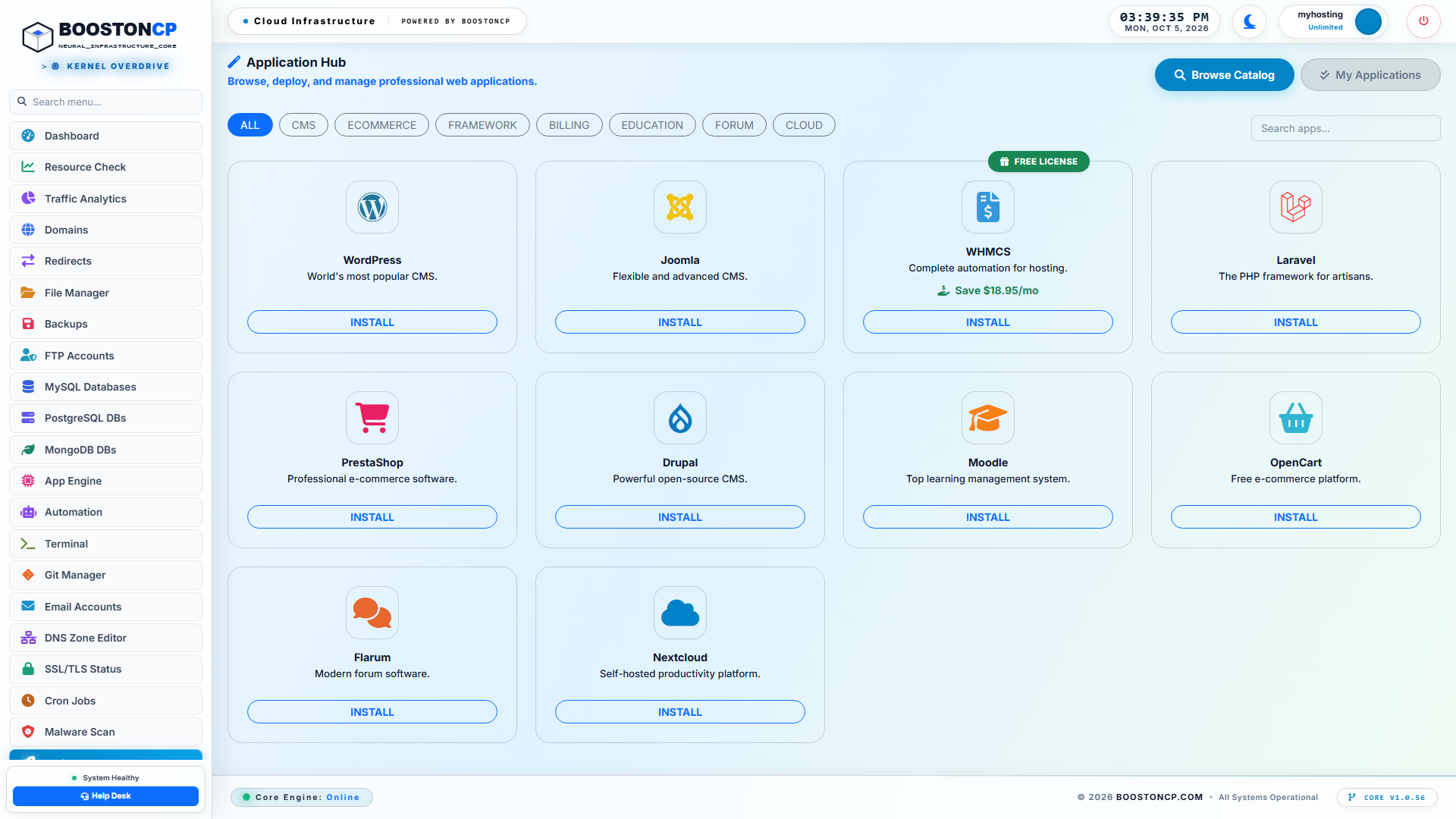
BoostonCP 1-Click App Installer Dashboard: Deploying Isolated WordPress Instances
Unlike standard script installers that inject bloated default configurations, BoostonCP’s 1-Click Installer provisions lean, enterprise-tuned WordPress instances:
- Automatically creates an optimized MariaDB database with secure, random 32-character hexadecimal passwords.
- Configures proper
utf8mb4_unicode_cicollations out of the box. - Configures native Redis object caching connectors automatically if Redis is enabled.
- Hardens
wp-config.phpfile permissions to0600(chmod 600), preventing unauthorized local system reads.
Step 2: WordPress Staging Configuration & Credential Generation
When deploying or preparing a staging copy, clicking on the application card reveals the deployment modal:
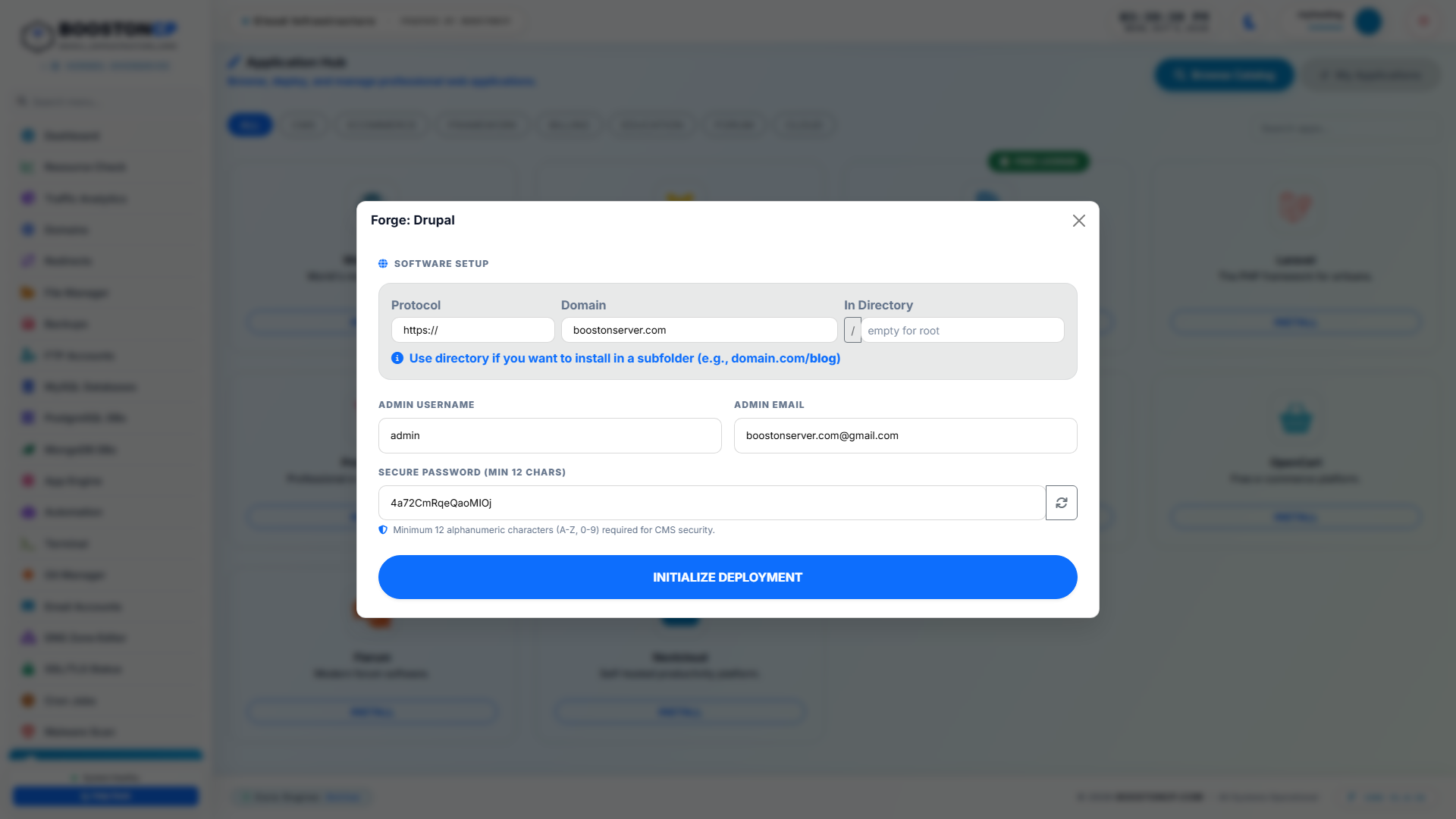
BoostonCP WordPress Deployment Engine: Automatic Database Creation, Subdomain Routing & SSL Isolation
From this interface, administrators can:
- Assign the site directly to an isolated staging subdomain (such as
staging.example.com). - Enforce modern cryptographic protocols (
https://). - Set unique administrative credentials completely separate from the production administrator accounts, ensuring development team members do not have access to live production credentials.
Step 3: Domain Routing, Subdomain Isolation & PHP Freedom
A staging environment cannot effectively test modern PHP updates if it is shackled to the production runtime. In Domains (/domains), BoostonCP provides granular control over virtual host routing:
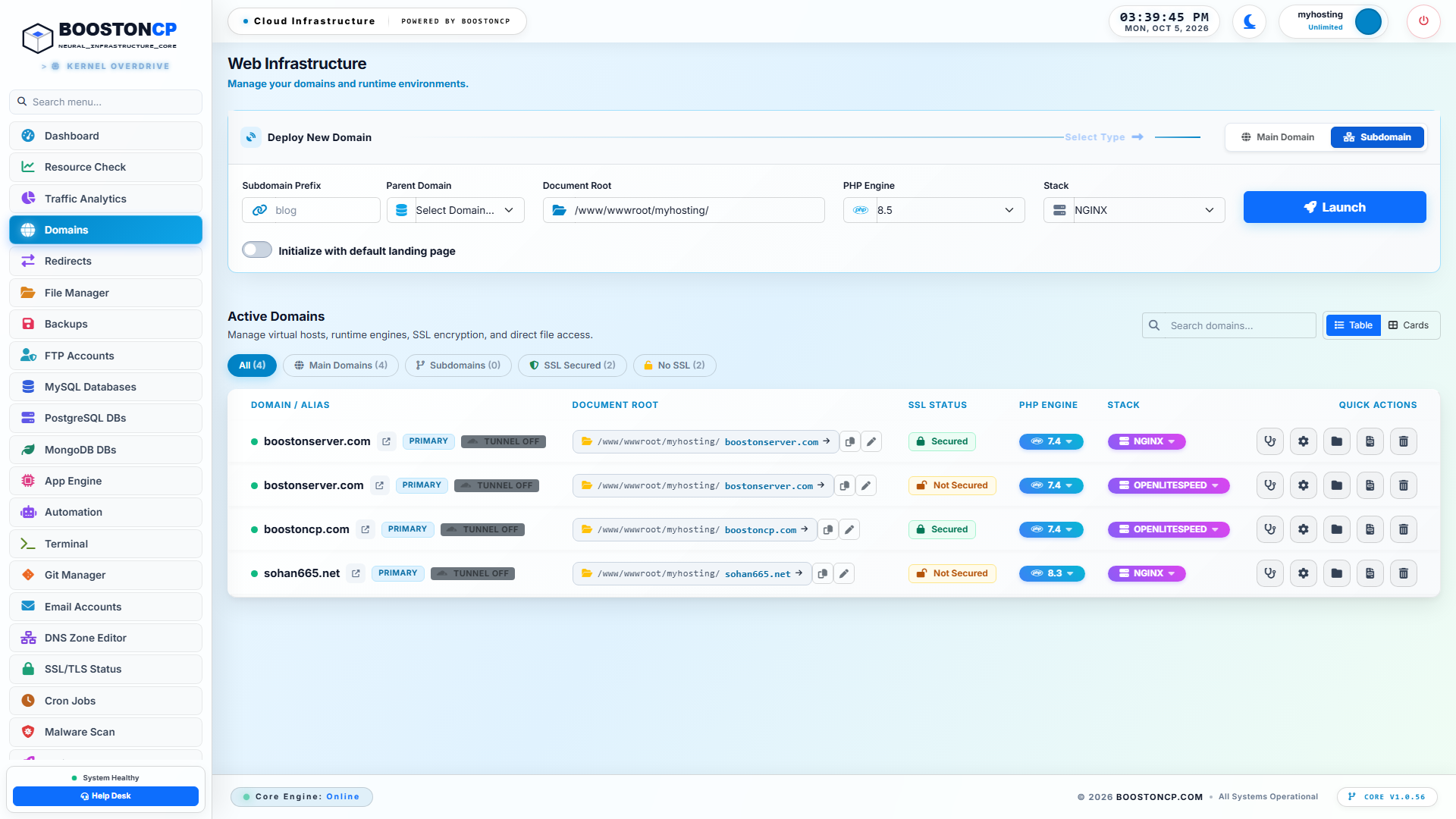
BoostonCP Domains Hub: Dedicated Staging Subdomains, Document Roots, and Independent PHP Versions
As shown in the BoostonCP Domains Hub:
- Subdomain Segregation: Subdomains like
staging.example.comare created as autonomous virtual hosts with custom document roots (/www/wwwroot/myhosting/staging.example.com). - PHP Version Freedom: In the domain settings, developers can assign PHP 8.2 or PHP 8.3 to the staging domain while the production domain continues running PHP 8.1.
- Webserver Switcher: Test the site under OpenLiteSpeed with native
.htaccessrewrite parsing or under Host Nginx with FastCGI microcaching with a 1-second zero-downtime toggle.
Step 4: Pre-Sync Point-in-Time Snapshots for Zero-Risk Rollbacks
The fundamental rule of production synchronization is: Always establish an instantaneous recovery checkpoint before executing a merge.
In Backups (/backup), BoostonCP provides sub-second point-in-time snapshot capabilities:
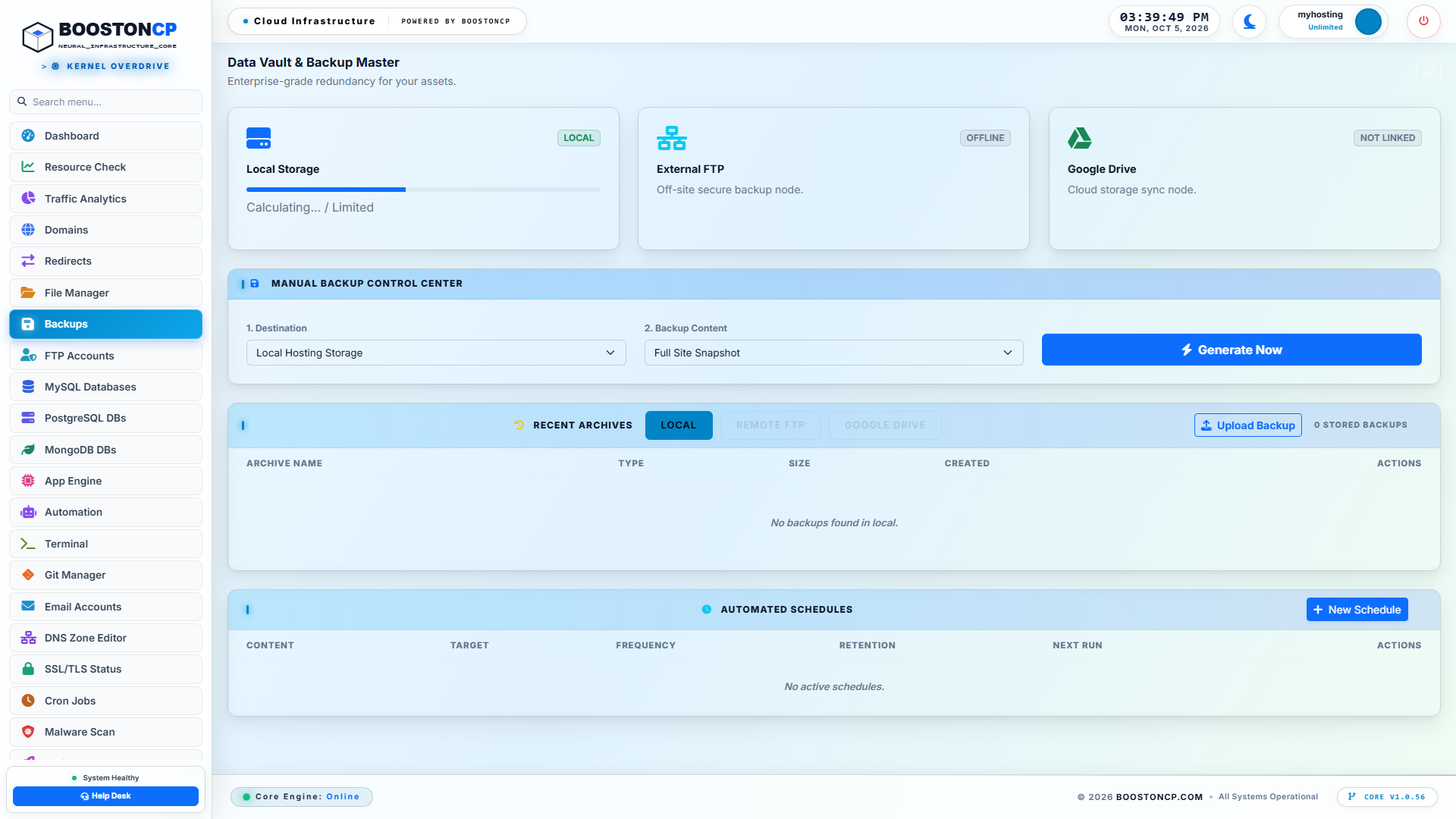
BoostonCP Instant Snapshots & Pre-Sync Restore Points: Zero-Latency Disaster Recovery Guardrails
Before initiating a production push:
- BoostonCP automatically creates an in-memory staging snapshot of the live production database and filesystem.
- Because BoostonCP utilizes a high-speed RAM-Disk Staging Engine (
/var/lib/php/sessions/user_sessions), snapshots are generated with virtually zero storage I/O drag on the live website. - If a post-merge conflict arises, the administrator can trigger a 1-Click Atomic Restore, reverting the production environment to its exact pre-sync state in under 5 seconds.
Step 5: Advanced Git CI/CD Push-to-Deploy Staging Workflows
For digital agencies and software development teams practicing modern GitOps, BoostonCP includes a native Git Manager (/git):
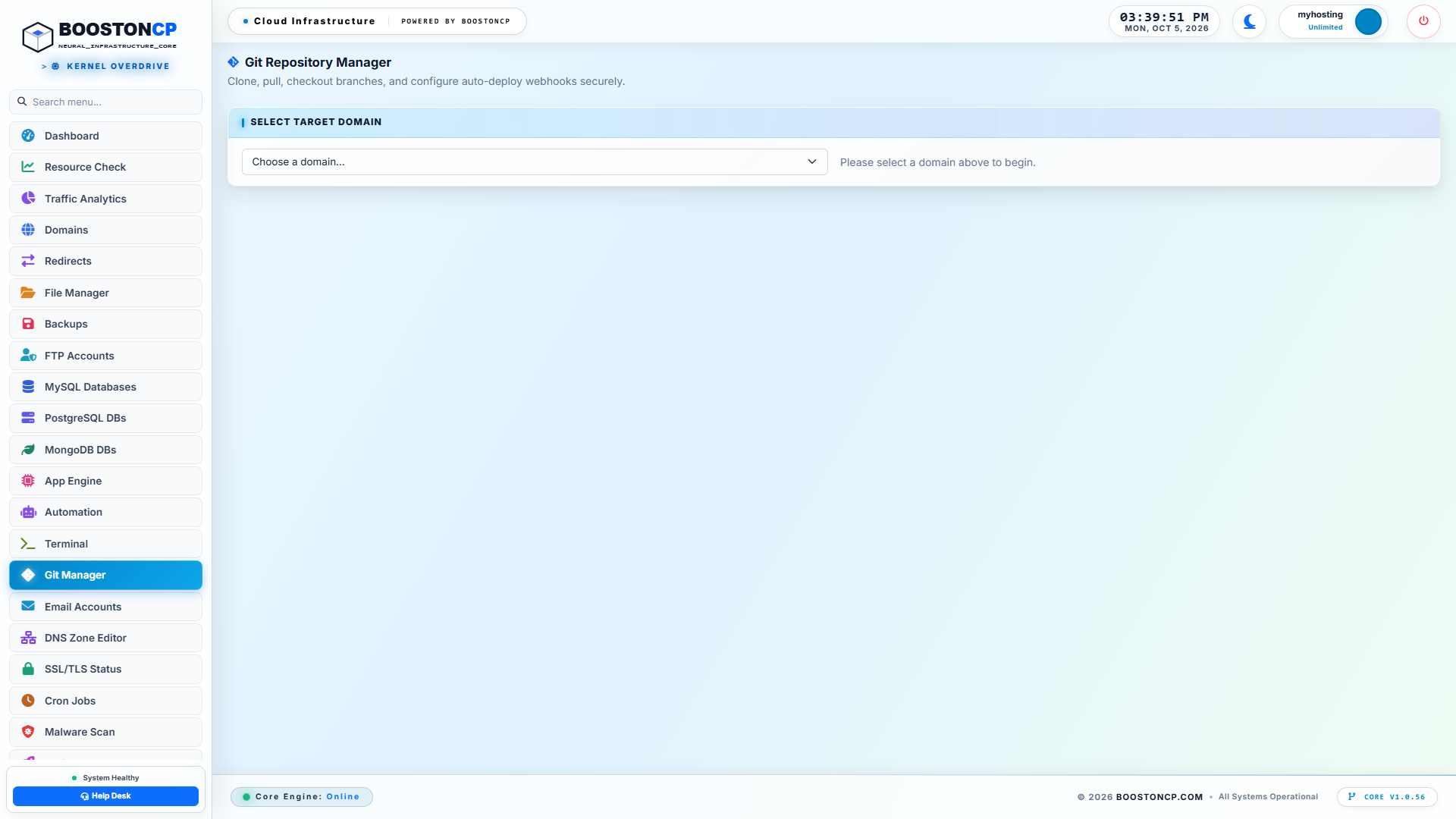
BoostonCP Push-to-Deploy Git Integration: CI/CD Staging Workflows and Automated Webhooks
- Branch-Based Deployment: Connect your GitHub, GitLab, or Bitbucket repository. Route the
staginggit branch to deploy automatically tostaging.example.comvia webhooks, while themainorproductionbranch deploys exclusively toexample.com. - Zero-Terminal Deployment: Developers push code from their local VS Code or terminal (
git push origin staging), and BoostonCP pulls the code, executes composer or build scripts, and invalidates opcode caches automatically.
5. Solving the E-Commerce "Lost Order" Problem During Production Sync
In static brochure websites or blogs, pushing staging changes to production is straightforward: you can overwrite both the filesystem and the database without consequence.
However, on high-traffic WooCommerce, membership, or e-commerce platforms, overwriting the production database is fatal.
The "Lost Order" Timeline
Consider this typical scenario:
- Monday, 09:00 AM: You clone the production WooCommerce site to
staging.example.com. Both sites share identical customer records and order histories. - Monday to Wednesday: Your development team spends 48 hours updating the theme, installing a new payment gateway, and tweaking landing pages on staging.
- Meanwhile, on Production: Live customers continue shopping! Between Monday and Wednesday, 450 new orders are placed, 80 new user accounts are registered, and inventory counts fluctuate.
- Wednesday, 02:00 PM: Your developer completes the staging work and executes a naive "Full Database Push" from staging to production.
- The Catastrophe: The staging database (frozen in time on Monday at 09:00 AM) overwrites the live production database. All 450 orders placed over the last 48 hours, all customer invoices, and all payment gateway transaction IDs are permanently wiped out.
+--------------------------------------------------------------------------------------------------+
|                          THE WOOCOMMERCE "LOST ORDER" DISASTER TIMELINE                          |
+--------------------------------------------------------------------------------------------------+
|                                                                                                  |
|   MONDAY 09:00 AM                 TUESDAY                          WEDNESDAY 02:00 PM            |
|   ┌────────────────────────┐      ┌────────────────────────┐       ┌────────────────────────┐    |
|   │ PRODUCTION (Order #100)│ ──►  │ PRODUCTION (Order #350)│ ──►   │ PRODUCTION (Order #550)│    |
|   └───────────┬────────────┘      └────────────────────────┘       └───────────▲────────────┘    |
|               │                                                                │                 |
|               │ CLONE                                                          │ OVERWRITE       |
|               ▼                                                                │ (FATAL MERGE)   |
|   ┌────────────────────────┐      ┌────────────────────────┐       ┌───────────┴────────────┐    |
|   │ STAGING    (Order #100)│ ──►  │ Developer refactors    │ ──►   │ STAGING    (Order #100)│    |
|   │                        │      │ checkout & styles      │       │ (Missing Orders #101   │    |
|   └────────────────────────┘      └────────────────────────┘       │  through #550!)        │    |
|                                                                    └────────────────────────┘    |
|                                                                                                  |
+--------------------------------------------------------------------------------------------------+
The Three Selective Synchronization Modes
To prevent data loss on transactional websites, enterprise staging platforms must provide Selective Granular Synchronization:
| Synchronization Mode | Files Synchronized | Database Synchronized | Recommended Use Case | Risk Level |
|---|---|---|---|---|
| Mode 1: Files-Only Sync | wp-content/themes, wp-content/plugins, custom assets |
None (Database Untouched) | CSS styling, theme layout changes, plugin updates, bug fixes | Zero Risk (Safe for active WooCommerce) |
| Mode 2: Content-Selective Sync | Files + Specified Post Types | Specific tables (wp_posts with post_type = 'page') |
Redesigned landing pages, new blog drafts, Elementor template updates | Low Risk (Excludes orders and users) |
| Mode 3: Full-Stack Overwrite | All Files | Complete Database (wp_* tables) |
Pre-launch sites, offline catalog redesigns, staging-first builds | High Risk (Requires Maintenance Mode on live site) |
Deep-Dive: Mode 1 (Files-Only Sync)
For 90% of WordPress updates (updating a plugin, patching a security vulnerability, modifying CSS, or adding JavaScript tracking pixels), the database does not require synchronization.
By executing a Files-Only Sync, BoostonCP transfers the modified plugin and theme files directly to the production document root using atomic file replacement. The production database remains 100% untouched. Not a single order, customer session, or inventory count is affected.
Deep-Dive: Mode 2 (Excluding Transactional Tables)
When database changes must be synchronized (such as new custom page layouts), the synchronization engine must explicitly exclude transactional and user tables:
TRANSACTIONAL TABLES TO EXCLUDE FROM STAGING MERGE:
├── `wp_users`                     (Customer accounts and password hashes)
├── `wp_usermeta`                  (Billing/shipping addresses, customer capabilities)
├── `wp_posts` WHERE post_type IN  ('shop_order', 'shop_order_refund')
├── `wp_postmeta`                  (Order totals, Stripe charge tokens, order line items)
├── `wp_woocommerce_order_items`   (Purchased products per transaction)
├── `wp_woocommerce_order_itemmeta`(Quantities, variations, applied coupon codes)
├── `wp_wc_orders`                 (WooCommerce High-Performance Order Storage - HPOS)
├── `wp_wc_order_stats`            (WooCommerce analytical revenue tracking)
└── `wp_actionscheduler_*`         (Queued webhook jobs and background tasks)
By isolating configuration tables from transactional data, updates can be rolled out with zero risk of order erasure.
6. Achieving Zero Downtime: Atomic Symlink Cutover & Cache Invalidation
When transferring thousands of files from staging to production, standard file copy utilities (cp -r or slow FTP transfers) take several minutes to complete.
During that transfer window, your live site exists in an inconsistent state: half of the files belong to the old version, while the other half belong to the new version. If a visitor requests a page during the copy process, PHP attempts to execute classes that do not yet exist, triggering fatal errors.
The Physics of Atomic Symlink Switching
To achieve true Zero-Downtime Deployment, BoostonCP implements the Atomic Symlink Cutover Pattern:
+--------------------------------------------------------------------------------------------------+
|                         ATOMIC SYMLINK CUTOVER SEQUENCE (0.00ms DOWNTIME)                        |
+--------------------------------------------------------------------------------------------------+
|                                                                                                  |
|   1. PREPARATION PHASE:                                                                          |
|      ├── Production Live Path: `/www/wwwroot/example.com/current` ──► points to `release_v1`     |
|      └── Deploy Staging Files to: `/www/wwwroot/example.com/releases/release_v2`                 |
|                                                                                                  |
|   2. PRE-COMPILATION & HEALTH CHECK:                                                             |
|      ├── PHP OPcache pre-heats bytecode in `release_v2`                                          |
|      └── Automated health check verifies HTTP 200 on internal port                               |
|                                                                                                  |
|   3. ATOMIC SWITCH:                                                                              |
|      └── Linux Kernel System Call: `ln -sfn /.../release_v2 /.../current_temp && mv -Tf ...`     |
|                                                                                                  |
|   4. INSTANTANEOUS TRAFFIC ROUTING:                                                              |
|      Production Live Path: `/www/wwwroot/example.com/current` ──► points to `release_v2`         |
|      (Old `release_v1` retained for instant 1-click rollback)                                    |
|                                                                                                  |
+--------------------------------------------------------------------------------------------------+- Directory Releases: Staging files are assembled into a timestamped release directory (e.g.,
/releases/release_20261009_1000/) rather than overwriting the live folder directly. - The Atomic System Call: Once all files are written and verified, the operating system executes an atomic symlink swap:
ln -sfn /www/wwwroot/example.com/releases/release_20261009_1000 /www/wwwroot/example.com/current_temp
mv -Tf /www/wwwroot/example.com/current_temp /www/wwwroot/example.com/public_html
In the Linux kernel,
mv -Tfon a symbolic link is an atomic filesystem operation completed in less than 1 millisecond. Not a single incoming TCP request is dropped, and no visitor ever experiences a partially written file. - OPcache & FastCGI Cache Purging: Concurrently with the symlink switch, BoostonCP sends an internal flush signal to the PHP OPcache engine (
opcache_reset()) and clears the Nginx FastCGI microcache zone or OpenLiteSpeed cache headers. Visitors immediately receive the updated code.
7. Step-by-Step Production Runbook: Safe Staging & 1-Click Sync
Follow this authoritative step-by-step engineering runbook to test any plugin, theme, or core update without risking production stability.
Phase 1: Creating the Staging Environment
- Access BoostonCP: Log in to your BoostonCP User Panel (
https://yourserver:2083). - Navigate to Domains: Open Domains (
/domains) and verify that your target domain (example.com) is active. - Add Staging Subdomain:
- Click Add Domain / Subdomain.
- Select Subdomain mode.
- Enter prefix:
staging. - Select parent domain:
example.com. - Set document root:
/www/wwwroot/myhosting/staging.example.com. - Click Create Domain.
- Issue TLS Certificate: In SSL/TLS Status (
/ssl), verify that Let's Encrypt has provisioned an SSL certificate forstaging.example.com. - Clone the Environment:
- In the Domains list, click the Staging / Clone action icon on
example.com. - Select destination:
staging.example.com. - The BoostonCP Staging Engine automatically clones the filesystem, duplicates the MariaDB database to a dedicated schema, executes the binary-safe search-and-replace, and configures
staging.example.com/wp-config.php.
- In the Domains list, click the Staging / Clone action icon on
Phase 2: Isolated Development & Testing
- Log in to Staging: Open
https://staging.example.com/wp-admin. (Tip: Use BoostonCP's 1-Click WP Auto-Login Bridge in the App Installer to enter the dashboard securely without re-typing passwords). - Set Robots Tag: Verify that search engines are blocked by confirming that
Settings > Reading > Discourage search engines from indexing this siteis enabled on staging. - Execute Updates:
- Update WordPress core.
- Update all outdated plugins and themes.
- Test major PHP version upgrades by adjusting the PHP version selector on
staging.example.comto PHP 8.3.
- Verify Functionality:
- Test checkout flows, contact form submissions, and user authentication.
- Review
/var/log/nginx/or/var/log/php-fpm/error logs for hidden PHP warnings or deprecated function notices.
Phase 3: The Pre-Sync Recovery Checkpoint
- Generate Production Snapshot: In Backups (
/backup), click Create Instant Snapshot onexample.com. - Verify Snapshot Integrity: Confirm that the snapshot archive is generated in local RAM-disk storage. This guarantees you have a 1-click restore point if unexpected production issues occur post-sync.
Phase 4: Production Synchronization
- Trigger Sync Engine: In BoostonCP Domains, select Staging Actions > Sync to Production.
- Select Synchronization Scope:
- For design and plugin updates: Select Files-Only Sync (Zero DB Contention).
- For complete redesigns where no live orders occurred: Select Full Stack Sync with Maintenance Mode.
- Execute Cutover: Click Execute Sync. BoostonCP executes the atomic file swap, recalculates serialized database strings, and invalidates FastCGI/OPcache buffers.
- Post-Sync Verification: Visit
https://example.comin an incognito browser window, verify TTFB latency, and confirm that all features operate smoothly.
8. Enterprise Cost & Architecture Comparison: BoostonCP vs Managed WordPress Hosts
Traditional managed WordPress hosts (such as WP Engine, Kinsta, and Flywheel) advertise 1-click staging as a proprietary, premium feature, charging exorbitant monthly fees while enforcing strict resource throttling.
Let's evaluate the architecture and total cost of ownership (TCO) across common hosting paradigms:
| Feature / Architectural Pillar | WP Engine / Kinsta | cPanel / Shared Hosting | BoostonCP on $5–$10 VPS |
|---|---|---|---|
| Monthly Cost (3 Websites) | \$70.00 – \$115.00 / month | \$15.00 – \$25.00 / month | \$5.00 – \$10.00 / month (Hetzner / DO) |
| Staging Environment Limit | 1 per site (strict storage caps) | None (Requires manual plugin) | Unlimited Staging Environments |
| Visitor Overage Penalties | Yes (\$1 – \$2 per 1,000 visitors) | No (Account suspended if overloaded) | Zero Penalties (Uncapped Traffic) |
| PHP Version Per Environment | Limited by account tier | Shared across entire account | Independent PHP 7.4–8.4 Per Domain |
| Webserver Flexibility | Proprietary Nginx only | Apache (Heavy RAM footprint) | 1-Sec Switch: Nginx FastCGI vs OLS |
| Database Engines Supported | MySQL only | MySQL only | MariaDB, PostgreSQL, MongoDB, Redis |
| Search-Replace Engine | Internal API | Third-party plugin required | Native Binary-Safe Serialized Parser |
| Disaster Recovery Staging | Local proprietary backup | Slow zip archives | RAM-Disk Snapshots + S3/G-Drive Sync |
| Kernel Tenant Isolation | Docker containers (Shared) | None (Shared server pool) | Native Linux Kernel cgroups v2 ($0) |
By deploying BoostonCP, digital agencies and web professionals liberate their infrastructure from artificial corporate host limitations. You gain enterprise-grade 1-click staging, atomic production synchronization, and polyglot database management on your own sovereign cloud hardware—saving thousands of dollars in hosting overhead every year.
Frequently Asked Questions (FAQ)
Will creating a staging site slow down my live production website?
No. Because BoostonCP provisions staging environments with isolated MariaDB database credentials and discrete PHP-FPM process pools, active testing on the staging site does not monopolize production database worker threads. Furthermore, if you utilize BoostonCP's Linux kernel cgroups v2 governor, you can allocate strict CPU and RAM ceilings (e.g., maximum 25% CPU for staging), guaranteeing that intensive staging tests never starve production visitors of server resources.
Does BoostonCP push-to-deploy support WooCommerce High-Performance Order Storage (HPOS)?
Yes. BoostonCP’s database synchronization engine is fully compatible with WooCommerce HPOS (custom order tables like wp_wc_orders and wp_wc_order_addresses). When executing a Content or Files-Only Sync, HPOS tables are strictly protected from overwrite, ensuring live order data remains completely untouched.
Can I password-protect my staging environment so Google doesn't index it?
Yes. Inside the BoostonCP Domain Settings for staging.example.com, you can enable 1-Click HTTP Basic Authentication (.htpasswd password protection). This completely blocks search engine crawlers, unauthorized web scrapers, and competitors from viewing your development site while allowing your team and clients to review changes securely.
What happens if a production sync encounters a database error midway?
BoostonCP utilizes transactional database safety mechanisms. The production database is snapshotted immediately before any table alteration is executed. If a network interruption or SQL error occurs, the transaction is rolled back, and the previous production state is preserved without corrupting your live installation.
Experience Zero-Risk WordPress Staging on BoostonCP
Stop gambling with your business revenue by updating plugins and modifying code directly on live WordPress production servers. Eliminate bloated staging plugins, bypass 504 gateway timeouts, and deploy flawless updates with absolute peace of mind.
Explore the modern, high-speed hosting control panel engineered specifically for developers, digital agencies, and high-performance WordPress operators:
👉 Launch the Free Interactive Live Demo — Experience BoostonCP’s 1-Click Staging, Webserver Switcher, and Native Cloud Architecture directly in your browser.





