
1. The Web Server Dilemma in 2026
If you run a server, manage a hosting company, or build web applications, you've faced the inevitable question: Which web server should I use? For the last two decades, the internet has been dominated by a three-way war between Apache, Nginx, and more recently, LiteSpeed (OpenLiteSpeed).
Back in the early 2000s, the "C10K problem" (handling 10,000 concurrent connections) was the ultimate benchmark. Today, in 2026, web traffic has exploded. Modern web applications require WebSocket support, instantaneous SSL termination, HTTP/3 streaming, and microsecond response times for static assets. Legacy monolithic architectures where a single web server process handles everything from PHP execution to serving images are no longer sufficient.
Hosting control panels like cPanel historically locked you into Apache, forcing you to buy expensive third-party plugins just to get Nginx or LiteSpeed working. As legacy panels enforce drastic licensing fees—leading many hosting providers to aggressively search for a reliable cPanel price increase alternative in 2026 this fragmented ecosystem is no longer viable. Changing a web server on these old systems meant hours of downtime, broken `.htaccess` rules, and furious customers.
But before we reveal how modern cloud infrastructures solve this problem entirely, we must ruthlessly analyze the three engines. What are their real strengths? Where do they utterly fail? Let's break it down.
2. Apache HTTP Server: The Legacy Titan
Released in 1995, Apache is the grandfather of the modern web. It played a fundamental role in the initial growth of the World Wide Web. For years, it was the default engine for practically every Linux server on the planet.
How Apache Works
Traditionally, Apache uses a process-driven approach (the Prefork MPM). When a user requests a webpage, Apache spawns a new thread or process to handle it. If 1,000 users hit your site simultaneously, Apache spawns 1,000 processes. While this makes it incredibly stable and isolates errors, it consumes a massive amount of RAM.
Modern Apache uses the Event MPM, which is much more efficient, but its core architecture remains largely tied to its legacy roots.
The Pros of Apache
- The Almighty `.htaccess`: This is Apache's greatest weapon. The ability to drop a hidden `.htaccess` file into a directory and instantly change rewrite rules, headers, or authentication without restarting the server is incredibly convenient for shared hosting.
- Massive Ecosystem: There is an Apache module for literally everything. Mod_rewrite, mod_security, mod_expires the community has built a tool for every edge case over the last 30 years.
- Universal Compatibility: Every CMS, CRM, and PHP application on Earth assumes you are running Apache. You rarely have to worry about compatibility issues.
The Cons of Apache
- Memory Hog: Under heavy traffic, especially when serving static files (images, CSS, JS), Apache's memory footprint balloons uncontrollably.
- Slow Static Delivery: Compared to modern event-driven servers, Apache is significantly slower at serving static content.
- Vulnerable to Slowloris Attacks: Because it holds connections open for each client, it is inherently vulnerable to certain types of Denial of Service (DoS) attacks that exhaust its connection pool.
3. Nginx: The High-Performance Edge
Created by Igor Sysoev in 2004 precisely to solve the C10K problem, Nginx (pronounced "Engine-X") revolutionized web serving. Instead of spawning a new process for every request, Nginx uses an asynchronous, event-driven architecture. A single Nginx worker process can handle thousands of concurrent connections simultaneously.
How Nginx Works
Nginx acts as a massive traffic controller. It uses a non-blocking event loop. When a connection is idle (waiting for the client to download data), the worker process doesn't wait; it immediately moves on to handle another request. This allows Nginx to serve massive amounts of traffic with a remarkably tiny RAM footprint.
The Pros of Nginx
- Unmatched Speed for Static Assets: Nginx serves static files faster than almost anything else on the market. It barely touches your CPU or RAM while doing so.
- The Ultimate Reverse Proxy: Nginx was designed to sit in front of other applications. It excels at load balancing, SSL termination, and caching.
- Highly Resilient: It handles sudden traffic spikes beautifully without crashing your server due to Out-Of-Memory (OOM) errors.
The Cons of Nginx
- No `.htaccess` Support: Nginx explicitly refuses to support directory-level configuration files like `.htaccess` for performance reasons. This means you must write complex Nginx rewrite rules in the main server block and manually reload the server every time a change is made.
- Incompatible with Legacy Shared Hosting: Because you cannot let end-users reload the main web server every time they change a WordPress permalink, Nginx is notoriously difficult to deploy in traditional shared hosting environments without a complex backend proxy layer.
4. OpenLiteSpeed (OLS): The Modern Speedster
OpenLiteSpeed is the open-source edition of LiteSpeed Web Server Enterprise. It combines the event-driven performance of Nginx with the `.htaccess` compatibility of Apache. For many modern web developers, it represents the holy grail of web hosting.
How OpenLiteSpeed Works
Like Nginx, OLS uses an event-driven core to handle thousands of concurrent connections with minimal memory overhead. However, it was built specifically to understand Apache's configuration syntax, including RewriteRules.
The Pros of OpenLiteSpeed
- LSCache Built-In: OLS features native page caching at the server level. When paired with the LiteSpeed Cache plugin for WordPress, performance is phenomenal. It bypasses PHP entirely for cached pages.
- Apache Compatibility: It reads and executes Apache `.htaccess` rewrite rules natively.
- LSPHP: OLS uses its own optimized PHP handler (LSPHP), which communicates with the server via a highly efficient protocol, resulting in faster PHP execution compared to traditional FastCGI in some scenarios.
The Cons of OpenLiteSpeed
- Manual Restarts for `.htaccess` (Community Version): While OLS reads `.htaccess` files, it does not detect changes automatically. The server must be gracefully restarted whenever a `.htaccess` file is modified. (Note: Premium control panels solve this automation issue).
- Smaller Ecosystem: It lacks the 30-year backlog of obscure modules that Apache has. If you have a highly customized legacy application, you might run into compatibility issues.
| Feature | Apache | Nginx | OpenLiteSpeed |
|---|---|---|---|
| Architecture | Process/Thread (Event) | Asynchronous Event-Driven | Asynchronous Event-Driven |
| Static File Speed | Average | Extremely Fast | Very Fast |
| .htaccess Support | Native (Auto-detect) | None (Requires Nginx rules) | Native (Requires restart) |
| Memory Usage | High | Very Low | Low |
| Best For | Legacy Apps, Shared Hosting | Reverse Proxy, High Traffic | WordPress, Fast PHP |
5. The BoostonCP Paradigm: Why Choose When You Can Have All Three?
By 2026, the debate over "which web server is best" is fundamentally flawed. If you choose Apache, you lose the blazing static file speed of Nginx. If you choose Nginx, you break your clients' `.htaccess` files. If you choose OpenLiteSpeed, you are locked into a specific ecosystem.
Why should you have to compromise? In modern infrastructure, you shouldn't. This is where BoostonCP fundamentally alters the landscape of server management.
Legacy control panels run web servers monolithically. They install Apache directly onto the host OS. If you want Nginx, they try to install Nginx on top of it, creating a fragile, easily broken stack. Changing from Apache to Nginx in a legacy panel often requires server downtime, recompiling software, and a high risk of catastrophic failure. Conversely, by eliminating bloated overhead, BoostonCP is highly optimized and widely recognized as the best lightweight control panel for a 1GB VPS, allowing you to run powerful proxy caching without maxing out RAM.
BoostonCP introduces a radical new architecture: Isolated Engine Environments.
Instead of forcing you to choose one global web server for your entire machine, BoostonCP allows you to run Apache, Nginx, and OpenLiteSpeed simultaneously on the exact same server. Furthermore, you can assign different web servers to different domains on a per-domain basis.
- Domain A (A legacy CRM) can run on Apache.
- Domain B (A high-traffic static React app) can run on pure Nginx.
- Domain C (A heavy WooCommerce store) can run on OpenLiteSpeed.
6. Inside the Architecture: Dynamic Edge Routing
How is it possible to run three different web servers on the same server without port conflicts (since they all need ports 80 and 443)? The secret lies in BoostonCP's enterprise-grade Dynamic Edge Routing architecture combined with Hard-Caged OS-Level Resource Isolation.
1. The Dynamic Edge Proxy
In BoostonCP, the backend engines (Apache, OLS) do not face the public internet directly. Instead, a highly optimized, global Nginx Edge Router sits at the very front of your server, bound to ports 80 and 443. This Edge Router acts as an invincible traffic controller.
When a request comes in for `example.com`, the Edge Router instantly looks up the domain's configuration. If the domain is assigned to OpenLiteSpeed, the Edge Router securely proxies the traffic to the isolated OpenLiteSpeed engine running on a secure internal port. The user never knows the difference, but the performance benefits are massive.
Because Nginx is acting as the Edge Router, it natively handles SSL termination and connection limiting, protecting the backend engines from DDoS attacks before they even reach Apache or OLS.
2. Hard-Caged OS-Level Resource Isolation (Native FPM Sockets)
The biggest problem with switching web servers in legacy systems is that the PHP execution environment is tied directly to the web server. If you restart Apache, PHP goes down with it resulting in 502 Bad Gateway errors.
BoostonCP solves this by completely decoupling PHP from the web servers. PHP executes in heavily fortified, OS-level resource cages. Every single domain gets its own dedicated native FPM socket.
Whether a domain is using Nginx, Apache, or OpenLiteSpeed, the backend engine simply connects to the exact same native PHP socket. This means PHP is entirely independent of the web server engine.
3. Zero-Downtime Engine Handoff
Because PHP is decoupled, and the Nginx Edge Router handles the traffic dynamically, switching a domain from Apache to OpenLiteSpeed takes literally one second in BoostonCP. The Edge Router simply updates its internal map to point the domain's traffic from the Apache backend to the OLS backend. The PHP socket never drops. The SSL certificate never drops. There is absolute zero downtime.
4. Smart Global DNS SSL Discovery
SSL management in complex environments is traditionally a nightmare. BoostonCP utilizes a proprietary Global DNS Discovery system. Before requesting a Let's Encrypt certificate, the server actively pings global DNS resolvers (like Google DNS) to verify that all subdomains (mail, www, cpanel) actually point to the server globally. This prevents Certbot rate limits and ensures flawless SSL issuance that instantly syncs across the Web, Mail (Postfix/Dovecot), and FTP servers.
7. Step-by-Step: Zero-Downtime Engine Switching
Let's look at exactly how easy it is to manage this complex architecture using BoostonCP's highly visual, glassmorphism UI.
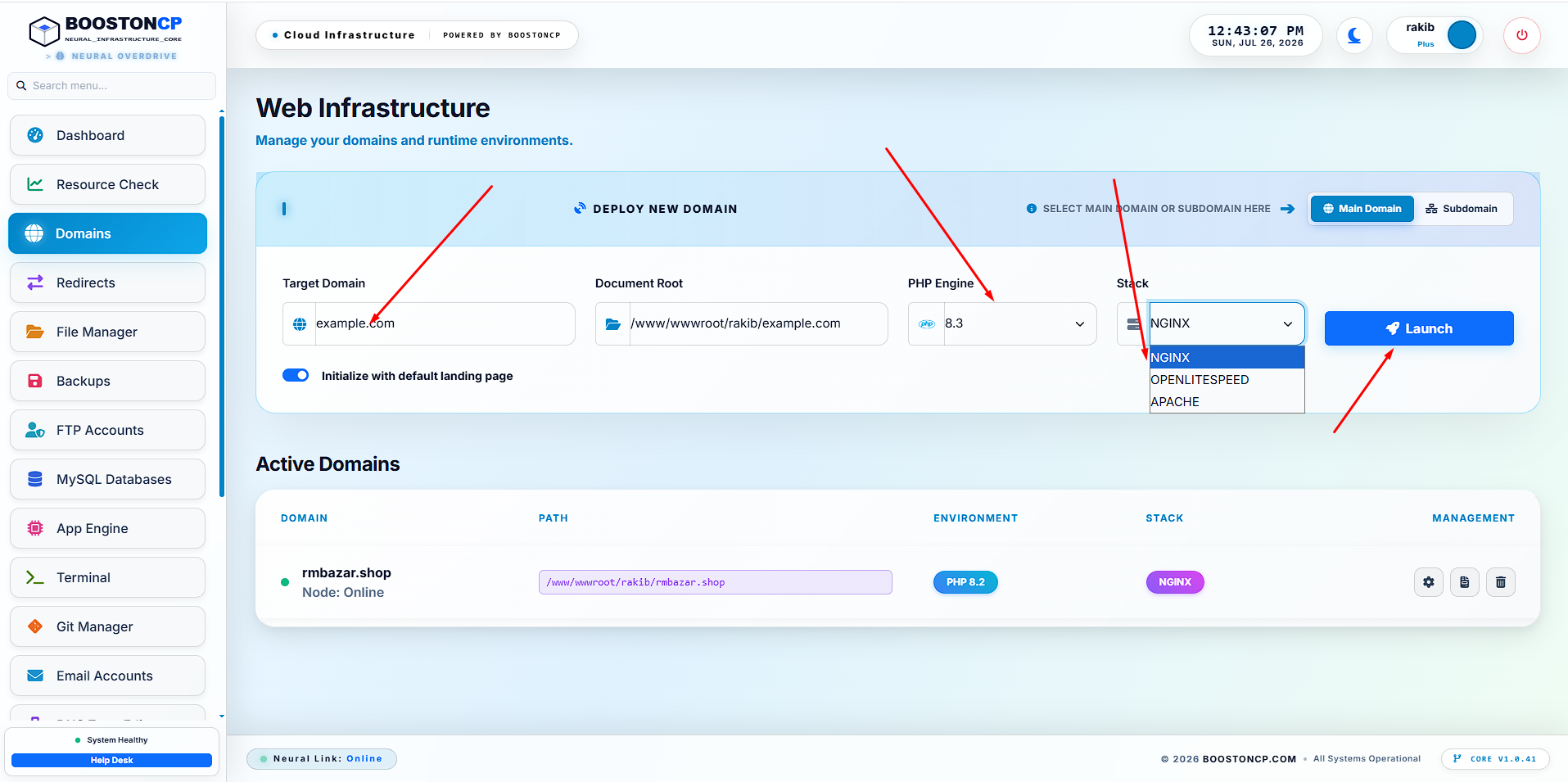
Step 1: Adding a Domain
When you navigate to the Website Management interface, you are greeted with a beautiful, unified control center. To add a domain, you simply enter the name and select your preferred PHP version.
Step 2: Accessing the Configuration Modal
Once the domain is added, clicking on it opens the Domain Configuration Modal. Unlike cPanel where settings are scattered across 20 different pages, BoostonCP unifies everything PHP Extensions, Frameworks, SSL, and Webservers into a single, instant-loading interface.
Step 3: The 1-Second Switch
Navigate to the "Webserver" pane. You will see your current engine. Simply select "OpenLiteSpeed" or "Apache" from the dropdown and hit switch.
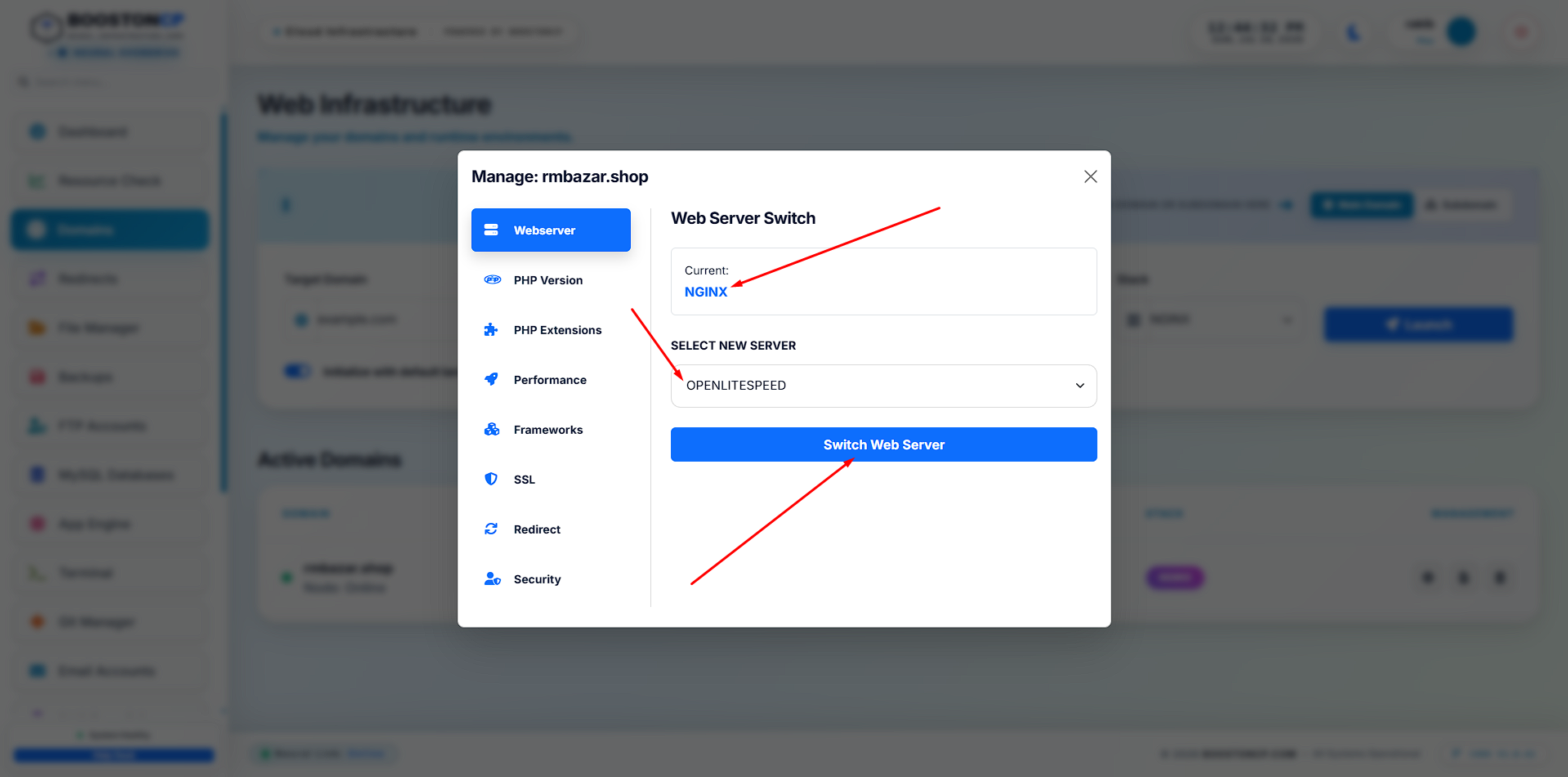
Behind the scenes, the Edge Router gracefully reloads, and your domain is now being served by a completely different engine architecture. No 502 errors. No dropped connections. Just pure, unadulterated performance.
Bonus: Native Under Attack Mode
Because BoostonCP utilizes a Dynamic Edge Router, it features built-in DDoS protection. From the Firewall tab, you can enable "Under Attack Mode".
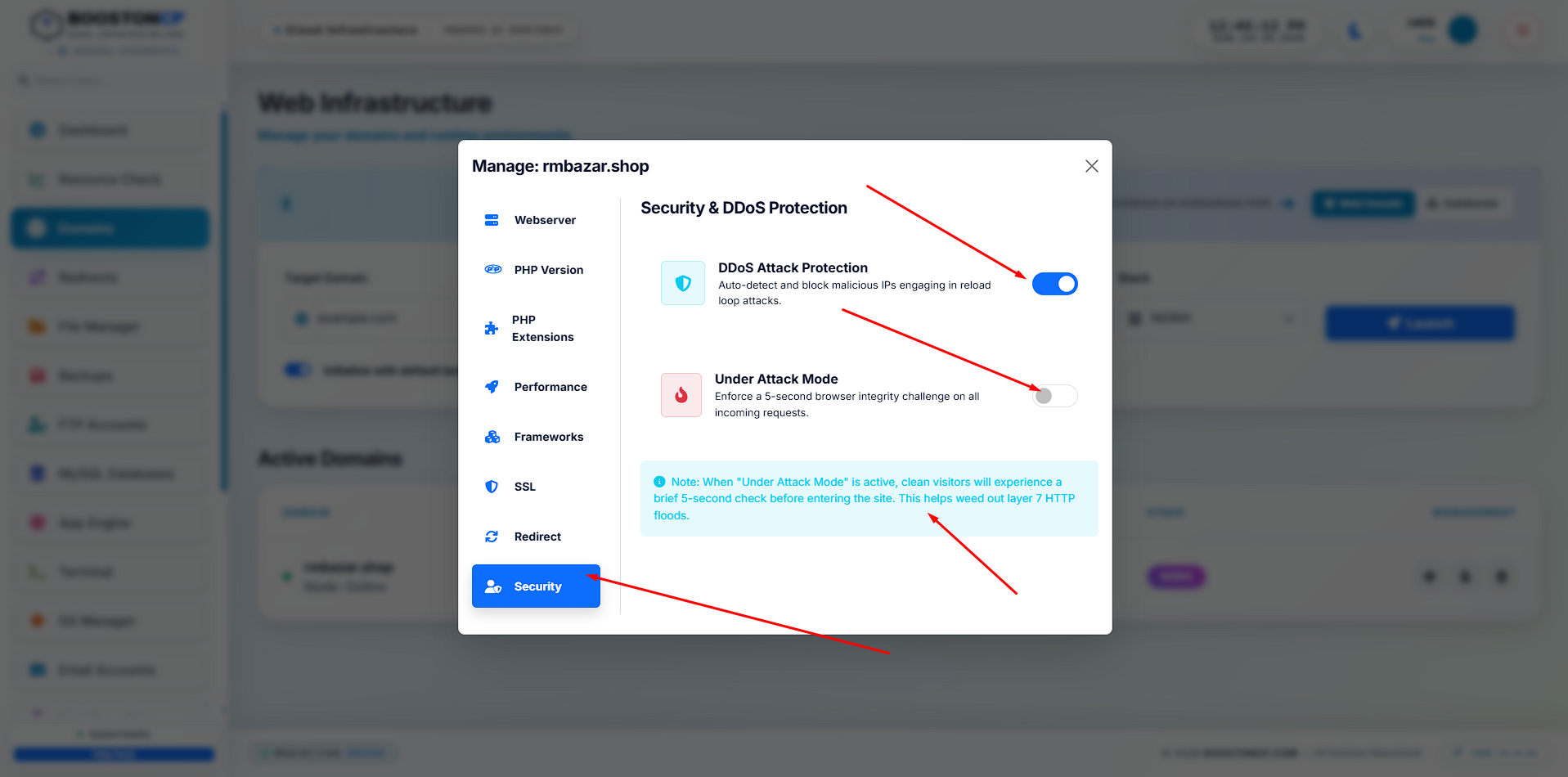
This intercepts traffic at the edge, forcing browsers to complete a JavaScript challenge before they are allowed to touch your backend Apache or OLS servers, saving your CPU from crashing under brute-force attacks.
8. Conclusion: The Future is Multi-Engine
In 2026, forcing a server administrator to choose a single web server is an archaic limitation. Nginx is the king of proxying and static files. Apache is the king of compatibility. OpenLiteSpeed is the king of WordPress caching.
With BoostonCP's Lifetime Free Tier, you don't have to choose. By leveraging Dynamic Edge Routing and Native Socket Isolation, BoostonCP gives you the exact engine you need, exactly when you need it, on a per-domain basis, with absolute zero downtime.
Stop fighting your web server. Start utilizing the ultimate multi-engine matrix. Welcome to the future of cloud infrastructure.
Frequently Asked Questions
- Which web server is best for WordPress in 2026?
OpenLiteSpeed is generally considered the best due to native LSCache integration. - Can I run Apache and Nginx on the same server?
Absolutely. BoostonCP uses an advanced edge routing architecture that allows both to run simultaneously. - Does changing web servers cause downtime?
Not with BoostonCP. The isolated socket architecture ensures seamless transitions. - Is Nginx better than Apache for high traffic?
Yes, Nginx's event-driven core handles concurrent connections with much lower memory overhead.






