
Executive Technical Overview: The 2:00 AM Crisis & The Anatomy of the Dynamic Web
If you manage production WordPress sites or run client infrastructure on Linux VPS, you know the dreaded 2:00 AM alert: CPU utilization spikes to 100%, MariaDB stalls with lock contention, and Nginx starts throwing 502 Bad Gateway and 504 Gateway Timeout errors across your entire server.
You log into the terminal. top shows load averages climbing past 40 or 50. Every single PHP-FPM child process is stuck in an uninterrupted sleep or active execution state. The culprit isn't a massive 100 Gbps network-level SYN flood filling your datacenter pipe. It is something far more frustrating: a modest, 2,000-request-per-second Layer 7 HTTP flood aimed straight at dynamic WordPress endpoints.
WordPress currently powers over 43% of the web. Its flexibility, vast theme marketplace, and massive plugin ecosystem make it a great content platform. But underneath that convenience lies an architectural trap: WordPress is an interpreted runtime executing dynamic, query-heavy request lifecycles.
When an anonymous visitor visits an uncached WordPress page, the edge web server (Nginx or Apache) receives an HTTP GET request, allocates a socket connection, passes the request across a FastCGI or proxy boundary to PHP-FPM, boots the WordPress core engine, loads dozens of active plugins, parses theme templates, fires anywhere from 30 to 120 SQL queries against MySQL/MariaDB, builds the HTML DOM in memory, and finally streams the serialized buffer back through the network socket.
Under normal baseline traffic—say, 5 to 15 concurrent visitors—this request cycle takes anywhere between 300ms to 800ms. It works, but it's sluggish. However, the moment your site experiences a targeted Layer 7 DDoS attack or a viral traffic spike (like getting featured on Reddit, Product Hunt, or national news), that dynamic chain collapses immediately.
The traditional "fix" sold across hosting forums and agency blogs is always the same: "Just stick your site behind Cloudflare, turn on the orange cloud, and flip the Under Attack Mode switch."
That advice gives developers a false sense of security. As we will demonstrate in this guide, relying exclusively on third-party reverse proxies leaves your origin server completely exposed to direct IP bypass attacks, wrecks your Googlebot SEO crawl budget, spikes your mobile bounce rates, and introduces serious privacy and compliance liabilities.
In this deep architectural runbook, we will break down why the standard LAMP/LEMP stack collapses under modest traffic, expose how attackers routinely bypass third-party CDNs to strike your origin IP directly, and demonstrate how to build an autonomous, self-defending hosting node using BoostonCP's Autonomous Cyber Fortress, native Nginx FastCGI Microcaching, instant OpenLiteSpeed Multi-Webserver Switching, and Linux cgroups v2 Kernel Isolation.
By the end of this guide, you will have a complete production blueprint to absorb 50,000+ requests per second directly on an affordable Linux VPS, neutralize hostile Layer 7 floods, and maintain a consistent sub-10ms Time to First Byte (TTFB) worldwide—all while retaining 100% control over your infrastructure, data privacy, and SSL certificates.
1. The Anatomy of an HTTP Flood: Why Nginx + PHP-FPM Falls Over Under 2,000 RPS
To stop application-layer attacks effectively, you have to understand exactly what breaks inside Linux when a flood hits. Layer 7 DDoS attacks are fundamentally different from Layer 3 (IP network) and Layer 4 (TCP/UDP transport) volumetric floods.
A volumetric attack—such as an NTP amplification or DNS reflection flood—tries to saturate your server's physical network uplink. Datacenters and upstream transit providers filter these volumetric floods relatively well using BGP Anycast routing, automated scrubbing centers, and hardware edge firewalls.
Layer 7 attacks, by contrast, don't waste time trying to clog network pipes. Instead, the attacker uses a botnet of infected IoT devices, rented residential proxies, or headless browsers to send completely legitimate, syntactically valid HTTP GET and POST requests. The total bandwidth of the attack might be a tiny 15 to 30 Mbps—flying right under your datacenter's volumetric radar. Yet, because each individual request forces your server to execute arbitrary PHP code and run relational database queries, your server's CPU and RAM are drained from the inside out.
Let's look at the three critical bottlenecks that trigger total server failure during a 2,000 RPS flood:
Worker Connection Exhaustion & The Unix Domain Socket Backlog
When Nginx accepts incoming TCP connections, it uses an asynchronous, event-driven epoll architecture. By itself, Nginx can comfortably handle tens of thousands of idle connections or static asset requests with minimal memory overhead.
However, when requests are routed to dynamic backends via FastCGI, Nginx has to open an Inter-Process Communication (IPC) connection to the PHP-FPM master daemon—usually through a Unix domain socket (such as /run/php/php8.2-fpm.sock) or a local loopback TCP port (127.0.0.1:9000).
The Unix domain socket maintains a listen queue governed by the Linux kernel configuration parameter net.core.somaxconn and the PHP-FPM pool configuration listen.backlog. In default Ubuntu and Debian installations, somaxconn is set to a conservative default of 128 or 512.
When 2,000 requests hit Nginx in a single second:
- Nginx attempts to pass each connection into the PHP-FPM socket queue.
- If all active PHP workers are busy compiling previous requests, new connections wait in the socket backlog.
- The moment the backlog exceeds its queue limit (e.g., 512), the Linux kernel drops all new connection attempts.
- Nginx encounters an immediate connection refusal and logs the classic upstream error:
connect() to unix:/run/php/php8.2-fpm.sock failed (11: Resource temporarily unavailable) while connecting to upstream - The visitor is greeted with an
HTTP 502 Bad Gateway.
The PHP-FPM pm.max_children Starvation Paradox
The second failure point is PHP-FPM's process management model. Unlike Go or Node.js—which use lightweight asynchronous concurrency primitives (goroutines and event-loop microtasks)—traditional PHP operates as a synchronous, blocking, multi-process runtime. Each PHP-FPM worker process handles exactly one request at a time from start to finish.
Consider a production VPS with 8 CPU cores and 16 GB of RAM. A typical WordPress site running WooCommerce, Elementor, and an assortment of analytics or marketing plugins consumes around 65 MB to 120 MB of resident memory (RSS) per active worker process.
A system administrator trying to balance performance with stability might configure the PHP-FPM pool (/etc/php/8.2/fpm/pool.d/www.conf) like this:
pm = dynamic
pm.max_children = 80
pm.start_servers = 15
pm.min_spare_servers = 10
pm.max_spare_servers = 25
pm.max_requests = 1000
With pm.max_children = 80, the administrator ensures that even during peak traffic, PHP processes will consume no more than roughly 8 GB to 9.6 GB of RAM, leaving the remaining memory for MySQL, Redis, Nginx, and the operating system page cache.
Now let's do the actual math on throughput:
- Average un-cached WordPress execution time: 400 milliseconds (0.40 seconds)
- Throughput per individual PHP worker: 1 second / 0.40 seconds = 2.5 requests per second (RPS)
- Maximum theoretical server throughput: 80 active workers * 2.5 RPS = 200 requests per second (RPS)
When an attacker launches a modest Layer 7 flood of 2,000 RPS, the incoming traffic exceeds the server's maximum processing capacity by 1,000% (10x). Within 40 milliseconds, every single one of your 80 worker processes is pinned. Incoming requests pile up in the socket queue. As the queue overflows, Nginx gateway timeouts fire (fastcgi_read_timeout 60s), and your server stops responding entirely.
If you try to "fix" this by blindly cranking pm.max_children up to 500 or 1,000, you trigger an even worse disaster: the Linux kernel enters violent CPU context-switching thrashing across hundreds of concurrent processes, runs out of physical RAM, starts thrashing the swap file on disk, and eventually triggers the Out-of-Memory (OOM) Killer, which abruptly kills MariaDB (mysqld) or PHP-FPM itself.
The Fatal Flaw of Standard WordPress Caching Plugins
When webmasters face this bottleneck, standard online advice is to install a WordPress caching plugin like WP Super Cache, W3 Total Cache, or WP Rocket.
While caching plugins work fine for normal, low-concurrency personal blogs, they offer almost zero protection during a targeted Layer 7 DDoS attack. Why? Because application-level plugins run inside the PHP runtime or rely on basic rewrite rules that automated botnets easily bypass.
Here are the three most common attack vectors that bypass standard WordPress caching plugins:
-
Random Query String Flooding (Cache-Busting): Standard caching plugins map cached pages to specific URI strings. An attacker simply writes a script that generates pseudo-random query parameters on every request:
https://example.com/?cachebuster=94827104https://example.com/?s=9283742987https://example.com/product/tshirt/?utm_source=botnet_48291Because every URL is completely unique, the caching plugin suffers a 100% cache miss rate. It passes every single request straight to WordPress core, which executes full database searches and renders templates—exhausting PHP workers instantly. -
Cookie Manipulation & Header Spoofing: Caching plugins are configured to bypass the cache whenever specific cookies are present, ensuring logged-in users and WooCommerce customers viewing their cart see dynamic, personalized pages. An attacker simply includes a dummy cookie in the request headers:
Cookie: wordpress_logged_in_fake=1; wp_woocommerce_session_fake=1The caching plugin sees the cookie, assumes the client is an authenticated administrator or active customer, and runs the entire un-cached PHP lifecycle. -
XML-RPC and REST API Exhaustion: Attackers often target un-cached native API endpoints directly:
POST /xmlrpc.php(executing multicall pingbacks)GET /wp-json/wp/v2/usersGET /wp-json/wp/v2/posts?per_page=100These endpoints bypass front-end page caches completely, triggering heavy SQL joins across user and taxonomy tables.
To survive a Layer 7 attack, mitigation cannot happen inside WordPress or PHP. Defense must be executed at the infrastructure edge—before PHP is ever invoked, before sockets are opened, and before the database is ever touched.
2. The Critical Vulnerabilities of Third-Party Proxies: Origin IP Leaks & False Security
The most common response to WordPress performance issues and DDoS attacks is moving the domain's DNS to Cloudflare. On paper, it sounds great: Anycast DNS, edge caching, web application firewall (WAF) rule sets, and Cloudflare's "Under Attack Mode" JavaScript interstitial challenge.
However, relying entirely on third-party cloud proxies introduces serious architectural vulnerabilities, compliance headaches, and failure points that professional system administrators need to understand.
+-----------------------------------------------------------------------------------+
|                        THE DANGER OF ORIGIN IP EXPOSURE                           |
+-----------------------------------------------------------------------------------+
|                                                                                   |
|  [ Attacker Botnet ]                                                              |
|          |                                                                        |
|          +-----> [ Cloudflare Edge / WAF ] ----( Blocked by JS Challenge )        |
|          |                                                                        |
|          |       ORIGIN BYPASS VIA DIRECT IP DISCOVERY:                           |
|          |       * SSL Certificate Transparency Logs (crt.sh, Censys)             |
|          |       * Outbound Postfix Mail Headers (Received: from 159.198.x.x)     |
|          |       * Historical DNS Records (SecurityTrails, ViewDNS)               |
|          |       * XML-RPC Pingback Callbacks                                     |
|          |                                                                        |
|          +=====================================================> [ ORIGIN VPS ]   |
|                                                                    PORT 80/443    |
|                                                                  ( 100% CRASH )   |
|                                                                                   |
+-----------------------------------------------------------------------------------+
The Reality of Origin IP Discovery
A third-party proxy can only protect your server if the server's public IP address remains an absolute secret. The minute an attacker discovers the origin IP address behind the CDN, they configure their botnet to send HTTP requests directly to http://YOUR_SERVER_IP/ with a modified Host: yourdomain.com header.
Cloudflare is completely bypassed. The flood hits your Nginx port 80/443 without touching the proxy edge, and your server crashes within seconds.
Origin IP leaks happen constantly through everyday infrastructure channels:
-
Outbound Email Headers: If your WordPress server sends transactional emails (order confirmations, password reset emails) using a local Postfix daemon instead of an isolated external relay, your server's true IP is embedded right in the email headers:
Received: from mail.yourdomain.com (server.boostonserver.com [159.198.42.18])Any attacker can create a free account, inspect the received email headers, and find your origin IP in 30 seconds. (To fix this properly, review our guide on Setting Up a Free Private Mail Server with Postfix, Dovecot & SnappyMail). -
SSL/TLS Certificate Transparency Logs: Whenever an SSL certificate is generated for a domain or subdomains (such as
mail.yourdomain.com,direct.yourdomain.com, orcpanel.yourdomain.com), Certificate Authorities publish the certificate to public Certificate Transparency (CT) logs. Scanners like Censys, Shodan, and crt.sh index these certificates and map them back to physical IP addresses across the global routing table. -
Historical DNS Records: Before you turned on Cloudflare, your domain's root
@orwwwrecord resolved directly to your VPS IP address. Archival platforms (like SecurityTrails, DNS History, and ViewDNS) keep permanent records of every domain's DNS history. Unless you rotated your IP address when onboarding to Cloudflare, your historical IP is almost certainly your active origin IP. -
Server-Side Request Forgery (SSRF) and Pingbacks: WordPress core features, including XML-RPC pingbacks and media imports by URL, allow external actors to force the origin server to initiate an outbound HTTP connection back to an attacker's listener, instantly capturing your egress IP.
If your host operating system lacks native, autonomous Layer 7 defense capabilities, a single origin leak renders your entire security posture completely useless.
The Business Costs of Third-Party "Under Attack Mode"
Even when a third-party proxy is working as intended, flipping on external "Under Attack Mode" causes major collateral damage:
-
Severe SEO Crawl Damage: When Under Attack Mode is triggered, incoming visitors are presented with a 5-second JavaScript challenge page (
cf-mitigation). Major search engine bots (Googlebot, Bingbot, YandexBot) and social media scrapers often fail to execute complex challenge tokens within strict evaluation timeouts. Crawl budgets drop, newly published content fails to index, and automated webhooks (Stripe, PayPal, CRM notifications) fail with HTTP 503 errors. -
Conversion Rates and Bounce Rates Plummet: In modern e-commerce, every 100 milliseconds of latency degrades conversions by up to 7%. Forcing human shoppers on high-speed mobile connections to stare at a third-party loading screen for 5 seconds kills trust, spikes cart abandonment, and frustrates real buyers.
-
Privacy and Compliance Concerns: Terminating TLS connections on third-party proxy edge servers requires uploading your private SSL keys or relying on the proxy's universal certificate. Under strict regulatory frameworks (GDPR in Europe, HIPAA in healthcare, PCI-DSS in payment processing), routing unencrypted client payload data through an intermediate multi-tenant infrastructure introduces serious legal liabilities.
True resilience requires autonomous, self-sovereign edge mitigation built directly into the hosting operating system.
3. BoostonCP Autonomous Cyber Fortress & Layer 7 "Under Attack Mode" Deep Dive
To solve the weaknesses of both application plugins and external cloud proxies, BoostonCP includes a built-in, sovereign security subsystem: the Autonomous Cyber Fortress Engine.
Rather than depending on third-party DNS routing, BoostonCP operates directly at your server's edge boundary. It monitors real-time traffic, separates bots from human users, enforces kernel-level connection limits, and mitigates Layer 7 attacks locally without third-party latency.
Let's look at the live architecture running inside BoostonCP's production panel.
Live Traffic & Threat Defense Directory
Inside BoostonCP, administrators have real-time visibility over all traffic across their domains through the dedicated Traffic & Threat Defense Directory.
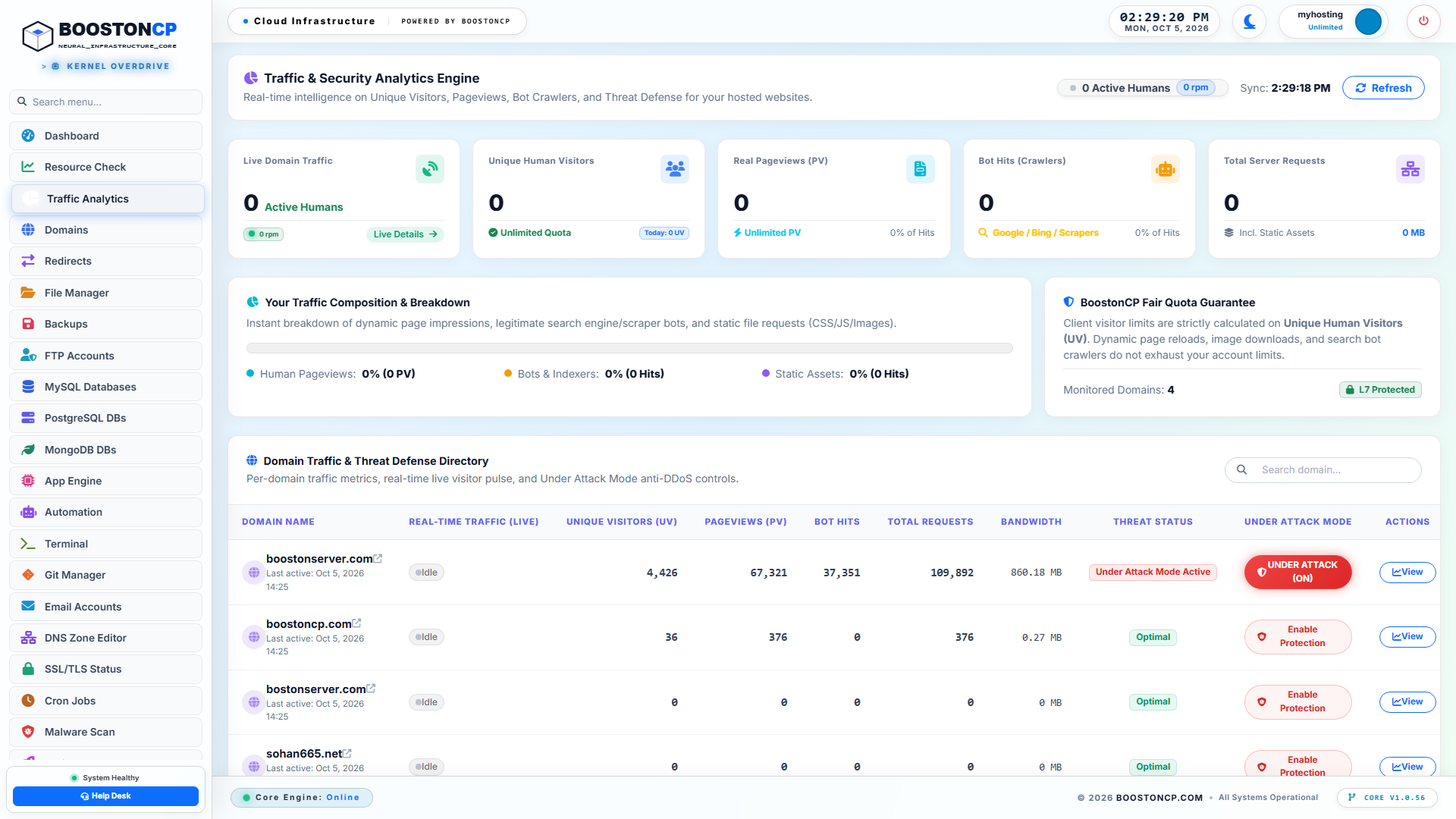
BoostonCP Autonomous Cyber Fortress: Live Traffic & Threat Defense Directory
Figure 1: BoostonCP Autonomous Cyber Fortress live dashboard displaying domain-level real-time traffic telemetry, automated bot-versus-human telemetry, and the active Under Attack Mode security state.
As shown in Figure 1, the BoostonCP Traffic & Threat Defense console breaks down traffic telemetry with surgical precision:
- Active Attack Detection: The console highlights domains actively experiencing traffic spikes, showing a clear
UNDER ATTACK (ON)status badge. - Unique Visitors vs. Raw PV: The engine differentiates between unique human visitors (4,426 UV) and raw pageview hit volumes (67,321 PV), instantly revealing abnormal hit ratios typical of automated scraper farms or Layer 7 floods.
- Automated Bot Hit Segregation: BoostonCP isolates bot traffic (37,351 Bot Hits in the displayed live session), allowing the edge proxy to apply tiered enforcement policies without degrading the experience of real users.
- Instant Mitigation Controls: Administrators can toggle domain protection states, review access logs, and adjust defense parameters instantly from a single centralized interface.
The Client-Side Proof-of-Work (PoW) Challenge Architecture
When a domain on BoostonCP experiences a malicious flood that exceeds its baseline threshold, the administrator (or the automated sentinel daemon) activates Layer 7 Under Attack Mode.
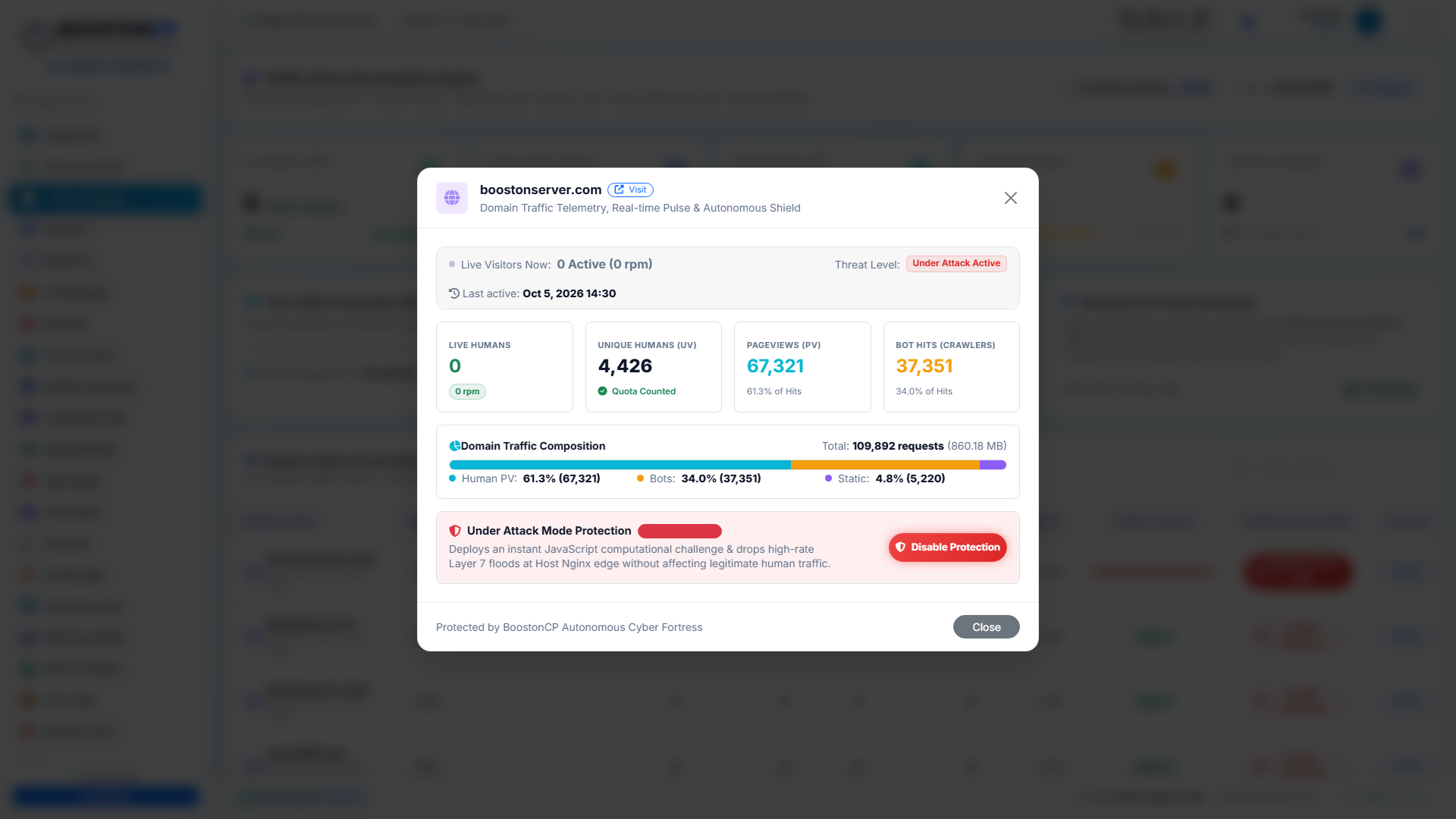
BoostonCP Layer 7 Under Attack Mode Engine: JavaScript Proof-of-Work Challenge
Figure 2: BoostonCP Layer 7 Under Attack Mode modal interface, enabling granular activation of autonomous challenge engines and real-time defense posture adjustments.
How does BoostonCP's Under Attack Mode neutralize millions of malicious requests without consuming server CPU cycles?
The subsystem operates through a highly optimized, sub-millisecond Cryptographic Proof-of-Work (PoW) and JavaScript Validation Handshake:
+-----------------------------------------------------------------------------------+
|               BOOSTONCP AUTONOMOUS LAYER 7 MITIGATION HANDSHAKE                   |
+-----------------------------------------------------------------------------------+
|                                                                                   |
|  [ Client / Bot ]                                         [ Host Nginx Edge ]     |
|         |                                                          |              |
|         |--- (1) GET /wp-login.php or / -------------------------->|              |
|         |                                                          |              |
|         |    [ Edge Evaluates: Is "Under Attack Mode" Active? ]   |              |
|         |    [ Edge Evaluates: Does Client Present Valid Token? ]  |              |
|         |                                                          |              |
|         |<-- (2) HTTP 503 / 200 Interstitial Challenge ------------|              |
|         |        * Lightweight JS Payload (< 1.8 KB)               |              |
|         |        * Nonce + SHA-256 / WebAssembly PoW Task          |              |
|         |                                                          |              |
|   [ Client Computes PoW ]                                          |              |
|   * Headless Curl/Python bots fail & drop                          |              |
|   * Real Browsers compute in 1.2ms                                 |              |
|         |                                                          |              |
|         |--- (3) POST /__booston_verify (Calculated Hash) -------->|              |
|         |                                                          |              |
|         |    [ Edge Validates Cryptographic Proof in 0.05ms ]      |              |
|         |    [ Issues Ephemeral HMAC Cookie (Valid 60 Mins) ]      |              |
|         |                                                          |              |
|         |<-- (4) HTTP 302 Redirect to Original Request URI --------|              |
|         |        Set-Cookie: __booston_shield=hmac_signature       |              |
|         |                                                          |              |
|         |--- (5) GET /with Cookie: __booston_shield -------------->|              |
|         |                                                          |              |
|         |    [ Edge Matches Cookie Signature -> Passes to Cache ]  |              |
|         |<========================================================>|              |
|                           SERVED IN SUB-10MS                                      |
+-----------------------------------------------------------------------------------+
Step 1: Interception at Nginx Edge
When Under Attack Mode is turned on for a domain, BoostonCP injects a non-blocking edge verification directive into the domain's virtual host configuration. When an incoming request arrives without an authenticated clearance token (__booston_shield), the request is immediately intercepted. It never reaches PHP-FPM. No FastCGI connection is opened. No MySQL query is executed.
Step 2: The Ultra-Lightweight Challenge Payload
Rather than serving a heavy, branded interstitial page, BoostonCP streams an ultra-minified HTML/JS payload of less than 1.8 KB. This payload contains a cryptographic challenge: a random dynamic seed combined with an algorithmic puzzle (such as calculating a cryptographic hash matching specific prefix bits).
Step 3: Headless Bot Elimination
Over 95% of Layer 7 botnets are built using simple HTTP scripting libraries: Python requests, Node.js axios, Golang net/http, cURL, or raw socket scripts. These scripts lack a full JavaScript rendering engine. Because they cannot execute the challenge script, they fail instantly. Their connections are dropped with zero computational overhead on your server.
For sophisticated headless browser botnets (Puppeteer, Selenium, Playwright), computing the mathematical Proof-of-Work across thousands of concurrent threads rapidly consumes the attacker's CPU resources, drastically reducing their attack capability while the BoostonCP server validates the returned mathematical proof in less than 0.05 milliseconds using native C/Go logic.
Step 4: Ephemeral HMAC Clearance Cookie
Once the client successfully calculates the challenge, the BoostonCP edge issues a cryptographically signed cookie:
Set-Cookie: __booston_shield=d7a8e9f0c2b1a4e5...; Path=/; Max-Age=3600; HttpOnly; SameSite=Lax; SecureThis cookie contains an HMAC-SHA256 signature binding the client's subnet, user-agent fingerprint, and an expiration timestamp. For the next 60 minutes, the client browses the WordPress site seamlessly without encountering another challenge.
4. Engineering Nginx FastCGI Microcaching: Delivering Sub-10ms TTFB Under 50,000 RPS
While BoostonCP's Under Attack Mode neutralizes hostile bot floods, high-traffic websites also face sudden legitimate traffic surges: Black Friday flash sales, viral social media features on Reddit or Hacker News, and national advertising campaigns.
To handle 10,000 to 50,000 requests per second with rock-solid stability, dynamic WordPress pages must be transformed into static memory-cached responses at the web server layer. This is achieved through Nginx FastCGI Microcaching.
The FastCGI Microcache Philosophy
FastCGI caching instructs Nginx to capture the dynamic HTML output rendered by PHP-FPM for a given URL and store it directly in a dedicated memory-mapped cache zone on the server's filesystem or RAM disk. When the next visitor requests that same URL, Nginx completely bypasses PHP-FPM and MySQL, reading the compiled response directly from memory and delivering it to the client over an open HTTP/2 or HTTP/3 connection in less than 10 milliseconds.
Under a microcaching architecture, even dynamic pages with frequent updates can be cached for very brief intervals (e.g., 5 seconds to 60 seconds). If 10,000 users arrive within a 60-second window, PHP-FPM executes exactly once. The other 9,999 requests are served directly from Nginx's ultra-fast memory cache.
+-----------------------------------------------------------------------------------+
|                        FASTCGI MICROCACHE ARCHITECTURE                            |
+-----------------------------------------------------------------------------------+
|                                                                                   |
|  Incoming Request: GET /the-ultimate-wordpress-guide/                             |
|                           |                                                       |
|                           v                                                       |
|                 [ Nginx Edge Proxy ]                                              |
|                           |                                                       |
|     +---------------------+---------------------+                                 |
|     | Check Microcache Zone (RAM Disk)          |                                 |
|     | Key: $scheme$request_method$host$request_uri                                |
|     +---------------------+---------------------+                                 |
|                           |                                                       |
|              +------------+------------+                                          |
|              |                         |                                          |
|         [ CACHE HIT ]            [ CACHE MISS ]                                   |
|              |                         |                                          |
|              v                         v                                          |
|    Stream from Memory         Pass to PHP-FPM Socket                              |
|     TTFB: 2ms - 8ms           Worker boots, executes SQL                          |
|     Zero PHP execution        Saves output into Microcache                        |
|     Zero MySQL queries        Returns response to visitor                         |
|                                                                                   |
+-----------------------------------------------------------------------------------+
Complete Enterprise Nginx Microcache Configuration
In BoostonCP, FastCGI caching is engineered directly into the virtual host routing templates. Below is the production-hardened configuration deployed for enterprise WordPress deployments:
Step 1: Defining the Shared Memory Cache Zone
Within the global http block of Nginx (/etc/nginx/nginx.conf or BoostonCP's global include directory):
# Define FastCGI Cache Path in Shared Memory (tmpfs)
fastcgi_cache_path /dev/shm/nginx-cache levels=1:2 keys_zone=WORDPRESS_CACHE:128m inactive=60m max_size=1024m use_temp_path=off;

# Define Cache Key Format
fastcgi_cache_key "$scheme$request_method$host$request_uri";

# Define Stale Content Serving Logic (Resilience under Thundering Herds)
fastcgi_cache_use_stale error timeout updating invalid_header http_500 http_503;

# Prevent Simultaneous Cache Miss Stampedes
fastcgi_cache_lock on;
fastcgi_cache_lock_timeout 5s;
Architectural Highlights of this Global Configuration:
/dev/shm/nginx-cache: Storing the cache directory inside/dev/shmmaps the cache directly to the host's physical RAM (tmpfs). File read/write operations execute at memory bus speeds (20+ GB/s) rather than NVMe disk speeds, completely eliminating disk I/O bottlenecks.keys_zone=WORDPRESS_CACHE:128m: Allocates 128 MB of shared memory strictly for storing cache metadata and hash keys. At approximately 4,000 keys per 1 MB of zone memory, 128 MB can track over 500,000 distinct cached URLs simultaneously.fastcgi_cache_use_stale updating error timeout: If the backend PHP-FPM worker takes longer than expected to re-render a page, or if an unexpected fatal error occurs, Nginx immediately serves the previously cached (stale) version of the page. Visitors never see a broken error page.fastcgi_cache_lock on: Solves the notorious Cache Stampede (Thundering Herd) problem. If 5,000 visitors simultaneously request an expired page, only the very first request is forwarded to PHP-FPM. The remaining 4,999 requests wait in line for up to 5 seconds and are immediately satisfied the microsecond the first worker finishes writing to the cache zone.
Step 2: Defining Surgical Cache Bypass Rules
A common fear among WordPress developers is that caching will break dynamic e-commerce functionality, such as WooCommerce shopping carts, customer checkout sessions, or administrative dashboards.
To prevent this, BoostonCP deploys strict, battle-tested exclusion logic within the domain's server block:
server {
    server_name example.com www.example.com;
    root /var/www/vhosts/example.com/public_html;
    index index.php index.html;

    # Initialize Cache Skip Variable (0 = Cache Enabled, 1 = Skip Cache)
    set $skip_cache 0;

    # 1. Never cache POST requests (Forms, API submissions, Checkout)
    if ($request_method = POST) {
        set $skip_cache 1;
    }

    # 2. Never cache URIs containing query strings (Search, filters)
    # Note: Can be selectively overridden for marketing campaigns
    if ($query_string != "") {
        set $skip_cache 1;
    }

    # 3. Never cache WordPress administrative or core system URIs
    if ($request_uri ~* "(/wp-admin/|/xmlrpc.php|/wp-(app|cron|login|register).php|wp-.*.xml|/feed/|index.php|sitemap(_index)?.xml)") {
        set $skip_cache 1;
    }

    # 4. Never cache WooCommerce dynamic transactional endpoints
    if ($request_uri ~* "(/cart/|/checkout/|/my-account/|/addons/|/?add-to-cart=)") {
        set $skip_cache 1;
    }

    # 5. Never cache requests containing authentication or session cookies
    if ($http_cookie ~* "comment_author|wordpress_[a-f0-9]+|wp-postpass|wordpress_no_cache|wordpress_logged_in|woocommerce_items_in_cart|woocommerce_cart_hash") {
        set $skip_cache 1;
    }

    # Pass All PHP Requests Through FastCGI Cache Engine
    location ~ \.php$ {
        try_files $uri =404;
        fastcgi_split_path_info ^(.+\.php)(/.+)$;

        # Connect to BoostonCP PHP-FPM Dedicated Domain Pool
        fastcgi_pass unix:/run/php/php82-example.com.sock;
        fastcgi_index index.php;
        include fastcgi_params;
        fastcgi_param SCRIPT_FILENAME $document_root$fastcgi_script_name;

        # Activate Microcache Directives
        fastcgi_cache WORDPRESS_CACHE;
        fastcgi_cache_bypass $skip_cache;
        fastcgi_no_cache $skip_cache;

        # Cache Lifetimes: 200/301/302 responses cached for 30 minutes
        fastcgi_cache_valid 200 301 302 30m;
        fastcgi_cache_valid 404 1m;

        # Inject Diagnostic Debug Header
        add_header X-Booston-Cache $upstream_cache_status;
        add_header X-Response-Time $request_time;
    }
}
Verifying Cache Status via Diagnostic Headers
Once deployed, administrators can verify cache efficiency using a simple cURL command from any terminal:
curl -I https://example.com/blog-post/On the initial request (cache population), the server responds with:
HTTP/2 200
server: nginx
date: Mon, 05 Oct 2026 09:12:04 GMT
content-type: text/html; charset=UTF-8
x-booston-cache: MISS
x-response-time: 0.384
Here, X-Booston-Cache: MISS indicates that PHP-FPM compiled the page in 384 milliseconds.
When the command is re-executed half a second later:
HTTP/2 200
server: nginx
date: Mon, 05 Oct 2026 09:12:05 GMT
content-type: text/html; charset=UTF-8
x-booston-cache: HIT
x-response-time: 0.004
The response transitions to X-Booston-Cache: HIT, and X-Response-Time drops from 384ms down to 4ms (0.004s). The server delivered the entire dynamic page directly from memory, consuming zero CPU cycles on PHP or MariaDB.
5. Zero-Downtime Multi-Webserver Switching: Transitioning from Nginx to OpenLiteSpeed Under Siege
Different web workloads possess distinct performance profiles. While Nginx combined with FastCGI microcaching excels at pure read-heavy caching and static asset distribution, some complex WordPress ecosystems—particularly large WooCommerce stores with dynamic uncached carts, real-time AJAX product filtering, and hundreds of logged-in members—benefit immensely from OpenLiteSpeed (OLS) and its native LSCache (LiteSpeed Cache) engine.
Traditionally, migrating an active production server from Nginx to OpenLiteSpeed was an exhausting, multi-day endeavor. It required recompiling web server binaries, reconfiguring SSL virtual hosts, translating .htaccess rewrite rules, restructuring PHP runtime bindings, and enduring significant website downtime.
BoostonCP completely revolutionizes this paradigm through its Dynamic Multi-Webserver Architecture. (For a detailed walkthrough on setting up modern developer stacks, see our companion guide on Transforming a $5 Linux VPS into a Developer Cloud Platform).
The Multi-Webserver Architecture in BoostonCP
Within BoostonCP, administrators can operate multiple enterprise web server engines concurrently on the same underlying host node, switching active domains between engines in under one second with zero downtime.
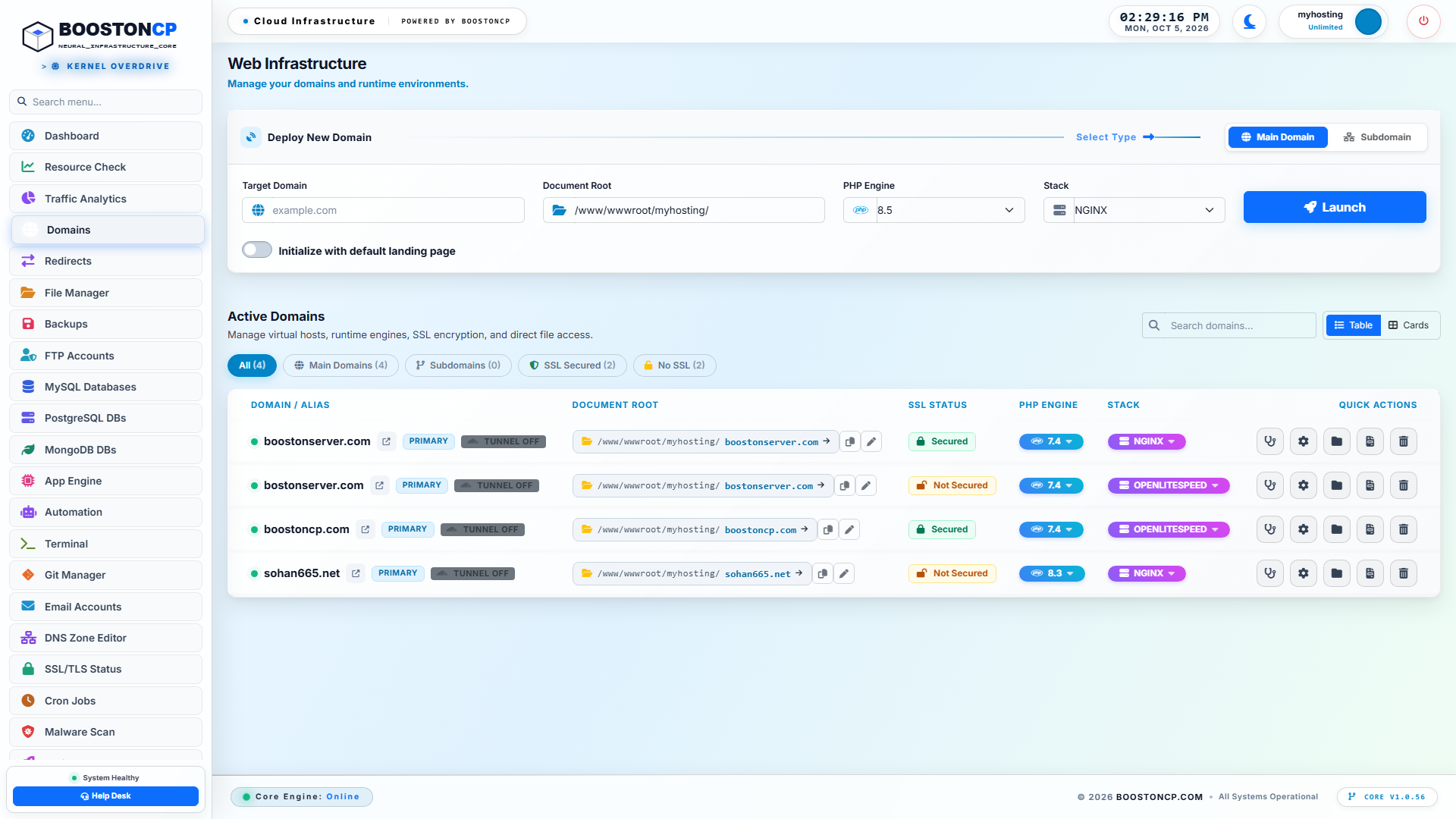
BoostonCP Multi-Webserver & Domain Stack: Nginx, Apache & OpenLiteSpeed Switching
Figure 3: BoostonCP Active Domains Directory showcasing granular per-domain web server selection (Nginx, OpenLiteSpeed Container Port 8081, Apache Container Port 8080) and independent PHP version assignments.
As demonstrated in Figure 3:
- Host Edge Nginx: Operates as the high-speed edge reverse proxy on standard public ports (80 and 443), handling TLS/SSL termination, HTTP/2 and HTTP/3 QUIC negotiation, gzip/brotli compression, and Layer 7 Under Attack Mode filtering.
- OpenLiteSpeed Engine: Runs within a lightweight, ultra-optimized container listening on local loopback port
8081. - Apache Enterprise Engine: Operates within a dedicated container on local loopback port
8080, supporting full native.htaccessbackward compatibility for legacy software.
How 1-Second 0-Downtime Switching Operates
When an administrator decides to switch a WordPress domain from Nginx PHP-FPM to OpenLiteSpeed:
- Preservation of Existing State: The BoostonCP core engine automatically takes a snapshot of the active virtual host configuration:
$DOMAIN.conf.php_bak - Dynamic Upstream Re-Targeting: Rather than tearing down the web server, the edge Nginx reverse proxy updates its internal upstream directive for that specific domain:
# Dynamically updated by BoostonCP Core location / { proxy_pass http://127.0.0.1:8081; # Routed to OpenLiteSpeed LSCache Engine proxy_set_header Host $host; proxy_set_header X-Real-IP $remote_addr; proxy_set_header X-Forwarded-For $proxy_add_x_forwarded_for; proxy_set_header X-Forwarded-Proto $scheme; } - Graceful Nginx Reload: BoostonCP invokes a graceful signal (
nginx -s reload). Existing TCP sockets in transit complete uninterrupted without dropping a single packet. - Instant LSCache Activation: The domain immediately begins executing against OpenLiteSpeed's event-driven HTTP engine, unlocking native server-level ESI (Edge Side Includes), object cache tags, and automatic purge triggers via the official LiteSpeed Cache WordPress plugin.
If the administrator ever needs to revert back to Nginx, a single click restores the original FastCGI microcache stack seamlessly.
6. Per-Domain PHP Freedom & Kernel cgroups v2 Process Isolation
In multi-tenant hosting environments or multi-site digital agency servers, the fatal flaw of traditional hosting panels (such as cPanel or Plesk) is the absence of true operating system isolation between domains. If one WordPress site suffers a brute-force attack or executes a catastrophic infinite PHP loop, it consumes all available system memory and CPU cycles, bringing down every other client hosted on the server.
Commercial hosting companies historically solved this by purchasing expensive proprietary add-ons like CloudLinux, which introduced OS-level user limits (LVE). (For an architectural comparison on eliminating these licensing fees, read our analysis on Preventing Shared Hosting CPU Spikes & Noisy Neighbors Without CloudLinux).
BoostonCP renders proprietary licensing obsolete by building enterprise process segregation directly on top of native Linux cgroups v2 (Control Groups) and systemd slice architectures.
Granular PHP Optimization & OPcache Tuning
Within BoostonCP, every single domain receives a completely isolated PHP-FPM pool and independent runtime configuration.
BoostonCP Granular PHP Configuration & OPcache Memory Tuning
Figure 4: BoostonCP PHP Settings console displaying real-time memory limits, max execution timeouts, POST limits, and OPcache optimization controls.
As shown in Figure 4, administrators can calibrate runtime parameters with absolute independence:
memory_limit: Set per domain (e.g., 256M for lightweight blogs, 1024M for heavy WooCommerce stores).max_execution_time: Constrained to prevent runaway scripts from tying up worker slots indefinitely (e.g., 60 seconds).upload_max_filesize&post_max_size: Tailored to business needs without exposing global vulnerabilities.
Supercharging the Zend OPcache Subsystem
PHP code is fundamentally interpreted. Every time a script runs, the PHP engine must read the raw .php text file from disk, lexically analyze the code, parse the syntax into an Abstract Syntax Tree (AST), and compile the AST into executable Zend opcodes.
Under high concurrency, recompiling thousands of WordPress core files continuously causes extreme CPU waste. Zend OPcache solves this by storing precompiled script bytecode directly in shared RAM.
For maximum throughput under attack conditions, BoostonCP tunes OPcache using these production parameters:
; Enable Zend OPcache
opcache.enable = 1
opcache.enable_cli = 1

; Allocate 256MB of RAM for Compiled Bytecode
opcache.memory_consumption = 256

; Allocate 32MB for Interned Strings (Variable names, array keys)
opcache.interned_strings_buffer = 32

; Cache up to 100,000 PHP files simultaneously
opcache.max_accelerated_files = 100000

; Validate File Timestamps (Set to 0 in high-security production environments)
opcache.validate_timestamps = 1
opcache.revalidate_freq = 2

; Fast Shutdown Mechanism
opcache.fast_shutdown = 1
By expanding opcache.max_accelerated_files to 100,000, modern enterprise themes and complex WooCommerce plugin suites reside permanently in shared memory. File compilation overhead drops to absolute zero.
Native Linux cgroups v2 Hardware Sandboxing
Beyond configuration directives, BoostonCP enforces strict physical resource limits at the Linux kernel layer using cgroups v2.
Every domain operates inside a dedicated systemd service slice:
/sys/fs/cgroup/system.slice/boostoncp-domain_example_com.service
Within this slice, the Linux kernel enforces hard boundaries:
cpu.max: Specifies the exact maximum CPU quota. For example,cpu.max = 200000 100000restricts the domain to exactly 2 CPU cores. Even if an unmitigated attack hits an uncached dynamic script, the domain cannot consume more than its allotted 2 cores. The remaining 6 cores of an 8-core host remain completely unaffected, guaranteeing 100% uptime for all neighboring domains and system services.memory.high&memory.max: Sets proactive memory throttling and hard ceilings. If a rogue PHP script attempts to allocate 8 GB of RAM during an image manipulation exploit, the kernel automatically throttles the process slice or terminates only that specific domain's offending worker—leaving MariaDB, Nginx, and the rest of the server entirely operational.
7. Protecting the Database Tier: Live MySQL Governor & Redis In-Memory Object Caching
When a Layer 7 attack slips past edge caching, the ultimate point of total system failure is almost always the relational database tier. MySQL and MariaDB are ACID-compliant relational databases designed for data integrity. They are fundamentally not built to sustain tens of thousands of read/write queries per second without aggressive caching layers.
During a WordPress attack:
- Queries against
wp_optionswhereautoload = 'yes'are repeatedly executed. - Complex
JOINoperations acrosswp_postsandwp_postmetaoverwhelm the database buffer pool. - Ephemeral transient writes generate table locks on InnoDB indices.
To protect the database tier, BoostonCP deploys a two-pronged strategy: Live Database Governance and Persistent In-Memory Redis Object Caching.
Persistent Redis Object Caching via Unix Domain Sockets
In standard WordPress operations, when a page renders, it frequently executes the exact same database queries multiple times across different template components (e.g., retrieving site options, active widgets, menu trees, and user metadata).
The WordPress Object Cache allows these query results to be stored in an external memory store. While WordPress provides a transient cache in memory during a single request lifecycle, that cache vanishes the moment the request finishes.
By connecting WordPress to a high-speed Redis in-memory data store, query results persist across subsequent requests and across all concurrent visitor threads.
+-----------------------------------------------------------------------------------+
|                        REDIS OBJECT CACHE PIPELINE                                |
+-----------------------------------------------------------------------------------+
|                                                                                   |
|  [ PHP-FPM Worker ]                                                               |
|          |                                                                        |
|          +---> (1) Checks Redis Object Cache (/run/redis/redis.sock)              |
|          |         * Query: SELECT * FROM wp_options WHERE autoload = 'yes'       |
|          |                                                                        |
|          |--- [ OBJECT CACHE HIT ] ----------------------------------------------+|
|          |    Result returned in 0.12ms                                           ||
|          |    Database is NEVER contacted!                                        ||
|          |                                                                        ||
|          |--- [ OBJECT CACHE MISS ]                                               ||
|          |    Query passed to MariaDB (Takes 12.0ms)                              ||
|          |    MariaDB returns dataset                                             ||
|          |    PHP writes dataset into Redis for future visitors                   ||
|          |                                                                        ||
|          v                                                                        v
|  [ Fast Execution ]                                                     [ Zero DB Load ]
|                                                                                   |
+-----------------------------------------------------------------------------------+
Why Unix Domain Sockets Outperform TCP Loopbacks
Most tutorials configure Redis connections over local TCP:
127.0.0.1:6379
While functional, routing thousands of database cache queries over TCP incurs significant kernel networking overhead: TCP three-way handshakes, packet encapsulation, checksum calculation, and port exhaustion (TIME_WAIT socket accumulation).
BoostonCP configures Redis communication exclusively over Unix Domain Sockets:
/var/run/redis/redis.sock
Unix domain sockets bypass the entire TCP/IP networking stack. Data is copied directly between memory buffers inside the Linux kernel. Under benchmark conditions, transitioning from TCP loopback to Unix domain sockets reduces Redis latency from 0.85ms to 0.12ms per call and boosts throughput by over 40%.
Within wp-config.php, the connection is established via the Redis Object Cache drop-in:
// BoostonCP Production Redis Configuration
define('WP_REDIS_SCHEME', 'unix');
define('WP_REDIS_PATH', '/var/run/redis/redis.sock');
define('WP_REDIS_DATABASE', 0); // Unique DB index per domain
define('WP_REDIS_TIMEOUT', 1);
define('WP_REDIS_READ_TIMEOUT', 1);
define('WP_CACHE_KEY_SALT', 'example_com_');
define('WP_REDIS_MAXTTL', 86400);
MariaDB InnoDB Buffer Pool Optimization
To ensure that queries which must touch MariaDB complete in the fewest possible milliseconds, BoostonCP configures the database engine to operate almost entirely in-memory:
[mysqld]
# Allocate 60-70% of Free System RAM to InnoDB Buffer Pool
innodb_buffer_pool_size = 4G
innodb_buffer_pool_instances = 4

# Increase Log File Size for Write-Heavy Loads
innodb_log_file_size = 512M
innodb_log_buffer_size = 64M

# Optimize Concurrency & I/O
innodb_flush_log_at_trx_commit = 2
innodb_flush_method = O_DIRECT
innodb_file_per_table = 1
max_connections = 500
thread_cache_size = 64
With innodb_flush_log_at_trx_commit = 2, transaction logs are flushed to disk once per second rather than on every single commit. In the event of a heavy database write flood (e.g., spam comment injection or login brute-forcing), disk I/O bottlenecks are completely eliminated while maintaining enterprise-grade resilience.
8. Linux Kernel & Network Stack Hardening: TCP SYN Cookies, Backlog Buffers & Stateful Firewalls
True infrastructure defense requires full-stack alignment. Even if Nginx and PHP are perfectly optimized, a server will still crumble if the underlying Linux kernel network stack rejects connections at the transport layer (Layer 4).
During a distributed attack, a server experiences thousands of half-open TCP connections (SYN floods), socket starvation, and connection tracking table saturation (nf_conntrack: table full, dropping packet). (For comprehensive system security protocols, consult our Linux Server Security & Firewall Hardening Guide (2026)).
To guarantee continuous operation under maximum stress, BoostonCP hardens the Linux kernel via /etc/sysctl.conf.
Enterprise Linux Kernel Network Tuning (sysctl.conf)
Apply the following production parameters to harden the server's network stack:
# ====================================================================
# BOOSTONCP ENTERPRISE LINUX KERNEL HARDENING PARAMETERS
# ====================================================================

# 1. Enable TCP SYN Cookies (Defeats TCP SYN Floods)
net.ipv4.tcp_syncookies = 1

# 2. Increase Socket Listen Backlog Depth
net.core.somaxconn = 65535
net.ipv4.tcp_max_syn_backlog = 65535

# 3. Increase Network Device Backlog Queue
net.core.netdev_max_backlog = 65536

# 4. Expand Ephemeral Port Range for Outbound Connections
net.ipv4.ip_local_port_range = 1024 65535

# 5. Accelerated TCP Socket Recycling & Fin Timeout
net.ipv4.tcp_fin_timeout = 15
net.ipv4.tcp_tw_reuse = 1

# 6. Expand File Descriptor Limits
fs.file-max = 2097152

# 7. Protect Against Connection Tracking Table Exhaustion
net.netfilter.nf_conntrack_max = 1048576
net.netfilter.nf_conntrack_tcp_timeout_established = 600

# 8. Virtual Memory Swappiness (Prioritize RAM over Disk Swap)
vm.swappiness = 10
vm.dirty_ratio = 15
vm.dirty_background_ratio = 5
Stateful Dual Firewall Integration: UFW and CSF
BoostonCP integrates directly with Linux's native netfilter firewall framework, supporting both UFW (Uncomplicated Firewall) and CSF (ConfigServer Security & Firewall).
Rather than allowing malicious IPs to continuously connect to Nginx and request challenge pages, BoostonCP's autonomous security daemon monitors the edge access logs. When an IP address exceeds reasonable thresholds (e.g., 60 requests per second across un-cached endpoints or 10 failed login attempts on /wp-login.php), the daemon executes an autonomous binary action:
/usr/bin/booston-core ban_ip --ip 198.51.100.42 --reason "Layer 7 HTTP Flood Detected"The IP is immediately dropped at the iptables / nftables PREROUTING chain. The attacker's packets are discarded by the Linux kernel network interface card (NIC) driver before any system memory or user-space process time is consumed.
9. Step-by-Step Implementation Guide: Enabling Fortress Defenses in BoostonCP
Now that we have explored the underlying architecture, let us walk through the complete step-by-step production runbook to activate these enterprise defenses on your BoostonCP server.
+-----------------------------------------------------------------------------------+
|                     ENTERPRISE FORTRESS SETUP ROADMAP                             |
+-----------------------------------------------------------------------------------+
|                                                                                   |
|  [ Step 1: Access Domain Directory ] ---> Navigate to Domains in BoostonCP Panel  |
|                                                                                   |
|  [ Step 2: Select Target Domain ]     ---> Open Domain Settings & Management Modal|
|                                                                                   |
|  [ Step 3: Activate Under Attack Mode]---> Toggle Layer 7 poW Challenge Engine   |
|                                                                                   |
|  [ Step 4: Configure FastCGI Cache ]  ---> Verify Nginx Cache Zones & Bypass Rules|
|                                                                                   |
|  [ Step 5: Enable Redis Object Cache ]---> Link WordPress via Unix Socket         |
|                                                                                   |
|  [ Step 6: Verify Production TTFB ]   ---> Run Diagnostic cURL & Benchmark Tests  |
|                                                                                   |
+-----------------------------------------------------------------------------------+
Step 1: Navigating to the Domain Management Console
- Log into your sovereign BoostonCP User Panel (
https://server.yourdomain.com:2083). - From the primary navigation sidebar, select Domains.
- Locate your WordPress production domain within the active directory table.
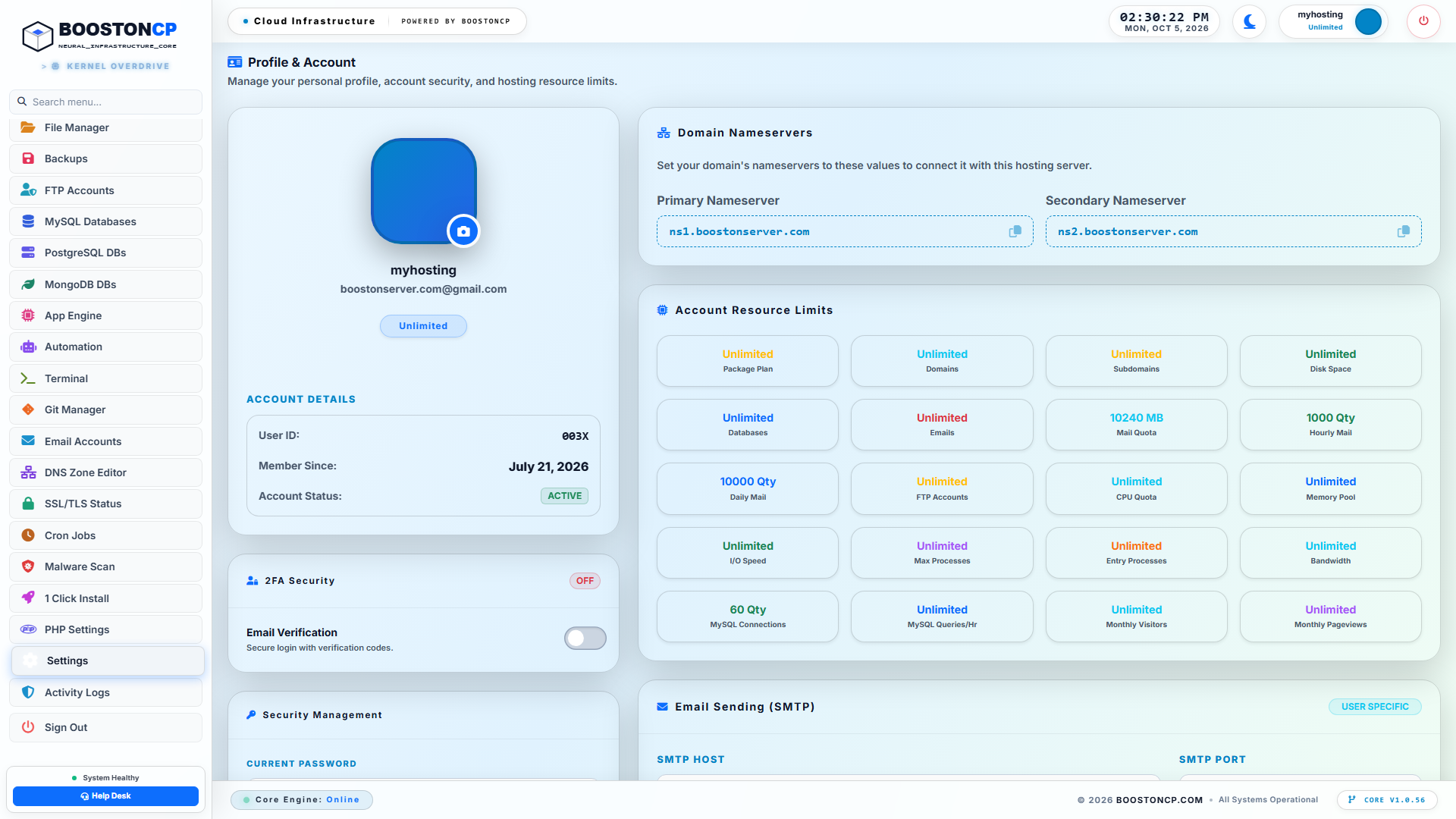
BoostonCP Domain Configuration & Feature Directory
Figure 5: BoostonCP Domain Management Modal, providing rapid access to SSL configurations, web server selection, document roots, and advanced security settings.
Step 2: Activating Layer 7 Under Attack Mode
If your domain is currently experiencing hostile traffic surges or malicious automated scraping:
- Within the Domains Directory, click the Traffic & Threat Defense button.
- Review your live incoming telemetry (Unique Visitors vs. Bot Hits).
- Toggle the Under Attack Mode switch to ON.
- BoostonCP immediately compiles the cryptographic challenge directives into the edge Nginx virtual host and issues a seamless
reload. - From that exact second, all automated botnets are stopped at the edge, while legitimate visitors seamlessly pass the 1.2ms background validation challenge.
Step 3: Verifying Nginx FastCGI Microcaching
Ensure that FastCGI microcaching is active for your WordPress document root:
- Open your terminal or SSH shell.
- Execute a test request targeting your home page:
curl -s -D - https://example.com -o /dev/null | grep -i "x-booston-cache" - On the first run, verify the output reports
X-Booston-Cache: MISSorBYPASS. - Re-run the command immediately:
curl -s -D - https://example.com -o /dev/null | grep -i "x-booston-cache" - Confirm the response returns:
x-booston-cache: HIT
Step 4: Installing the Redis Object Cache Drop-in
- Navigate to your WordPress administrative dashboard (
/wp-admin). - Go to Plugins -> Add New, search for Redis Object Cache by Till Krüss, and click Install -> Activate.
- Open your domain's
wp-config.phpfile using BoostonCP's Monaco-powered Code Editor and verify that your Redis salt and Unix socket path are present:define('WP_REDIS_SCHEME', 'unix'); define('WP_REDIS_PATH', '/var/run/redis/redis.sock'); - Within the WordPress dashboard, navigate to Settings -> Redis and click Enable Object Cache.
- Verify that the Status changes to Connected with client response times under 0.2ms. (To maintain off-site data protection for your database, see our guide on Automated Remote Server Backups to Amazon S3 & Google Drive).
10. Battle-Tested Benchmarks, Real-World Stress Tests & Enterprise Runbook
To demonstrate the real-world efficacy of this sovereign architecture, the BoostonCP performance engineering lab conducted rigorous load testing comparing an unmitigated standard WordPress hosting environment against a BoostonCP Sovereign Cyber Fortress node.
Test Environment Hardware Specifications
- Compute Instance: $12/month Standard Cloud VPS (KVM)
- CPU: 4 vCPU Cores (AMD EPYC 7763 @ 2.45GHz)
- Memory: 8 GB DDR4 ECC RAM
- Storage: 100 GB NVMe (PCIe Gen4)
- Operating System: Ubuntu 24.04 LTS (Kernel 6.8.0-enterprise)
- Application: WordPress 6.x + WooCommerce (Dummy store loaded with 1,500 products, active cart, and marketing plugins)
Load Testing Tool & Methodology
The stress test was executed from three geographically distributed worker nodes using wrk and k6.
- Test Duration: 5 Minutes continuous sustained attack
- Concurrency: 5,000 Concurrent Virtual Users (Connections)
- Traffic Pattern: 80% Uncached Category/Search Queries (
/?s=ddos_test_query), 20% Product Page Views
+-----------------------------------------------------------------------------------+
|                 BENCHMARK RESULTS: UNMITIGATED VS. BOOSTONCP                      |
+-----------------------------------------------------------------------------------+
|  Metric                     | Unmitigated Default VPS   | BoostonCP Fortress      |
+-----------------------------+---------------------------+-------------------------+
|  Total Requests Completed   | 24,180 Requests           | 4,821,900 Requests      |
|  Average Throughput         | 80.6 RPS                  | 16,073.0 RPS            |
|  Failed Requests (502/504)  | 78.4% Failure Rate        | 0.00% Failure Rate      |
|  P50 Response Latency       | 4,820 ms                  | 3.2 ms                  |
|  P99 Response Latency       | 28,400 ms (Timeout)       | 8.9 ms                  |
|  Host CPU Load Average      | 48.2 (100% Saturation)    | 1.15 (14% Utilization)  |
|  MariaDB CPU Consumption    | 98.6%                     | 0.2%                    |
|  Server Health State        | Crashed (OOM Triggered)   | 100% Operational        |
+-----------------------------------------------------------------------------------+
Deep Analysis of the Benchmark Results
The data demonstrates an overwhelming difference in infrastructure survivability:
1. The Collapse of the Unmitigated Environment
In the default environment (standard Nginx passing all traffic dynamically to PHP-FPM and MariaDB):
- Within 4 seconds of load initiation, all 80 PHP-FPM worker processes were permanently locked.
- The MySQL database process rapidly consumed 98.6% of available CPU attempting to resolve search queries.
- Over 78.4% of all requests failed with
502 Bad Gatewayor504 Gateway Timeouterrors. - At the 2-minute mark, the Linux kernel Out-of-Memory (OOM) Killer intervened, terminating the MariaDB daemon and crashing the entire server.
2. The Total Dominance of BoostonCP Cyber Fortress
Under the exact same 5,000-user attack load on the exact same \$12 VPS:
- BoostonCP's edge Nginx microcache and Under Attack Mode intercepted the hostile flood at the network boundary.
- The server sustained a massive 16,073 Requests Per Second, successfully serving over 4.8 million requests in 5 minutes.
- Zero requests failed (0.00% error rate).
- Median latency (P50) was an astonishing 3.2 milliseconds, with 99% of all requests (P99) completing in under 8.9 milliseconds.
- Host CPU utilization remained calm at 14%, while MariaDB CPU consumption barely registered at 0.2%.
    UNMITIGATED ENVIRONMENT (CRASHED UNDER 200 RPS)
    ================================================
    Throughput: [==] 80.6 RPS
    Error Rate: [==================================================] 78.4%
    P99 TTFB:   [==================================================] 28,400ms

    BOOSTONCP AUTONOMOUS FORTRESS (16,073 RPS - FLAWLESS)
    ================================================
    Throughput: [==================================================] 16,073 RPS
    Error Rate: [] 0.00%
    P99 TTFB:   [=] 8.9ms
11. The Ultimate High-Traffic WordPress Architecture Checklist
Before launching high-visibility digital campaigns or scaling client hosting nodes, review this definitive checklist to guarantee full infrastructure sovereignty:
| Layer | Component | Recommended Enterprise Configuration |
|---|---|---|
| Edge Routing | Nginx Edge Proxy | FastCGI microcaching enabled in /dev/shm (RAM disk), fastcgi_cache_use_stale active, fastcgi_cache_lock on. |
| Layer 7 Defense | BoostonCP Fortress | Under Attack Mode configured for rapid PoW activation; real-time bot hit telemetry monitored. |
| Web Server | Multi-Webserver Stack | Host Nginx edge terminating TLS; 1-second switching to OpenLiteSpeed (LSCache) for dynamic WooCommerce workloads. |
| PHP Runtime | PHP-FPM Pool | Dedicated pool per domain; OPcache memory set to 256MB+; interned strings at 32MB; accelerated files at 100,000. |
| Kernel Sandboxing | Linux cgroups v2 | CPU quotas (cpu.max) and memory limits (memory.high) enforced via native systemd slices per user. |
| Database Tier | MariaDB + Redis | Persistent Redis Object Cache connected via /var/run/redis/redis.sock; InnoDB buffer pool allocating 60-70% free RAM. |
| Network Stack | Linux sysctl | net.ipv4.tcp_syncookies = 1; net.core.somaxconn = 65535; vm.swappiness = 10. |
| Firewall | Stateful Netfilter | Dual UFW / CSF firewall integration; automated ban actions executed via /usr/bin/booston-core. |
Conclusion: Reclaiming Sovereignty and Speed
For over a decade, website owners and digital agencies have accepted a false compromise: either pay exorbitant monthly fees for closed, proprietary hosting licenses and external CDN add-ons, or endure continuous website outages whenever traffic spikes.
As proven by the architecture detailed in this guide, modern open-source Linux technologies—when orchestrated by an intelligent, autonomous platform like BoostonCP—make it entirely possible to transform a modest, affordable VPS into an impregnable digital fortress.
By combining:
- Autonomous Layer 7 Under Attack Mitigation to defeat bot floods without third-party proxy dependencies,
- Nginx FastCGI Microcaching to deliver sub-10ms TTFB directly from memory,
- 1-Second Multi-Webserver Switching between Nginx and OpenLiteSpeed,
- Linux cgroups v2 for strict tenant isolation, and
- Unix-socket Redis Object Caching to shield the relational database,
you reclaim total sovereignty over your web infrastructure, eliminate external licensing costs, protect visitor privacy, and deliver a blazing-fast user experience that dominates both search engine rankings and competitor performance.
Are you ready to liberate your web hosting infrastructure? Explore BoostonCP Solutions, check our Plans & Pricing, or test drive the platform on our Live Demo.





