
Executive Technical Summary: Private Mail Sovereignty Without The SaaS Hostage Tax
In the modern digital economy, enterprise email communication has become an enormous operational tax on businesses, web agencies, and freelance developers. Big Tech SaaS providers like Google Workspace ($6 to $18/user/month) and Microsoft 365 ($6 to $22/user/month) turn a modest team of 50 mailboxes into an annual recurring expense of $3,600 to $10,800+ every single year. Over a 3-year span, businesses surrender up to $32,400 in subscription fees just to send basic transactional and corporate messages—all while their purchased cloud VPS hardware sits 90% idle.
Yet, attempting to host a self-hosted mail server on traditional Linux setups has historically been an agonizing ordeal plagued by three severe failure traps:
1. The Port 25 Hardware Blockade: Almost every major cloud hosting provider (Hetzner, DigitalOcean, AWS, Vultr, Linode) blocks outbound Port 25 by default to prevent spam, completely disabling traditional email sending without recourse.
2. The Spam Folder Trap: Even when a server has a clean, unblacklisted IPv4 address, emails land directly in Gmail and Outlook spam folders due to missing or broken SPF, 2048-bit OpenDKIM signatures, strict DMARC policies, Reverse DNS (PTR), and modern TLSv1.3 cryptographic ciphers.
3. Control Panel Script Bugs & RAM Bloat: Outdated open-source control panels run fragile email scripts, suffer Dovecot permission crashes, and package bloated webmail clients like Roundcube that require dedicated MySQL databases (consuming 150MB+ RAM and crashing under memory pressure).
Booston Control Panel (BCP) solves the private mail server crisis natively with BCP system hosting. By integrating an enterprise mail subsystem powered by Postfix, Dovecot (Maildir format), OpenDKIM, Stateless SnappyMail (0MB DB, 15MB RAM), and a 1-Click SMTP Relay Hub, BoostonCP enables anyone to run an unlimited, high-deliverability private mail server with a 10/10 mail-tester score—at zero licensing cost forever.
1. The Private Mail Server Hostage Crisis: Why SaaS Subscriptions Bleed Agency Margins
For web agencies and digital businesses managing client websites, email hosting is often the single most contentious line item in their budget. When an agency provisions a 4-core, 8GB RAM Linux VPS to host 25 client websites, that server possesses more than enough compute and storage capacity to handle hundreds of thousands of daily emails. Yet, because setting up self-hosted email on standard control panels is notoriously fragile, agencies feel forced to outsource their email to Google Workspace, Microsoft 365, or Zoho.
Consider the financial reality of this SaaS hostage tax across a 3-year operational window:
- Small Business (10 Users): At $6/user/month on Google Workspace Starter, the business pays $720/year or $2,160 over 3 years for basic 30GB mailboxes.
- Growing Digital Agency (50 Users across 10 client domains): At $12/user/month on Google Workspace Standard, the agency pays $7,200/year or $21,600 over 3 years.
- Mid-Size Enterprise (100 Users): At $18/user/month on Google Workspace Plus, the company pays $21,600/year or $64,800 over 3 years in pure operational software tax.
As documented in our Enterprise Email Infrastructure Guide and BoostonCP Platform Overview, hosting your own private mail server on BCP system hosting reclaims this capital, converting thousands of dollars in SaaS waste into 100% net profit for your business.
2. The 3 Great VPS Mail Traps & How BoostonCP Eliminates Them
Historically, system administrators who attempted to run self-hosted email on standard Linux VPS nodes encountered three fatal roadblocks. BoostonCP was engineered from the ground up to neutralize each of these obstacles natively:
Trap 1: Port 25 Hardware Blockade
The Problem: To prevent spam botnets, cloud VPS providers (Hetzner, DigitalOcean, Vultr, AWS) permanently block outbound TCP Port 25. Standard mail servers cannot deliver a single outbound email.
The BCP Fix: 1-Click SMTP Relay Hub. Route all outgoing mail through high-reputation transactional relays (Brevo, AWS SES, SendGrid, Mailgun) over secure Port 587/465 with automated SASL encryption. Incoming mail on Port 25 remains 100% active and free!
Trap 2: The Spam Folder Trap
The Problem: Even on a clean IP, emails get marked as spam because manual configuration of SPF, 2048-bit DKIM keys, and DMARC alignment is complex and prone to syntax errors.
The BCP Fix: Automated 10/10 Deliverability Fortress. BCP generates 2048-bit OpenDKIM keys, provisions RFC-compliant SPF records, binds DMARC policies, and issues Let's Encrypt TLS certificates automatically upon domain creation.
Trap 3: Database & Webmail Bloat
The Problem: Legacy panels bundle Roundcube webmail, which requires a persistent MySQL database. Database locks cause webmail crashes and consume 150MB+ RAM idle.
The BCP Fix: Stateless SnappyMail. Consumes 0MB MySQL database storage and just ~15MB RAM, offering a lightning-fast modern interface with end-to-end PGP encryption and S/MIME support.
3. The Core Mail Architecture: Postfix + Dovecot + OpenDKIM + SnappyMail
To achieve high throughput and cryptographic deliverability, BoostonCP deploys a battle-hardened mail daemon stack:
Let's examine how each component operates in harmony:
- Postfix (Mail Transfer Agent - MTA): Manages inbound and outbound SMTP queues, enforces connection rate limits, handles TLSv1.3 handshakes, and communicates with OpenDKIM milters for cryptographic message signing.
- Dovecot (Mail Delivery Agent & IMAP/POP3 Server): Stores emails using the high-performance Maildir format (where each email is an individual file, preventing mailbox corruption). Enforces SSL-encrypted IMAP (Port 993) and POP3 (Port 995) access.
- 2048-bit OpenDKIM Engine: Automatically generates cryptographically secure 2048-bit RSA keys per domain, signing outgoing MIME headers so major inbox providers (Google, Microsoft, Yahoo) verify message authenticity without spoofing warnings.
- Stateless SnappyMail Webmail: A sleek, modern webmail client built with lightweight PHP-FPM and JavaScript. Unlike legacy Roundcube, SnappyMail stores zero user credentials or session data in a MySQL database, eliminating database corruption risks and memory bloat.
4. Deep Dive into BoostonCP Email Manager: The 7 Enterprise Subsystems
In BoostonCP, email administration is centralized into a clean, 7-tab management interface designed to eliminate complexity while providing deep administrative telemetry:
Tab 1: Email Accounts & Native Autoresponders
Create and manage custom corporate email accounts (e.g. ceo@yourdomain.com) with granular mailbox storage quotas (MB, GB, or Unlimited). Every account features Direct Webmail Single Sign-On (SSO), allowing users to jump straight into SnappyMail with one click. Additionally, users can configure Native HTML Autoresponders directly from the dashboard for out-of-office vacation notices, setting start and end dates with custom subject lines and rich HTML body templates.
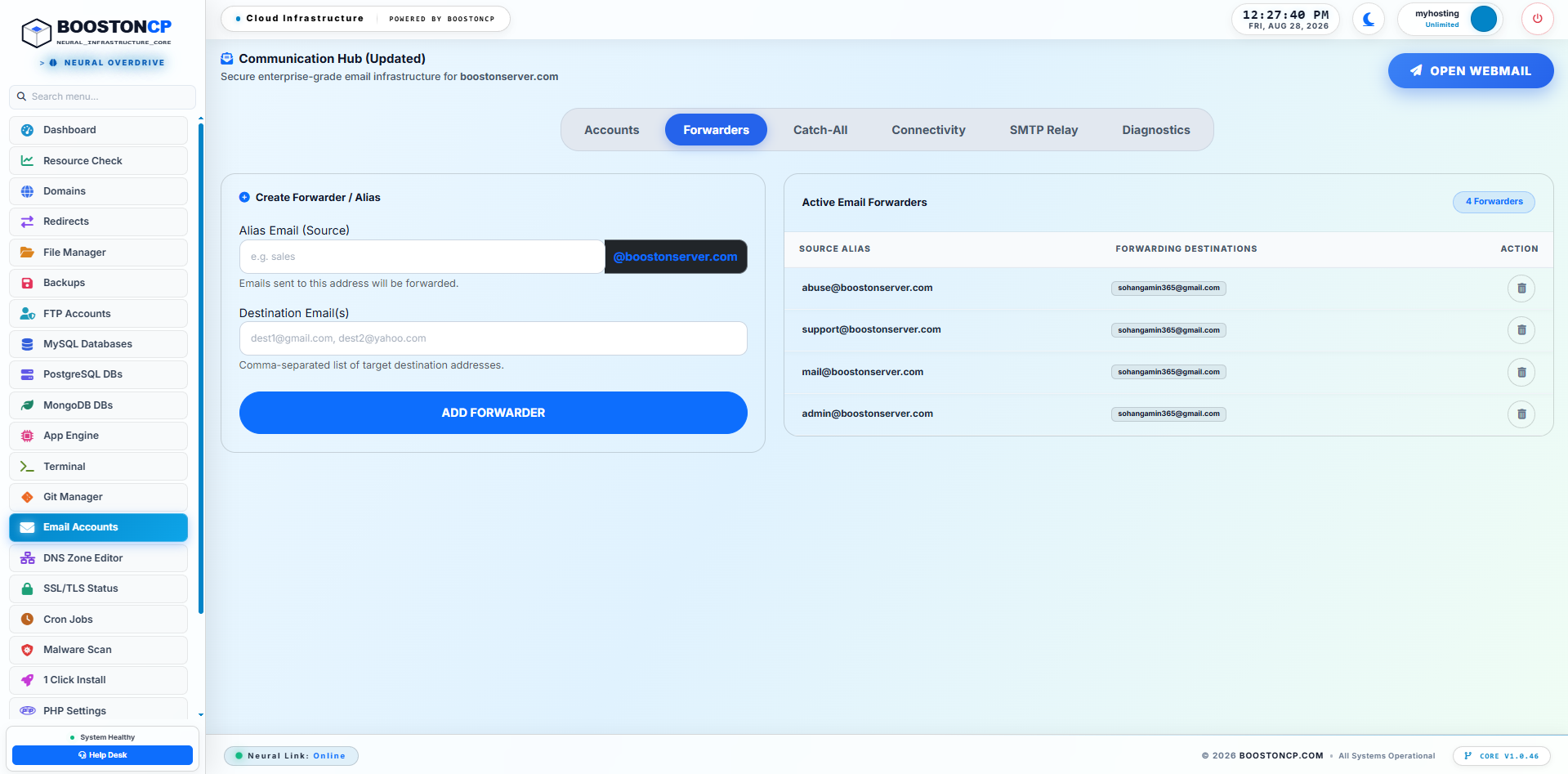
Tab 2: Advanced Forwarders & Multi-Destination Aliases
Forward incoming mail to multiple destination addresses simultaneously without creating physical mailbox storage. BoostonCP incorporates Sender Rewriting Scheme (SRS) on all forwarded mail, ensuring that forwarded messages do not fail the destination server's SPF checks when relayed to external Gmail or Outlook inboxes.
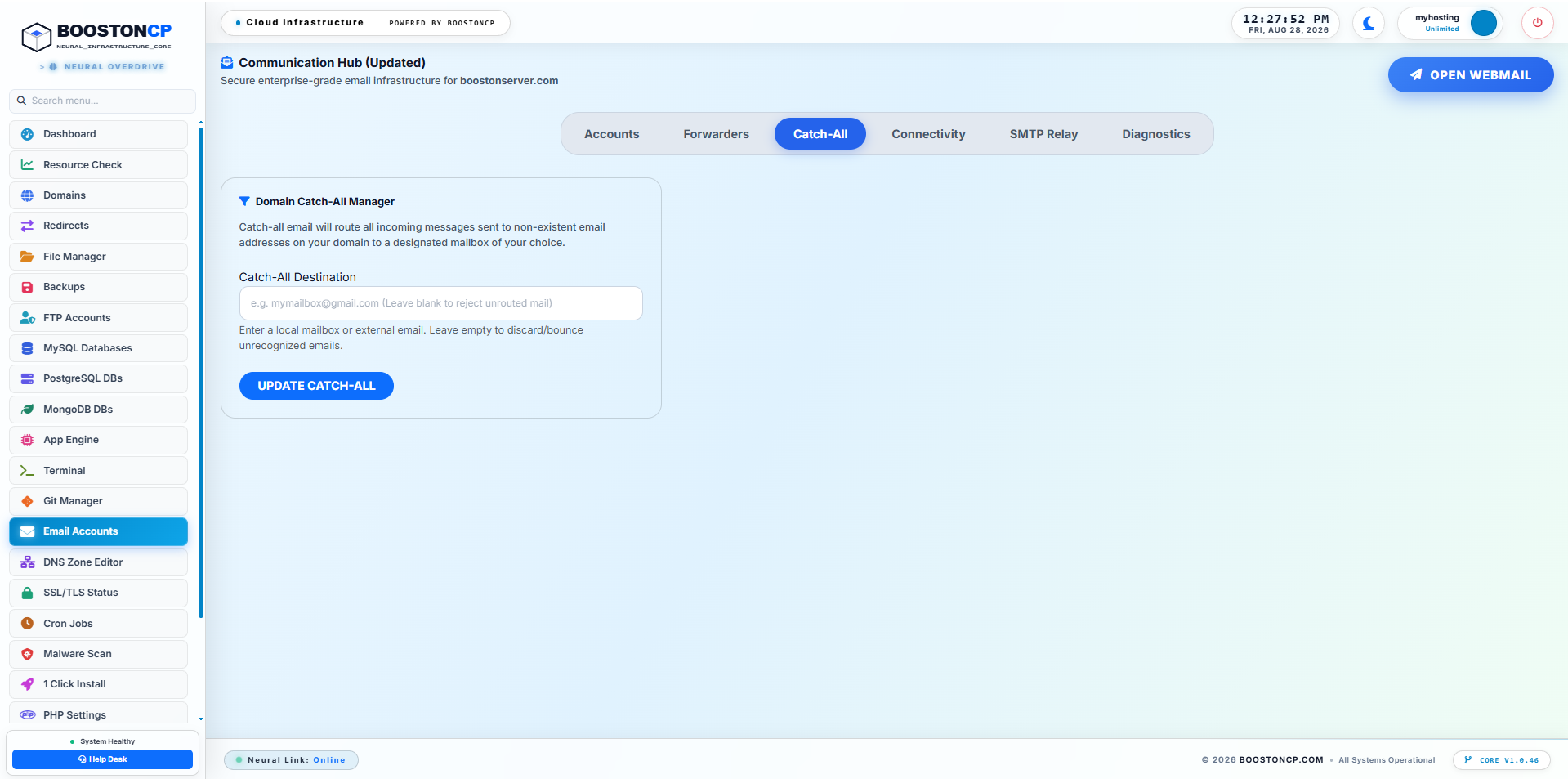
Tab 3: Domain-Wide Catch-All Email Routing
Never lose a sales inquiry or invoice due to a customer typo. BoostonCP's Catch-All subsystem allows domain owners to direct all emails sent to non-existent or misaddressed mailboxes (e.g., billing-dept@yourdomain.com or support1@yourdomain.com) into a designated master inbox or discard them cleanly with an RFC 550 reject code.
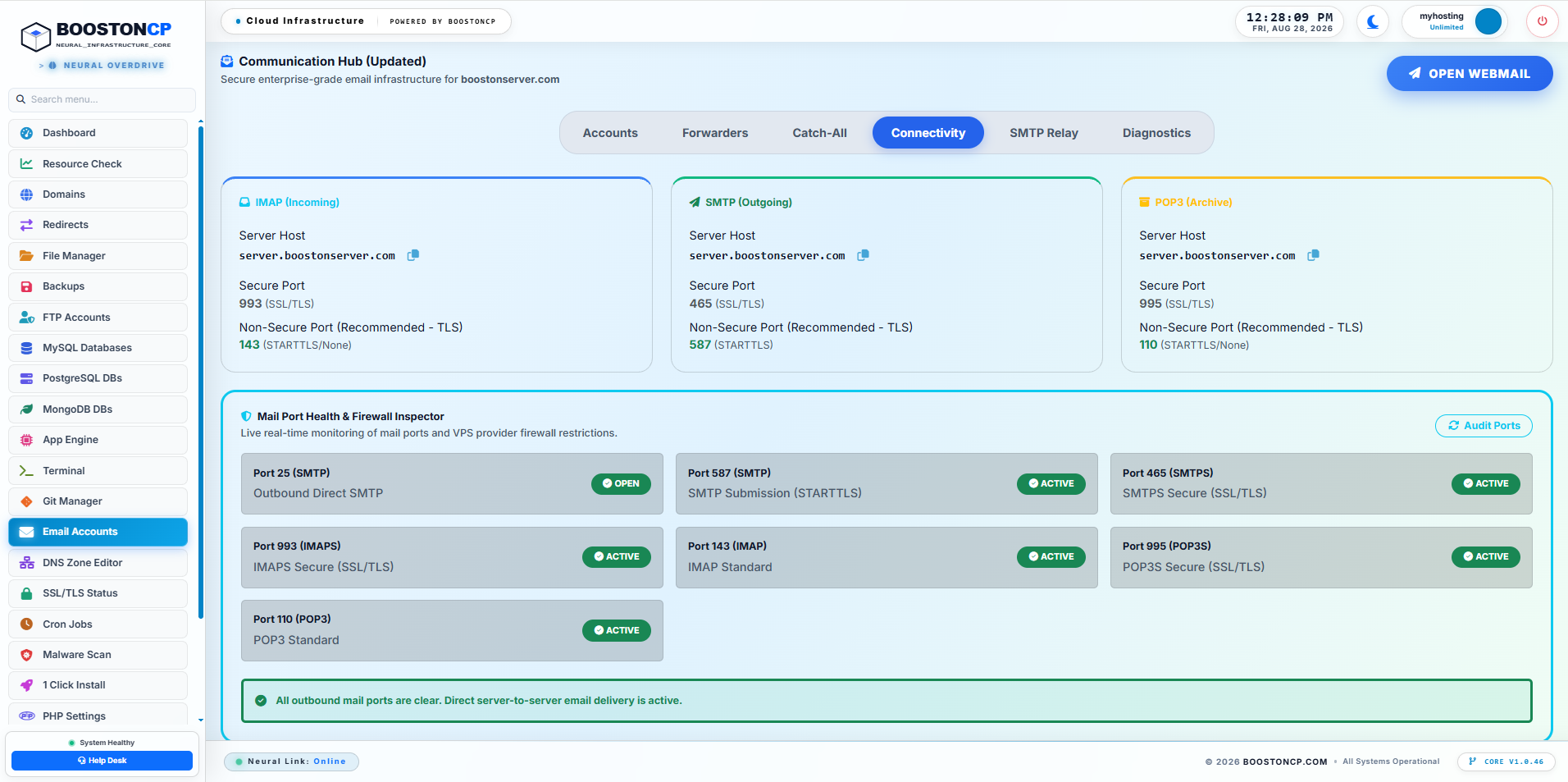
Tab 4: Central Configuration Hub (iOS, Mac, Outlook Cheatsheet)
Eliminate user support tickets regarding email setup. The Configuration Hub provides an instant visual cheatsheet displaying exact SSL/TLS connection parameters for Apple Mail (iOS/macOS), Microsoft Outlook, Mozilla Thunderbird, and Android:
- Incoming IMAP Server: mail.yourdomain.com | Port: 993 (SSL/TLS)
- Incoming POP3 Server: mail.yourdomain.com | Port: 995 (SSL/TLS)
- Outgoing SMTP Server: mail.yourdomain.com | Port: 465 (SSL/TLS) or Port: 587 (STARTTLS)
- Authentication: Standard Password (Full Email Address as Username)
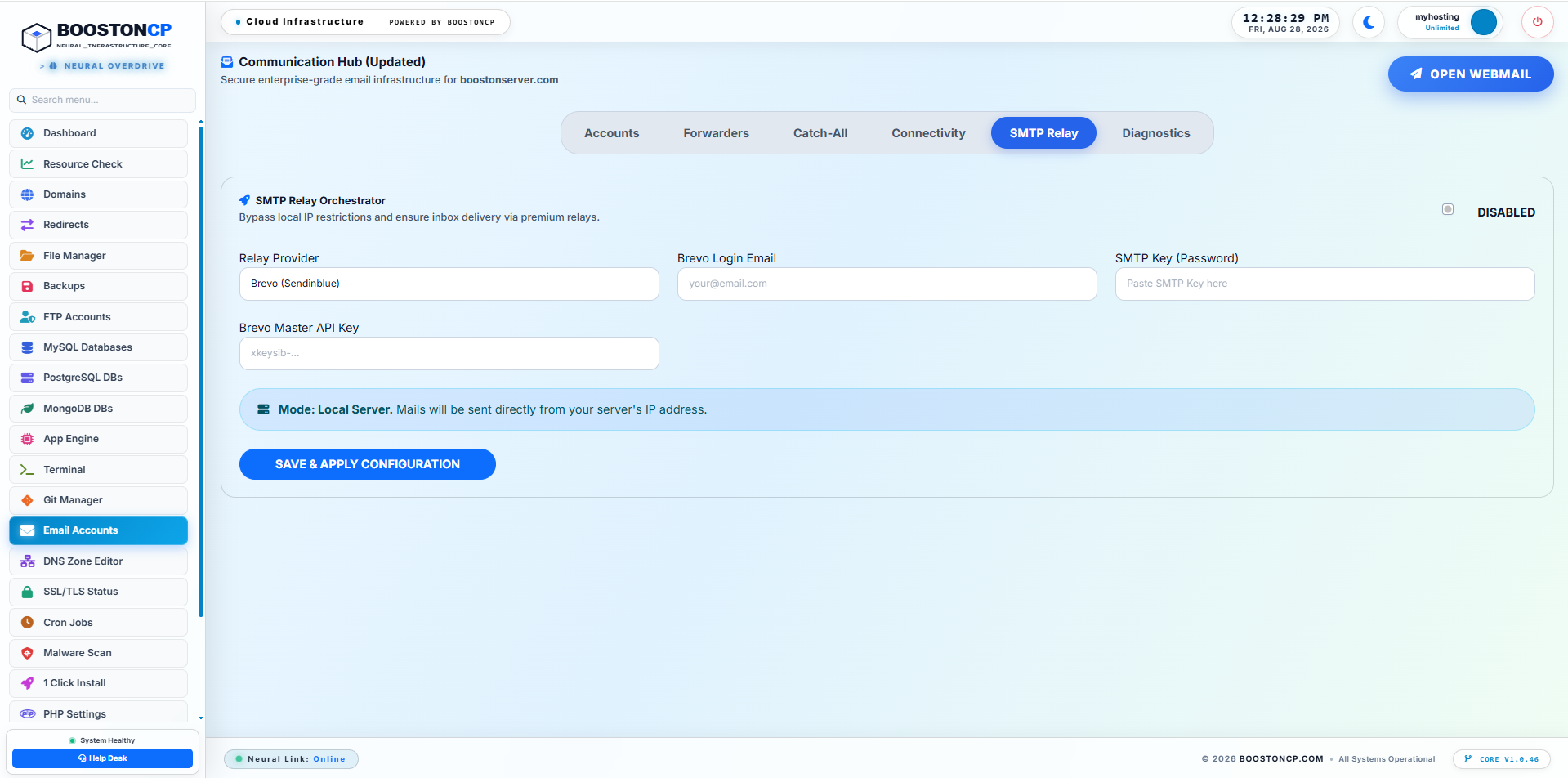
Tab 5: 1-Click SMTP Relay Hub (Bypassing Port 25 Blocks)
If your VPS provider blocks outbound Port 25, BoostonCP allows you to bypass the block in seconds. Simply select your preferred relay provider (Brevo / Sendinblue (300 free emails/day), AWS SES (62,000 free emails/month), SendGrid, Mailgun, or Postmark), enter your API key or SMTP credentials, and BoostonCP automatically configures Postfix relayhost and SASL password maps. All outgoing mail is routed through high-reputation relay IPs over Port 587 or 465, while all incoming mail continues arriving directly to your server on Port 25 for free.
Tab 6: Spam Filter (SpamAssassin Bayesian Score Tuning)
Keep user inboxes pristine with integrated SpamAssassin Bayesian filtering. Domain owners can adjust the required spam score threshold slider (from 1 aggressive to 10 relaxed, with 5.0 as default), enable custom spam header prefixes (e.g. ***SPAM*** in email subject lines), and configure automatic routing of flagged spam into the user's Junk IMAP folder.
Tab 7: Visual Diagnostics & Tools (DNS Health Check & Live Queue Management)
When email issues arise, sysadmins no longer need to execute obscure terminal commands. The Diagnostics tab provides:
- Automated DNS Health Check Matrix: Inspects MX records, SPF syntax, 2048-bit DKIM public key propagation, DMARC alignment, and Reverse DNS (PTR) with visual green/red status indicators.
- Live Mail Telemetry Stream: Displays a real-time, filtered log stream of
/var/log/mail.log, showing connection handshakes, TLS negotiation, and delivery receipt status. - 1-Click Mail Queue Purge: Inspects stuck outgoing mail queues and allows instant deletion of frozen spam queues with one click (executing
postsuper -d ALL).
5. The 10/10 Deliverability Fortress: Essential DNS Records Cheatsheet
To ensure your outgoing messages never trigger spam classification algorithms at Google Workspace, Microsoft 365, or Yahoo Mail, you must publish four critical DNS authentication records:
| Record Type | Host / Name | Value / Target Configuration |
|---|---|---|
| MX Record | @ (or yourdomain.com) | 10 mail.yourdomain.com |
| SPF Record (TXT) | @ | v=spf1 mx a ip4:YOUR_SERVER_IP ~all |
| DKIM Record (TXT) | default._domainkey | v=DKIM1; k=rsa; p=MIIBIjANBgkqhkiG9w0BAQEFAAOCAQ8AMIIBCgKCAQE... |
| DMARC Policy (TXT) | _dmarc | v=DMARC1; p=quarantine; rua=mailto:admin@yourdomain.com; pct=100 |
6. Kernel Outbound Anti-Spam Quotas & IP Reputation Protection
In shared hosting environments, a compromised WordPress site can silently upload a malicious PHP mailer script and dispatch 50,000 spam emails in 20 minutes, burning your server's clean IPv4 address on global blacklists (Spamhaus, Barracuda, SORBS).
BoostonCP includes the native BoostonCP Kernel Mail Policy Service:
- Hourly & Daily Outbound Quotas: Set maximum outgoing email limits per domain or user package (e.g. 50 emails/hour).
- Postfix Socket Policy Delegation: Outgoing mail requests are evaluated in real time via a custom UNIX socket. If a compromised script exceeds its hourly limit, Postfix temporarily defers subsequent messages with a
450 4.7.1 Quota Exceededcode, preventing IP blacklisting. - Automated Admin Incident Alerts: When an account triggers its quota limit, BoostonCP sends an immediate notification to the root administrator, pinpointing the exact offending virtual host.
7. 3-Year Enterprise Email TCO Analysis ($5,400 SaaS Waste vs. $0 BCP)
Let's compare the total financial cost of running 25 corporate mailboxes across 3 years:
| Email Infrastructure Plan | Google Workspace / M365 (25 Users) | BoostonCP Private Mail Server |
|---|---|---|
| Monthly User Subscription | $6.00 / user / mo ($150.00 / mo) | $0.00 (Unlimited Free Users) |
| Control Panel License | N/A | $0.00 (Lifetime Free License) |
| SMTP Relay Overhead (Optional) | Included in SaaS fee | $0.00 (Brevo 300 free/day or AWS SES $1/mo) |
| 3-Year Total Financial Cost | $5,400.00 | $0.00 to $36.00 (99.3% Savings) |
8. Frequently Asked Questions (FAQ)
1. Can I send emails if my cloud hosting provider has blocked Port 25?
Yes. BoostonCP includes a native 1-Click SMTP Relay Hub. You can route outgoing emails through Brevo (300 free emails/day), AWS SES, SendGrid, or Mailgun over Port 587 or 465, while incoming emails continue arriving directly to your server on Port 25 for free.
2. How does BoostonCP guarantee a 10/10 mail-tester deliverability score?
BoostonCP automatically configures 2048-bit OpenDKIM cryptographic keys, generates RFC-compliant SPF records, provisions strict DMARC alignment, and binds Let's Encrypt TLS certificates. This ensures your emails pass all verification checks at Google, Microsoft, and Yahoo without landing in spam folders.
3. Why is SnappyMail superior to legacy Roundcube webmail?
SnappyMail is a stateless webmail client that consumes 0MB of MySQL database storage and only ~15MB of RAM. Unlike Roundcube, which suffers from database table lock crashes and consumes 150MB+ RAM, SnappyMail is ultra-lightweight, secure, and renders instantly.
4. Can I set hourly outbound email limits to prevent spam blacklisting?
Yes. BoostonCP includes the BoostonCP Kernel Mail Policy Service, which delegates Postfix socket checks to enforce strict hourly and daily email quotas per domain or user package. If a compromised website attempts to blast spam, excess messages are deferred automatically.
Deploy Unlimited Private Mail Servers With Zero SaaS Fees
Reclaim your email sovereignty with Postfix, Dovecot, stateless SnappyMail, and 1-click SMTP relays on BoostonCP.





