
Running a commercial web hosting company requires 100% hands-free billing and account lifecycle management. Integrating WHMCS with BoostonCP allows hosts and resellers to automate client account creation, package upgrades/downgrades, automatic suspensions on overdue invoices, and seamless 1-click Single Sign-On (SSO) into the BoostonCP User Portal. By replacing legacy cPanel server modules with BoostonCP’s native WHMCS engine, hosting providers eliminate per-account control panel software fees while maintaining sub-second provisioning speeds.
1. The Modern Web Host’s Dilemma: WHMCS & The Per-Account License Trap
WHMCS is the undisputed gold standard for web hosting billing, domain registration, and customer management. However, for over two decades, running a WHMCS-powered hosting business required pairing it with cPanel/WHM. In 2026, cPanel's aggressive per-account licensing tiers mean that as your client base grows, your software overhead scales exponentially—eating into your gross profit margins. Learn how to eliminate control panel licensing completely in our BoostonCP vs cPanel vs CyberPanel Comparison or inspect our BoostonCP Transparent Pricing Matrix. If you are starting a reseller business, read our step-by-step guide on How to Start a Premium WordPress Hosting Agency for $0.
When a client orders a $5/month hosting plan on WHMCS, paying $0.40 to $1.50 per account in control panel licensing fees destroys your unit economics. Furthermore, alternative control panels often lack robust WHMCS server modules, causing failed API calls, broken password resets, or missing resource quota enforcement.
The official BoostonCP WHMCS Server Module solves this bottleneck completely. It communicates directly with BoostonCP’s Secure REST API Architecture over HTTPS, providing native Cgroup v2 Resource Isolation Controls with $0 control panel licensing costs. You can test these live features instantly on our Interactive BoostonCP Live Demo.
[WHMCS Checkout]
[Port 2087 / Core]
[PHP Pool & MySQL]
2. Installing the BoostonCP WHMCS Server Module
The official BoostonCP WHMCS module is lightweight, secure, and compatible with WHMCS v8.x and v9.x. You can inspect the module features on our official BoostonCP WHMCS Integration Portal or download the package directly.
Step 1: Download & Extract Module Files
You can download the module directly using the Official BoostonCP WHMCS Module (.ZIP Download), or clone it directly onto your server via SSH:
cd /var/www/whmcs/modules/servers/

wget https://boostoncp.com/whmcs_modiuls/boostoncp-whmcs-server-module.zip

unzip boostoncp-whmcs-server-module.zip -d boostoncp/

chown -R www-data:www-data boostoncp/
Ensure the directory structure matches: /modules/servers/boostoncp/boostoncp.php.
Step 2: Generate a BoostonCP API Key
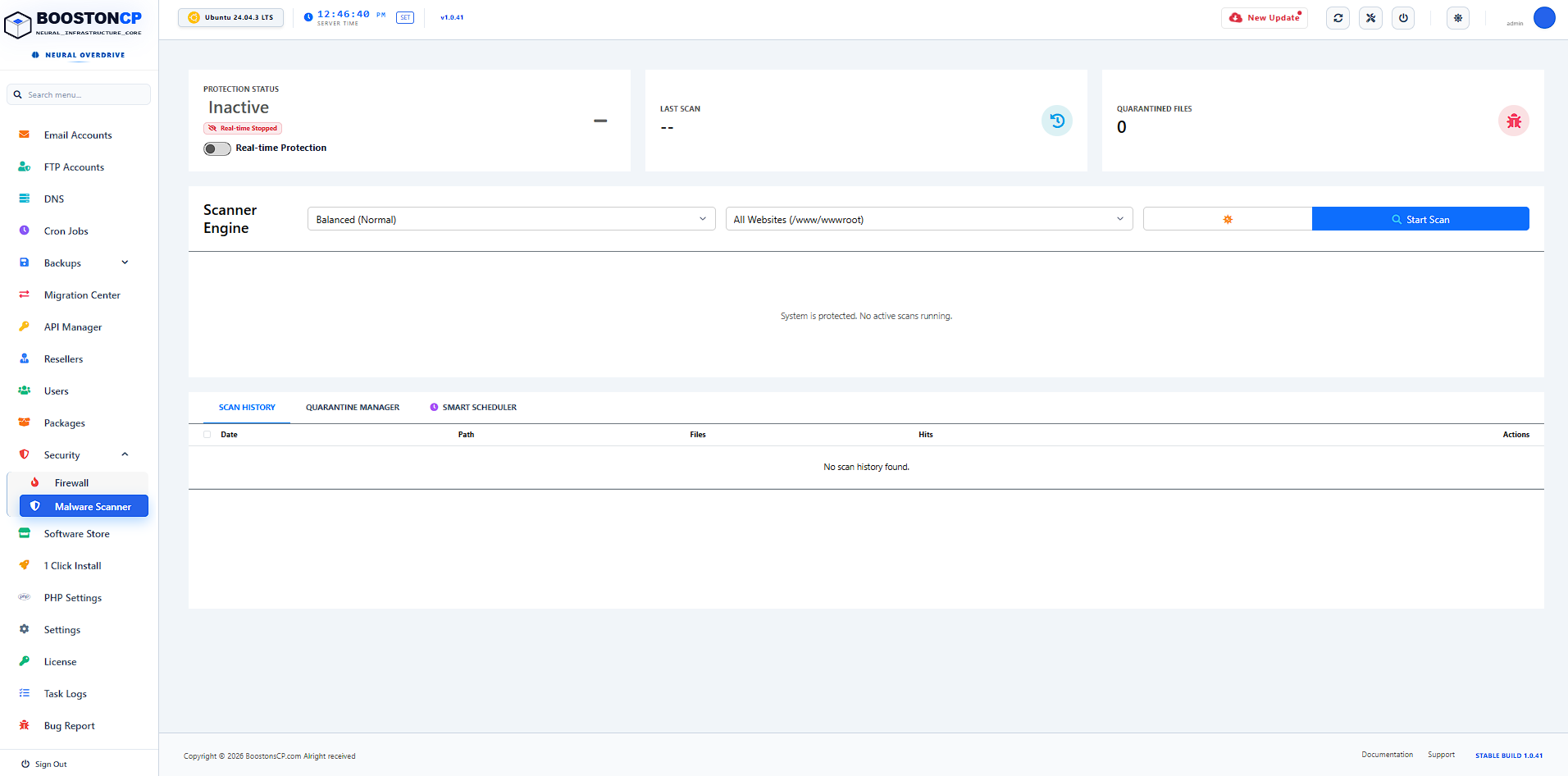
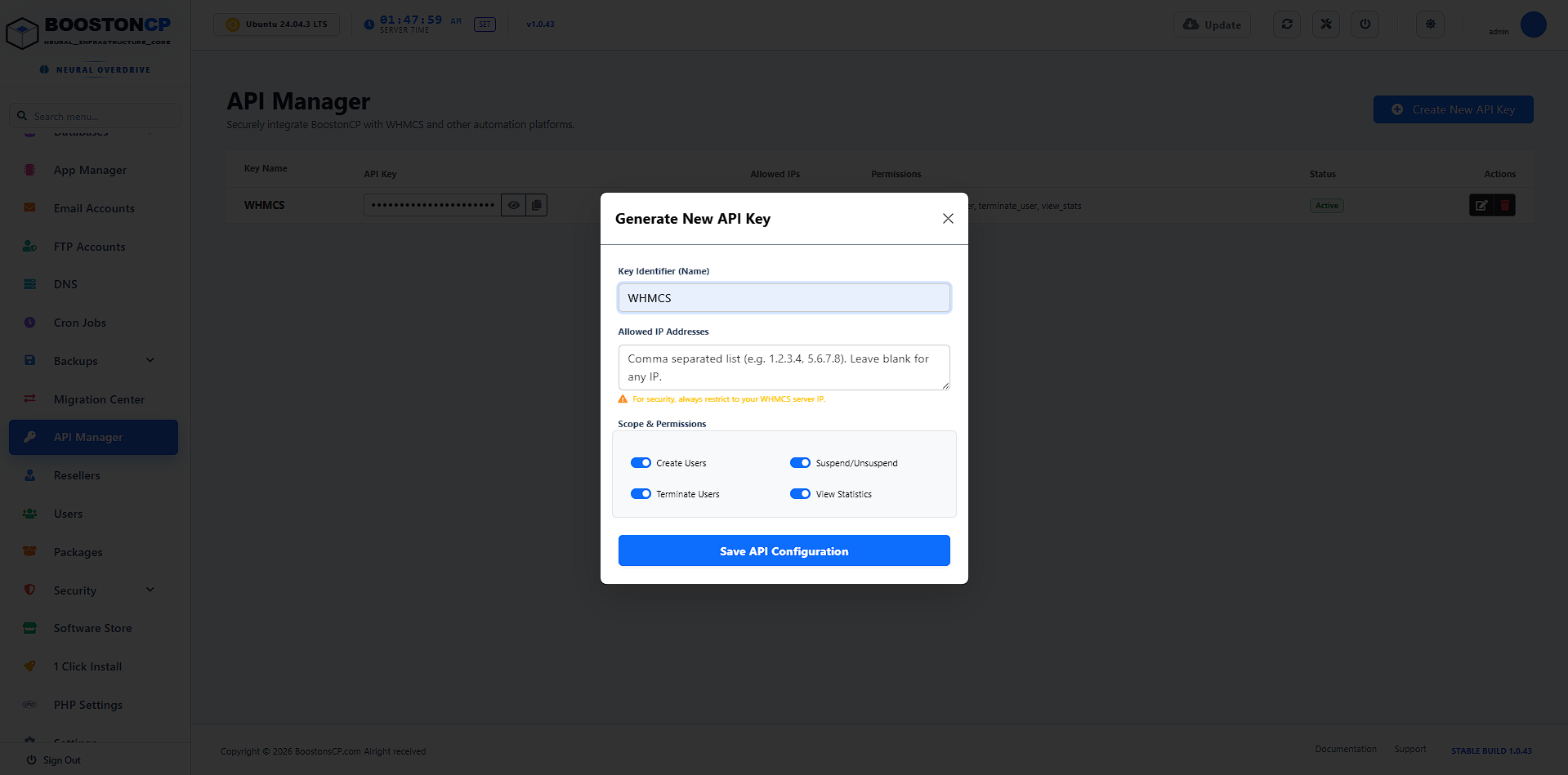
Before connecting WHMCS, generate a dedicated API Key inside your BoostonCP Admin Panel:
- Log in to BoostonCP Admin Panel at
https://your-server-ip:2087. - Navigate to Settings ➔ API Keys.
- Click Generate New API Key. Set Key Name to
WHMCS-Billing-Module. - (Optional but Recommended): Enter your WHMCS Server IP in the Allowed IPs whitelist field to prevent unauthorized API requests.
- Copy the generated 64-character
API Key.
3. Configuring the BoostonCP Server in WHMCS
Now that the module is installed and your API Key is ready, add your BoostonCP server to WHMCS:
- In WHMCS Admin, go to Setup ➔ System Settings ➔ Servers (or Configuration ➔ System Settings ➔ Servers).
- Click Create New Server.
- Fill in the Server Details:
- Name:
BoostonCP Production Server 01 - Hostname:
srv1.yourdomain.com - IP Address:
103.240.4.56(Your server's public IP) - Module: Select Boostoncp from the dropdown.
- Name:
- In the Server Access / Credentials section:
- Access Hash / API Token: Paste your 64-character BoostonCP API Key.
- Secure Connection: Check
Tick to use SSL mode for connections. - Port:
2087
- Click Test Connection. You will see a green success banner:
Connection Successful! BoostonCP v1.0.42 Online. - Save Changes.
4. Mapping WHMCS Products to BoostonCP Hosting Packages
To automate account setup, you must link each WHMCS product to a pre-defined BoostonCP package or specify custom resource limits. Explore our full list of enterprise resource management tools in the BoostonCP Feature Directory. For deep technical details on how Systemd slices isolate client memory without paid OS extensions, read our CloudLinux Alternative Cgroup v2 Benchmark Guide. If you are transferring existing hosting clients from cPanel WHMCS, follow our Bulk Zero-Downtime cPanel Migration Blueprint.
Option A: Standard Package Name Matching (Recommended)
Create your hosting packages inside BoostonCP (e.g., Starter_5GB, Business_20GB, Agency_Unlimited). Then, in WHMCS:
- Navigate to System Settings ➔ Products/Services.
- Edit your hosting product and click the Module Settings tab.
- Select Boostoncp as the Module Name.
- In the Package Name field, enter the exact name of the BoostonCP package (e.g.
Starter_5GB). - Set the automatic option: Automatically setup the product as soon as the first payment is received.
Option B: Dynamic Custom Resource Limits Overrides
If you want WHMCS to dynamically dictate Cgroup CPU/RAM limits per product without creating multiple packages in BoostonCP, fill in the custom parameters inside WHMCS Module Settings:
| WHMCS Setting Field | Value / Format | BoostonCP Enforced Resource |
|---|---|---|
| Disk Space (MB) | 5120 (or 0 for Unlimited) | Filesystem Quota (`setquota`) |
| Memory Limit (MB) | 1024 | Systemd Cgroup v2 `MemoryMax` |
| CPU Limit (%) | 100 | Systemd Cgroup v2 `CPUQuota` |
| Entry Processes (EP) | 20 | PHP-FPM Pool `pm.max_children` |
| MySQL Max Connections | 0 (0 = Unlimited) | MySQL Governor `MAX_USER_CONNECTIONS` |
5. Automated Lifecycle Management: How WHMCS Controls BoostonCP
Once configured, the BoostonCP module handles every stage of the customer lifecycle automatically without requiring human intervention:
When a client pays an invoice, WHMCS sends a create_system_user API request. BoostonCP creates the Linux user, provisions JailShell security, configures the Per-Domain Webserver Engine (Nginx / OpenLiteSpeed), creates the PHP-FPM pool, generates default document roots, and issues a free Let's Encrypt SSL.
If an invoice is unpaid after X days, WHMCS triggers suspend_user. BoostonCP disables the client's PHP-FPM pool and routes HTTP requests to a customizable "Account Suspended" notice page instantly.
When the overdue invoice is paid, WHMCS sends an unsuspend_user API request. BoostonCP immediately restores the PHP-FPM pool and removes the suspension notice in under 0.5 seconds.
If a client upgrades from 1GB to 5GB RAM in WHMCS, BoostonCP executes sync_resource_limits to dynamically re-adjust Systemd Cgroup limits without restarting the webserver or causing site downtime.
6. Client Experience: 1-Click Single Sign-On (SSO) Portal
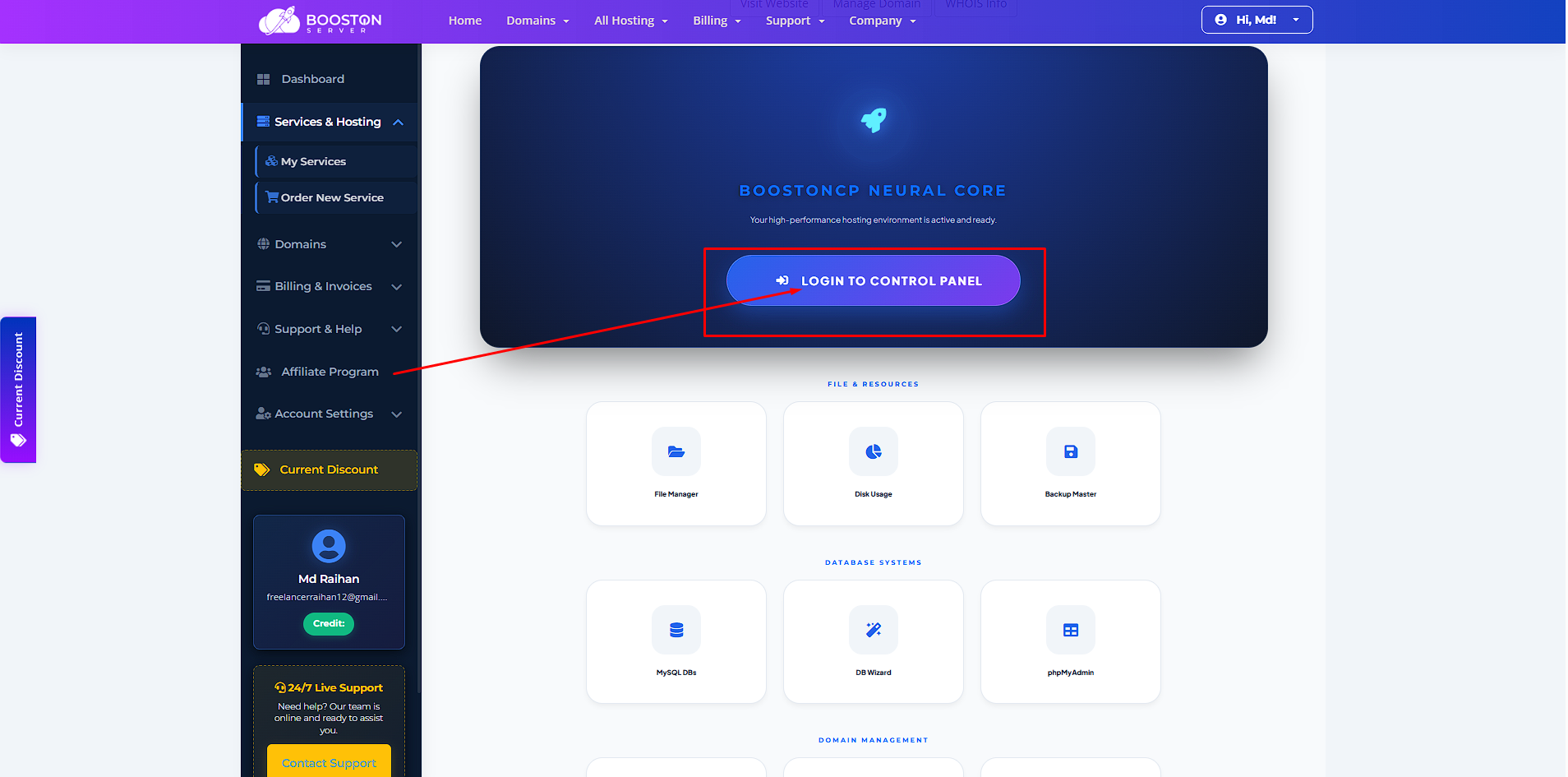
Clients hate remembering multiple passwords for billing portals and web hosting control panels. The BoostonCP WHMCS module includes a native Single Sign-On (SSO) button in the WHMCS Client Area:
- When a customer views their hosting service in WHMCS, they click "Log in to Control Panel".
- WHMCS generates a temporary, encrypted single-use OAuth token via BoostonCP's
create_sso_sessionAPI endpoint. - The client is seamlessly redirected into their BoostonCP User Portal (Port 2083) without seeing a login screen.
7. Reseller Account Provisioning: Automating Reseller Hosting Packages
In addition to standard shared hosting, the BoostonCP WHMCS Module supports automated Reseller Hosting Account Provisioning. When a client purchases a Reseller Hosting Plan in WHMCS:
- WHMCS sets the
is_reseller = 1flag via the BoostonCP REST API. - BoostonCP grants the user access to the Reseller Management Interface, allowing them to create client accounts, assign custom packages, and manage client DNS zones.
- WHMCS passes the maximum allowed sub-accounts parameter (
max_sub_accounts = 25) and overselling permissions (overselling_enabled = 1).
8. Bandwidth Usage Sync & Automated Overage Notifications
Bandwidth overages can cause unexpected server costs if not monitored continuously. BoostonCP's background bandwidth worker tracks network interface bytes (`/proc/net/dev`) per domain and stores hourly metrics in user_bandwidth_usage.
During the daily WHMCS cron execution (`cron.php`), the BoostonCP module executes a bulk bandwidth sync query:
- WHMCS queries BoostonCP's
/public/api/user_manager.php?action=get_bandwidth_stats. - WHMCS updates the client's Bandwidth Usage bar in the Client Portal.
- If a client reaches 80% or 90% of their monthly bandwidth quota, WHMCS automatically dispatches a branded email alert.
- If a client hits 100% of their monthly bandwidth quota, WHMCS triggers a soft suspension API call to prevent server network congestion.
9. SSO Token Encryption Mechanics & Zero-Trust Security Architecture
Single Sign-On (SSO) must be fast, but security cannot be compromised. BoostonCP uses an encrypted single-use OAuth2 token architecture:
1. WHMCS signs request with 64-char API Secret + Client Username + Timestamp.
2. BoostonCP generates a single-use 128-bit session hash valid for 60 seconds.
3. Client browser is redirected to
https://your-server:2087/login.php?sso_token=TOKEN_HASH.4. BoostonCP validates token IP match, authenticates session, and immediately invalidates the token.
5. Result: Zero password sharing, zero replay attack risk!
10. Feature Comparison: BoostonCP vs cPanel vs CyberPanel WHMCS Automation
| Automation Feature | BoostonCP + WHMCS | cPanel + WHMCS | CyberPanel + WHMCS |
|---|---|---|---|
| Control Panel License Fee | $0 (100% Free) | $0.40 - $1.50 / account | Freemium ($10-$20/mo for Enterprise) |
| Provisioning Speed | < 0.8 seconds (Go Core) | 3.5 - 6.0 seconds | 2.0 - 4.0 seconds |
| Resource Quota Enforcement | Native Systemd Cgroups v2 | Requires CloudLinux ($16+/mo) | Basic Docker / Process Limits |
| Native 1-Click Client SSO | Yes (OAuth Token) | Yes (cPanel User Auth) | Often unstable / Breaks on updates |
| API Key Security Whitelisting | Yes (IP Masking) | Yes (Remote Access Keys) | No (Admin Credentials Only) |
Ready to Scale Your Hosting Business for $0 Software Cost?
Download the official BoostonCP WHMCS Server Module today. Automate client onboarding, eliminate cPanel software fees, and deliver enterprise-grade performance to your web hosting clients.





